
AudioPen: AI Voice to Text
Kupovina unutar aplikacije

3,9star
227 recenzija

Svako
info
50 hilj.+
Preuzimanja

Svako
Saznajte više


O aplikaciji
Turn your voice into clear, structured text.
Speak naturally. AudioPen cleans, rewrites, and formats your words instantly.
It’s faster than typing and far more useful than basic dictation.
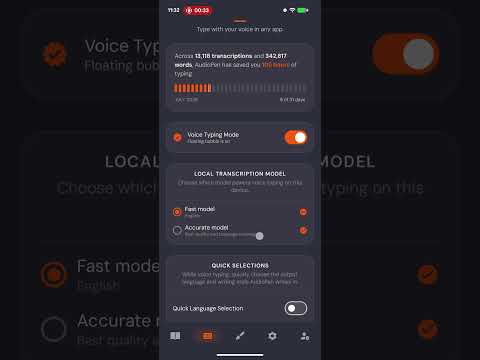
Use it to take notes, or to type inside any app with the AudioPen Voice Typing Mode.
- Speak instead of typing
- Get clean, readable text, not messy transcripts
- Rewrite in any tone or style.
- Capture notes, ideas, emails, and thoughts
- Save and organize everything in one place
- Works fast, right when you need it
Use cases:
- Notes on the go
- Writing emails faster
- Brain dumping ideas
- Journaling
- Thinking out loud
- Typing anywhere, in any style with your voice
If you can speak, you can write.
Try AudioPen and move faster.
Speak like a human. Write like a pro.
------
Accessibility Service Disclosure
AudioPen optionally uses Android's Accessibility Service to let you dictate text into text fields across your device. Android does not provide another way for third-party apps to offer this type of system-wide voice input.
When enabled, the Accessibility Service is used only to support this functionality by:
- Detecting when an editable text field is active so AudioPen can be made available when needed.
- Inserting the transcribed text into the currently selected text field.
- Determining when the on-screen keyboard is visible so AudioPen can appear and behave correctly.
- Collecting limited diagnostic information, such as crash reports and performance data, to help identify and fix technical issues.
AudioPen does not use the Accessibility Service to read, collect, store, or share information from other apps beyond what is necessary to provide voice dictation. It never reads passwords or collects other on-screen content.
You can disable these permissions at any time in Android's Accessibility settings.
Speak naturally. AudioPen cleans, rewrites, and formats your words instantly.
It’s faster than typing and far more useful than basic dictation.
Use it to take notes, or to type inside any app with the AudioPen Voice Typing Mode.
- Speak instead of typing
- Get clean, readable text, not messy transcripts
- Rewrite in any tone or style.
- Capture notes, ideas, emails, and thoughts
- Save and organize everything in one place
- Works fast, right when you need it
Use cases:
- Notes on the go
- Writing emails faster
- Brain dumping ideas
- Journaling
- Thinking out loud
- Typing anywhere, in any style with your voice
If you can speak, you can write.
Try AudioPen and move faster.
Speak like a human. Write like a pro.
------
Accessibility Service Disclosure
AudioPen optionally uses Android's Accessibility Service to let you dictate text into text fields across your device. Android does not provide another way for third-party apps to offer this type of system-wide voice input.
When enabled, the Accessibility Service is used only to support this functionality by:
- Detecting when an editable text field is active so AudioPen can be made available when needed.
- Inserting the transcribed text into the currently selected text field.
- Determining when the on-screen keyboard is visible so AudioPen can appear and behave correctly.
- Collecting limited diagnostic information, such as crash reports and performance data, to help identify and fix technical issues.
AudioPen does not use the Accessibility Service to read, collect, store, or share information from other apps beyond what is necessary to provide voice dictation. It never reads passwords or collects other on-screen content.
You can disable these permissions at any time in Android's Accessibility settings.
Ažurirano dana
Istaknute priče

Sigurnost počinje razumijevanjem na koji način programeri prikupljaju i dijele vaše podatke. Privatnost podataka i sigurnosne prakse se mogu razlikovati ovisno o korištenju, regiji i dobi. Programer je naveo ove informacije i može ih s vremenom ažurirati.

Podaci se ne dijele s trećim stranama
Saznajte više o načinu na koji programeri pružaju izjavu o dijeljenju

Ova aplikacija može prikupljati ove vrste podataka
Lične informacije

Podaci se šifriraju tokom prenosa

Možete zatražiti da se podaci izbrišu
Ocjene i recenzije
4,0
216 recenzija
Što je novo
Voice typing is here!
Svako
Saznajte višePodrška za aplikaciju
Informacije o programeru
Nicheless, Inc.
louis@nicheless.com
651 N Broad St Ste 206
Middletown, DE 19709
United States
+91 85888 00962


