
JSON Workshop: Editor


Svako
info
0+
Preuzimanja

Svako
Saznajte više


O aplikaciji
Inspect an API response, update a configuration file, or check what changed between two JSON exports—right on your phone. JSON Workshop brings code editing, a navigable tree and document comparison into one offline workspace.
Pay once for all included features. No ads, account, subscription or in-app purchases. JSON processing happens on your device.
READ, EDIT AND REPAIR
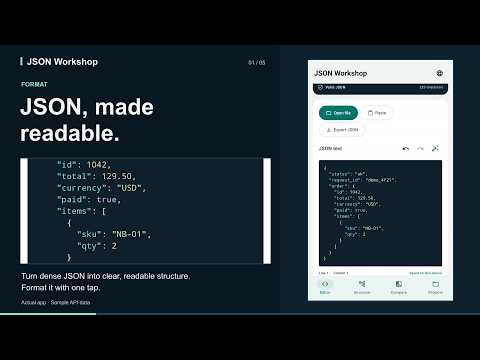
Open a UTF-8 file or paste JSON. Read syntax colors, format compact text, or minify it for export. Validation explains syntax problems with a line and column; jump to the error to make your correction.
EXPLORE THE STRUCTURE
Browse objects and arrays with type labels and breadcrumbs. Search keys and values across the document. Add, duplicate or remove values, sort object keys, and copy a value or its JSON Pointer.
SEE WHAT CHANGED
Compare two documents for added, removed and changed values. Formatting and object-key order are ignored. Export a CSV difference report for further review.
KEEP WORK MOVING
Continue from a locally saved draft. Undo and redo recent changes, including incomplete text. Save JSON or an unfinished draft through Android’s file picker, or share valid JSON with another app.
DOCUMENT SCOPE
Each document supports up to 500,000 UTF-16 code units. UTF-8 file imports support up to 2,000,000 bytes (2 MB), within the same text limit. Syntax colors are available up to 80,000 code units; larger documents remain editable as plain text. Search and comparison show the first 1,000 results. Standard JSON is supported.
Available in English, Japanese, German, French, Spanish, Brazilian Portuguese, Italian, Dutch, Korean and Traditional Chinese.
Pay once for all included features. No ads, account, subscription or in-app purchases. JSON processing happens on your device.
READ, EDIT AND REPAIR
Open a UTF-8 file or paste JSON. Read syntax colors, format compact text, or minify it for export. Validation explains syntax problems with a line and column; jump to the error to make your correction.
EXPLORE THE STRUCTURE
Browse objects and arrays with type labels and breadcrumbs. Search keys and values across the document. Add, duplicate or remove values, sort object keys, and copy a value or its JSON Pointer.
SEE WHAT CHANGED
Compare two documents for added, removed and changed values. Formatting and object-key order are ignored. Export a CSV difference report for further review.
KEEP WORK MOVING
Continue from a locally saved draft. Undo and redo recent changes, including incomplete text. Save JSON or an unfinished draft through Android’s file picker, or share valid JSON with another app.
DOCUMENT SCOPE
Each document supports up to 500,000 UTF-16 code units. UTF-8 file imports support up to 2,000,000 bytes (2 MB), within the same text limit. Syntax colors are available up to 80,000 code units; larger documents remain editable as plain text. Search and comparison show the first 1,000 results. Standard JSON is supported.
Available in English, Japanese, German, French, Spanish, Brazilian Portuguese, Italian, Dutch, Korean and Traditional Chinese.
Edit, format and compare JSON offline. Find errors and explore each value.
Ažurirano dana
Sigurnost počinje razumijevanjem na koji način programeri prikupljaju i dijele vaše podatke. Privatnost podataka i sigurnosne prakse se mogu razlikovati ovisno o korištenju, regiji i dobi. Programer je naveo ove informacije i može ih s vremenom ažurirati.
- Podaci se ne dijele s trećim stranamaSaznajte više o načinu na koji programeri pružaju izjavu o dijeljenju
- Podaci se ne prikupljajuSaznajte više o načinu na koji programeri pružaju izjavu o prikupljanju


Šta je novo
A refreshed JSON workspace with syntax colors, clear error explanations and a jump to the error location. Browse typed values with breadcrumbs, undo and redo recent edits, save JSON or drafts to a chosen file, and compare documents with a CSV difference report. Includes 10 interface languages.
Svako
Saznajte višePodrška za aplikaciju
phone
Telefonski broj
+818064749748
Informacije o programeru
CAIROPLUS, K.K.
info@cairo-plus.com
29-3, IWAMOTO, HIGASHIOBAYASHICHO
TOYOTA, 愛知県 444-3261
Japan
+81 80-6474-9748


