
Avenza Maps: Offline Mapping
In-app purchases
4.7star
86.6K reviews
5M+
Downloads

Everyone
info





About this app
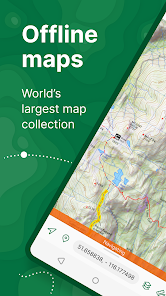
Avenza Maps, the best app for hiking, biking and all trails. Featuring maps from National Geographic, national parks and more! On your next adventure, stay on track with GPS using offline mobile maps. Make your own maps? Import your custom maps and never get lost off the grid.
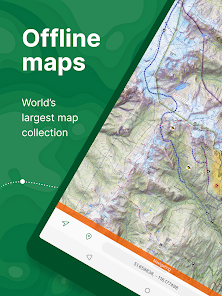
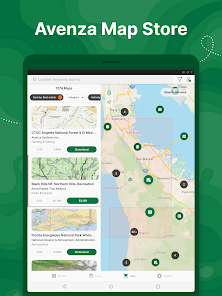
Explore the largest mobile Map Store of hiking, topographic, cycling, city, nautical, travel, and trail maps. Featuring maps from professional publishers including National Geographic, National Park Service, and the US Forest Service. Discover maps for your next camping, fishing, or backpacking trip with your family and friends. Navigate confidently when off-roading or taking those backcountry trails. Precisely identify your location with what3words and stay safe wherever you are.
Avenza Maps is free and the best map app for recreational use. Maps are available for free or purchase from the in-app Map Store. Plus subscription is available for unlimited custom map imports. Pro subscription is available for professional users with full access to all features and mapping tools.
Avenza Maps for your offline adventures on all trails!
ENHANCE YOUR MAPS WITH THESE FEATURES
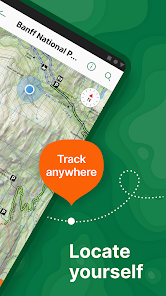
- Locate your realtime GPS position and find direction, even when offline
- Record GPS tracks during your activities
- Navigate to features using compass tools
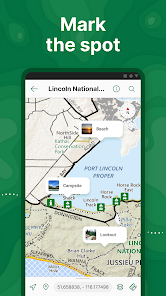
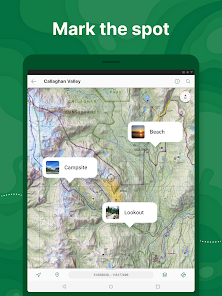
- Add photos and notes to any location
- Add placemarks to your map and style them with recreational symbols
- Measure distances and estimate times
- Supports KML, GPX, and CSV Formats
EXPLORE THE MAP STORE
Search and download maps by activity, category, and specific publishers with premium maps from:
- National Geographic
- Michelin
- Backroad Mapbooks (BRMB)
- New York-New Jersey Trail Conference
- USFS (United States Forest Service)
- USGS (United States Geological Survey)
- FAA (Federal Aviation Administration)
- NOAA (National Oceanic and Atmospheric Administration)
- BLM (Bureau of Land Management)
- HarperCollins
- DeLorme Atlas & Gazetteer / Garmin
- BaseImage
- National Park Service
- And thousands more!
A free account lets you access all of your map downloads.
GET MORE WITH AVENZA MAPS PLUS
For recreational and power users who need more
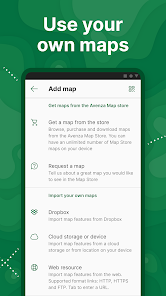
- Unlimited import of your own geospatial PDF, GeoPDF®, and GeoTIFF maps
- Create geofences for up to 50 individual features and up to four geofence layers
GET EVEN MORE WITH AVENZA MAPS PRO
For professionals and organizations who require an offline mapping solution with location awareness with more features and tools
- Unlimited import of your own geospatial PDF, GeoPDF®, and GeoTIFF maps
- GPS averaging, additional coordinate display formats, custom symbol sets
- Connect high-accuracy GPS devices including Trimble, Bad Elf, and Dual via Bluetooth
- Created unlimited geofences and get global geofence notifications
- Convert tracks to areas
- Map orientation lock
- Import and export Esri® Shapefiles
- Import and manage custom symbology sets
- Priority technical support
Avenza Maps Pro subscription required for commercial, academic, government, and professional use.
SUPPORT
We can help! Go to support.avenzamaps.com
LEGAL
Privacy Policy: avenzamaps.com/legal/privacy-policy.html
Terms of Use: avenzamaps.com/legal/terms.html
CONNECT WITH US
avenzamaps.com
facebook.com/avenzamaps
twitter.com/avenzamaps
instagram.com/avenzamaps
Explore the largest mobile Map Store of hiking, topographic, cycling, city, nautical, travel, and trail maps. Featuring maps from professional publishers including National Geographic, National Park Service, and the US Forest Service. Discover maps for your next camping, fishing, or backpacking trip with your family and friends. Navigate confidently when off-roading or taking those backcountry trails. Precisely identify your location with what3words and stay safe wherever you are.
Avenza Maps is free and the best map app for recreational use. Maps are available for free or purchase from the in-app Map Store. Plus subscription is available for unlimited custom map imports. Pro subscription is available for professional users with full access to all features and mapping tools.
Avenza Maps for your offline adventures on all trails!
ENHANCE YOUR MAPS WITH THESE FEATURES
- Locate your realtime GPS position and find direction, even when offline
- Record GPS tracks during your activities
- Navigate to features using compass tools
- Add photos and notes to any location
- Add placemarks to your map and style them with recreational symbols
- Measure distances and estimate times
- Supports KML, GPX, and CSV Formats
EXPLORE THE MAP STORE
Search and download maps by activity, category, and specific publishers with premium maps from:
- National Geographic
- Michelin
- Backroad Mapbooks (BRMB)
- New York-New Jersey Trail Conference
- USFS (United States Forest Service)
- USGS (United States Geological Survey)
- FAA (Federal Aviation Administration)
- NOAA (National Oceanic and Atmospheric Administration)
- BLM (Bureau of Land Management)
- HarperCollins
- DeLorme Atlas & Gazetteer / Garmin
- BaseImage
- National Park Service
- And thousands more!
A free account lets you access all of your map downloads.
GET MORE WITH AVENZA MAPS PLUS
For recreational and power users who need more
- Unlimited import of your own geospatial PDF, GeoPDF®, and GeoTIFF maps
- Create geofences for up to 50 individual features and up to four geofence layers
GET EVEN MORE WITH AVENZA MAPS PRO
For professionals and organizations who require an offline mapping solution with location awareness with more features and tools
- Unlimited import of your own geospatial PDF, GeoPDF®, and GeoTIFF maps
- GPS averaging, additional coordinate display formats, custom symbol sets
- Connect high-accuracy GPS devices including Trimble, Bad Elf, and Dual via Bluetooth
- Created unlimited geofences and get global geofence notifications
- Convert tracks to areas
- Map orientation lock
- Import and export Esri® Shapefiles
- Import and manage custom symbology sets
- Priority technical support
Avenza Maps Pro subscription required for commercial, academic, government, and professional use.
SUPPORT
We can help! Go to support.avenzamaps.com
LEGAL
Privacy Policy: avenzamaps.com/legal/privacy-policy.html
Terms of Use: avenzamaps.com/legal/terms.html
CONNECT WITH US
avenzamaps.com
facebook.com/avenzamaps
twitter.com/avenzamaps
instagram.com/avenzamaps
Updated on
Safety starts with understanding how developers collect and share your data. Data privacy and security practices may vary based on your use, region, and age. The developer provided this information and may update it over time.


Ratings and reviews
4.7
83K reviews

Sean Required field cannot be left blank
- Flag inappropriate
- Show review history
June 24, 2024
This app is the bees' knees for field work. I'm sure there are better, but the free version, allowing you to upload up to 3 geo referenced .pdfs, is brilliant. The pro version is not worth the $155 USD, but as a student doing a field based project I took the plunge for a year sub. The diploma will erase the cringe of paying so much. For $30, I wouldn't bat an eye. The free version is painless to try and is certainly worth the cost of admission ($0). -1 for the high cost of pro.
10 people found this review helpful

Logan H.
- Flag inappropriate
- Show review history
May 22, 2024
The app, overall, works fine. It constantly pesters me to upgrade, which is very annoying. I have to switch between maps frequently, and it can't go more than a few minutes without a dozen pop-ups in a row. One pop-up after initial start-up of the app is fine. Anything after that, especially a dozen times, is excessive. Maybe it's a bug. Really detracts from the apps overall usefulness. If they fix it, I'd say it's 5 stars.
3 people found this review helpful

Sylvia M V
- Flag inappropriate
- Show review history
May 23, 2024
NEW It turns out that I had run into a bug, and they were very responsive about it, and actually were able to put out an APK that fixed the problem. I assume they'll fix it pretty soon in the play store version too. So, kudos to them. OLD It was great before, but I was on a much older version (which worked fine). Now, I downloaded the latest version, and I can't use the maps when offline. As soon as I open the app, I get a message, "You're offline, check your connection".
13 people found this review helpful
Avenza Systems Inc.
May 22, 2024
You do not need to be online to use this app. Make sure that you have location services permitted for this app. Also, What type and model of device are you using? As long as your device has a GPS chip and you allow location services, you should not have a problem. Please let us help you by contacting us at support@avenza.com Thank you
What's new
Thanks for using Avenza Maps! What's new in this version:
- Satellite imagery basemap available to Plus and Pro subscribers
- Style improvements for OSM basemap
- Ability to reclaim license on another device
- Ability to duplicate maps and layers
- Performance, UI improvements and minor bug fixes
- Satellite imagery basemap available to Plus and Pro subscribers
- Style improvements for OSM basemap
- Ability to reclaim license on another device
- Ability to duplicate maps and layers
- Performance, UI improvements and minor bug fixes


