
百度输入法
3.0star
24.7K reviews
5M+
Downloads

Everyone
info
About this app
【The main function】
【YAN Keyboard】Yan/Yan/Yan's new skin is online, multi-picture carousel, copywriting is ever-changing, and there is a small surprise every time you type;
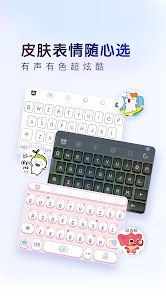
[Customized skin] Super multi-material, support for multi-picture DIY and ever-changing copywriting DIY;
[Intelligent prediction] Guess what you want to say according to the scene, and intelligently complete the whole sentence;
[AI Intelligent Input] Adaptive input scene, more intelligent words;
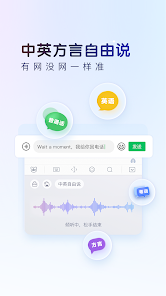
【AI Voice Input】Supports Chinese-English mixing without switching, dialect without switching, faster and more accurate;
[Offline Voice] The voice input is as accurate as when the network is disconnected and the weak network is weak;
[AR Emoticons] Make a variety of funny emoticons through face recognition technology;
[Super Large System Thesaurus] 500,000 system thesaurus, smooth input and accurate word selection;
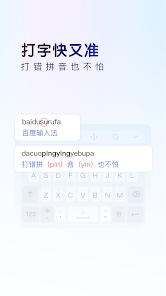
[Artificial Intelligence Engine] Intelligent sentence input algorithm plus error correction algorithm to improve accuracy;
【Quick search】Search while chatting, one step direct;
[Game keyboard] The three major artifacts of game phrases, floating voice, and harmonious conversion are essential for boosting scores and super gods;
[Lazy Phrases] Built-in multiple phrase categories, and supports adding personal common words;
【Automatic synchronization】Automatic synchronization of cloud backup of user network words, setting items, and personalized phrases;
[Super strong Chinese and English mixed input] Free mixed input of Chinese, English, numbers and symbols;
【Smart handwriting】Support stacking; writing while writing, fast recognition speed; brush writing effect;
【Multiple input methods】Support multiple input methods such as Pinyin, English, strokes, Wubi, and voice;
【Voice shorthand】Voiceprint distinguishing role technology landed in the input method for the first time;
【Accessibility Service】
If you want to use the one-click sending function of emoticons, please enable the accessibility service of the input method. This service is only used to achieve the above functions, and the input method will not collect user privacy information, please feel free to use it. Opening method: "Settings" > "Accessibility" > "Installed Services" > "Check Baidu Input Method"
【YAN Keyboard】Yan/Yan/Yan's new skin is online, multi-picture carousel, copywriting is ever-changing, and there is a small surprise every time you type;
[Customized skin] Super multi-material, support for multi-picture DIY and ever-changing copywriting DIY;
[Intelligent prediction] Guess what you want to say according to the scene, and intelligently complete the whole sentence;
[AI Intelligent Input] Adaptive input scene, more intelligent words;
【AI Voice Input】Supports Chinese-English mixing without switching, dialect without switching, faster and more accurate;
[Offline Voice] The voice input is as accurate as when the network is disconnected and the weak network is weak;
[AR Emoticons] Make a variety of funny emoticons through face recognition technology;
[Super Large System Thesaurus] 500,000 system thesaurus, smooth input and accurate word selection;
[Artificial Intelligence Engine] Intelligent sentence input algorithm plus error correction algorithm to improve accuracy;
【Quick search】Search while chatting, one step direct;
[Game keyboard] The three major artifacts of game phrases, floating voice, and harmonious conversion are essential for boosting scores and super gods;
[Lazy Phrases] Built-in multiple phrase categories, and supports adding personal common words;
【Automatic synchronization】Automatic synchronization of cloud backup of user network words, setting items, and personalized phrases;
[Super strong Chinese and English mixed input] Free mixed input of Chinese, English, numbers and symbols;
【Smart handwriting】Support stacking; writing while writing, fast recognition speed; brush writing effect;
【Multiple input methods】Support multiple input methods such as Pinyin, English, strokes, Wubi, and voice;
【Voice shorthand】Voiceprint distinguishing role technology landed in the input method for the first time;
【Accessibility Service】
If you want to use the one-click sending function of emoticons, please enable the accessibility service of the input method. This service is only used to achieve the above functions, and the input method will not collect user privacy information, please feel free to use it. Opening method: "Settings" > "Accessibility" > "Installed Services" > "Check Baidu Input Method"
Updated on
Safety starts with understanding how developers collect and share your data. Data privacy and security practices may vary based on your use, region, and age. The developer provided this information and may update it over time.

No data shared with third parties
Learn more about how developers declare sharing

No data collected
Learn more about how developers declare collection
Ratings and reviews
3.0
24K reviews

GaloreValley
- Flag inappropriate
December 4, 2025
It's a good app, I'm giving it a 1 star because it won't allow you to register if you aren't in China or have a Chinese number. Apparently, it's been reported that they purposely make it difficult for oversea users. I've spent a total of 2 hours, researching and going to different websites to try and sign in but it says I already have an account which is odd, this is my first time attempting to because unless you have an account, your basically limited on the app. I can't buy VIP/Premium at all.
40 people found this review helpful

Mira Işık
- Flag inappropriate
October 17, 2025
Nice app but 2 problems, I hate how it sometimes disappears and becomes non usable for a time or until I reboot the phone. Also the Chinese language being the only option wouldn't really disturb me cuz it's a Chinese app but since this app is currently on global, I'd honestly recommend adding an English language. It's quite hard for me to understand but it still gets easier to use once I memorize everything
61 people found this review helpful

Ken Ng
- Flag inappropriate
- Show review history
October 29, 2025
Extremely smooth experience for Chinese input. However, it does not provide a button for you to switch to another keyboard. This creates bad UX and I won't use it until really needs to type a lot of Chinese, as switching back to another keyboardblike gboard is a pain.
8 people found this review helpful
What’s new
基於AI模型,重磅陞級!
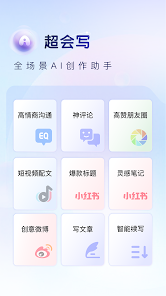
全場景AI創作助手【超會寫】上線,助力潤色、改寫文案,讓你社交溝通不再精神內耗!
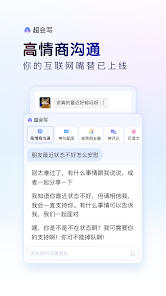
【高情商溝通】:你的互聯網嘴替已上線,無論親情友情愛情還是職場關係都輕鬆拿捏、情商線上
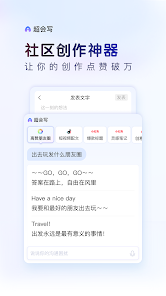
【社區創作神器】:激發創意、花式創作,讓你的作品點贊破萬
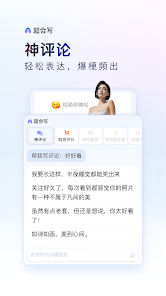
【神評論】:短視頻、購物評論輕鬆寫,從此在評論區前排坐穩
全場景AI創作助手【超會寫】上線,助力潤色、改寫文案,讓你社交溝通不再精神內耗!
【高情商溝通】:你的互聯網嘴替已上線,無論親情友情愛情還是職場關係都輕鬆拿捏、情商線上
【社區創作神器】:激發創意、花式創作,讓你的作品點贊破萬
【神評論】:短視頻、購物評論輕鬆寫,從此在評論區前排坐穩
App support
About the developer
百度在线网络技术(北京)有限公司
dingyi2014530@gmail.com
海淀区上地十街10号百度大厦三层
海淀区, 北京市
China
100085
+86 159 1023 7023


