
S3Drive: Cloud storage
In-app purchases
4.1star
366 reviews
10K+
Downloads

Everyone
info



About this app
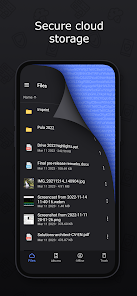
S3Drive is an easy-to-use client that converts any S3, WebDAV or Rclone compatible back-end into your personal encrypted file storage. Your files are encrypted before they leave your device, so no one beside you can access them. Not even us.
Features:
- Drive mount / Files app integration,
- Multiple sync modes (copy, sync, move, two-way),
- Content and filename encryption,
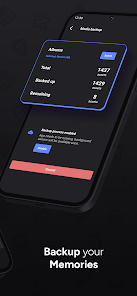
- Photo & video backup with background mode,
- Secure sharing via encrypted link,
- Multiple accounts support,
- Manage files & directories (open, preview, download, copy, delete, rename, folder upload etc.),
- Preview different file formats (pdf, markdown, txt, audio, video),
- Background audio play-out,
- Simple text editor,
- Search within directories,
- Object Lock support,
- File versioning (delete & restore),
- Light and dark themes
==Supported providers==
Protocols: S3, WebDAV, SFTP, SMB, FTP, HTTP
Personal storage: Google Drive, Google Photos, Dropbox, Box, Microsoft OneDrive, pCloud, Proton Drive, Koofr
S3 clouds: AWS S3, Backblaze B2, Synology C2, Cloudflare R2, Google Cloud Storage, Wasabi, Linode, IDrive e2, Storj, Scaleway, DigitalOcean Spaces
Self-hosted: MinIO, SeaweedFS, GarageFS, Openstack Swift S3, Ceph, Zenko CloudServer
Full list: https://docs.s3drive.app/setup/providers
Encryption
Full compatibility with Rclone crypt - free and open-source encryption scheme.
Media backup
Backup your valuable photos&videos automatically in the background
Sync
Synchronize between different accounts. Choose folders and select mode (one-way copy/sync, two-way sync).
Import/export
Import your data from other providers or export your data if it's time to switch. No vendor lock-in.
Cost-effectiveness
Choose provider with best pricing model, combine multiple tiers.
Self-sovereignty
Stay independent from external providers, connect to your own server or NAS... or enable encryption and store your files privately pretty much anywhere.
Sign-up for a free account, no credit card required.
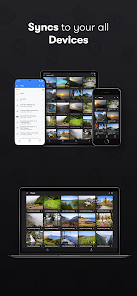
Available on: Android, iOS, macOS, Windows, Linux, Web
Desktop clients: https://s3drive.app/desktop
Browser web client: https://web.s3drive.app
If you would like to support our mission considering rating our app and spread the word.
More info: https://docs.s3drive.app/contributing
Roadmap: https://s3drive.canny.io/
We would love to hear from you !
Missing some features? App not working as intended?
Please visit our Discord: https://s3drive.app/discord or reach us at: http://s3drive.app/support
Features:
- Drive mount / Files app integration,
- Multiple sync modes (copy, sync, move, two-way),
- Content and filename encryption,
- Photo & video backup with background mode,
- Secure sharing via encrypted link,
- Multiple accounts support,
- Manage files & directories (open, preview, download, copy, delete, rename, folder upload etc.),
- Preview different file formats (pdf, markdown, txt, audio, video),
- Background audio play-out,
- Simple text editor,
- Search within directories,
- Object Lock support,
- File versioning (delete & restore),
- Light and dark themes
==Supported providers==
Protocols: S3, WebDAV, SFTP, SMB, FTP, HTTP
Personal storage: Google Drive, Google Photos, Dropbox, Box, Microsoft OneDrive, pCloud, Proton Drive, Koofr
S3 clouds: AWS S3, Backblaze B2, Synology C2, Cloudflare R2, Google Cloud Storage, Wasabi, Linode, IDrive e2, Storj, Scaleway, DigitalOcean Spaces
Self-hosted: MinIO, SeaweedFS, GarageFS, Openstack Swift S3, Ceph, Zenko CloudServer
Full list: https://docs.s3drive.app/setup/providers
Encryption
Full compatibility with Rclone crypt - free and open-source encryption scheme.
Media backup
Backup your valuable photos&videos automatically in the background
Sync
Synchronize between different accounts. Choose folders and select mode (one-way copy/sync, two-way sync).
Import/export
Import your data from other providers or export your data if it's time to switch. No vendor lock-in.
Cost-effectiveness
Choose provider with best pricing model, combine multiple tiers.
Self-sovereignty
Stay independent from external providers, connect to your own server or NAS... or enable encryption and store your files privately pretty much anywhere.
Sign-up for a free account, no credit card required.
Available on: Android, iOS, macOS, Windows, Linux, Web
Desktop clients: https://s3drive.app/desktop
Browser web client: https://web.s3drive.app
If you would like to support our mission considering rating our app and spread the word.
More info: https://docs.s3drive.app/contributing
Roadmap: https://s3drive.canny.io/
We would love to hear from you !
Missing some features? App not working as intended?
Please visit our Discord: https://s3drive.app/discord or reach us at: http://s3drive.app/support
Updated on
Safety starts with understanding how developers collect and share your data. Data privacy and security practices may vary based on your use, region, and age. The developer provided this information and may update it over time.

No data shared with third parties
Learn more about how developers declare sharing

No data collected
Learn more about how developers declare collection
Ratings and reviews
4.1
348 reviews

Douglas McDonald
- Flag inappropriate
- Show review history
December 23, 2025
Overall, not too bad. You can only set up one S3 bucket per connection, so a large S3 repository would be cumbersome to sync. Adding a bucket also requires your endpoint address, which other apps don't usually require. The interface is also clunky. For example, the button to access all of your buckets has an icon that suggests adding users. I am cautiously optimistic at this point.

Т
- Flag inappropriate
December 12, 2025
Amazing app for those who want to use rclone cross platform. No other solution works if you want to use E2EE Cloud storage both on Android and iOS. Different subscription options make it perfect solution for anyone, you can subscribe only for the app or you can also get pretty cheap cloud storage package. For me the best option was the LIFETIME Subscription. The developer is very committed and constantly updates the app. Keep up the good work Tom! 👍🏻
1 person found this review helpful

Kristoffer Bouchard
- Flag inappropriate
- Show review history
January 12, 2026
11 jan 26: not sure i recommend. still uncertain I'm trying to add a self hosted rustfs container http endpoint over tailscale. no success connecting or listing buckets update 12 Jan 26: I can login to rustfs buckets over tailscale on a chrome book . however the exact same configuration fails on a Samsung s10 using the same s3 drive app. very confused. 3rd yodate: resolved there is an android bug if you enable pin locks or biometrics s3 compatible won't log in.
What’s new
Fix Proton Drive 422 upload error,
Add support for new back-ends (Filen, Drime, Shade, Internxt),
Update Rclone v1.73.0
Add support for new back-ends (Filen, Drime, Shade, Internxt),
Update Rclone v1.73.0
App support
About the developer
Tomasz Raganowicz
support@s3drive.app
Komenského 264
5
500 03 Hradec Králové
Czechia


