
RoByte: Roku TV Remote Control
In-app purchases
4.3star
75.3K reviews
10M+
Downloads

Everyone
info

About this app
RoByte is a simple and easy to use Roku remote control app that works with your Roku Player or Roku TV.
Features:
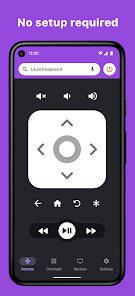
• No Setup required, RoByte automatically scans for your Roku device
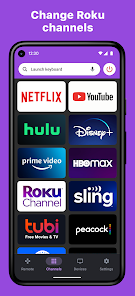
• Easy channel switcher
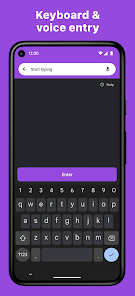
• Use your keyboard for fast text & voice entry on channels like Netflix, Hulu, or Disney+.
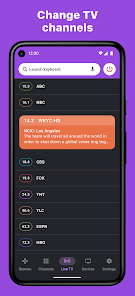
• View all your TV channels and jump directly to the one you like.
• Adjust your Roku TV's volume and toggle the input.
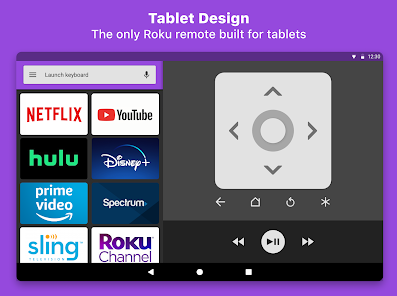
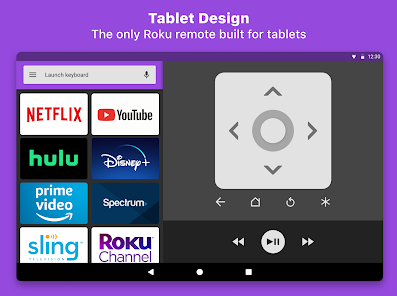
• Tablet support
• Wear OS support, quick access to play/pause from your wrist
• Navigate using D-pad or Swipe-Pad
• Pair with multiple Roku devices
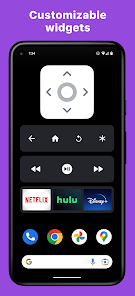
• Customizable Widgets turn your Android homescreen into a Roku remote
• Option to keep the wifi from sleeping
• Beautiful design with material design
RoByte Free features:
• Roku remote control
• Play/pause, fast forward, rewind
• Pair with multiple Roku devices
RoByte Pro features:
• Roku channel switcher
• Power button
• Volume control
• Keyboard & Voice Search
• TV channels switcher
• Homescreen widgets
• Wear OS app
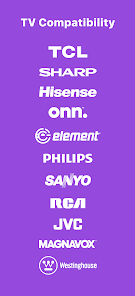
Supported Roku TVs:
• TCL
• Sharp
• Hisense
• Onn.
• Element
• Philips
• Sanyo
• RCA
• JVC
• Magnavox
• Westinghouse
With RoByte Roku TV Remote, we wanted everyone to have the best Roku remote app so we made the remote control functionality free.
Help Guide:
If you are having issues, please do the following on your Roku TV:
Go to Settings -> System -> Advanced System Settings -> Control by mobile apps, and select "Enabled"
Quick tips:
• Most problems connecting to your Roku can be resolved by simply reinstalling RoByte.
• RoByte can only connect if you are on the same wifi network as your Roku device.
Support: tinybyteapps@gmail.com
Privacy Policy: https://tinybyte-apps-website.web.app/robyte_android_pp.html
RoByte Roku TV Remote is not affiliated with Roku, Inc. This Roku remote is not designed to control Roku SoundBridge.
Features:
• No Setup required, RoByte automatically scans for your Roku device
• Easy channel switcher
• Use your keyboard for fast text & voice entry on channels like Netflix, Hulu, or Disney+.
• View all your TV channels and jump directly to the one you like.
• Adjust your Roku TV's volume and toggle the input.
• Tablet support
• Wear OS support, quick access to play/pause from your wrist
• Navigate using D-pad or Swipe-Pad
• Pair with multiple Roku devices
• Customizable Widgets turn your Android homescreen into a Roku remote
• Option to keep the wifi from sleeping
• Beautiful design with material design
RoByte Free features:
• Roku remote control
• Play/pause, fast forward, rewind
• Pair with multiple Roku devices
RoByte Pro features:
• Roku channel switcher
• Power button
• Volume control
• Keyboard & Voice Search
• TV channels switcher
• Homescreen widgets
• Wear OS app
Supported Roku TVs:
• TCL
• Sharp
• Hisense
• Onn.
• Element
• Philips
• Sanyo
• RCA
• JVC
• Magnavox
• Westinghouse
With RoByte Roku TV Remote, we wanted everyone to have the best Roku remote app so we made the remote control functionality free.
Help Guide:
If you are having issues, please do the following on your Roku TV:
Go to Settings -> System -> Advanced System Settings -> Control by mobile apps, and select "Enabled"
Quick tips:
• Most problems connecting to your Roku can be resolved by simply reinstalling RoByte.
• RoByte can only connect if you are on the same wifi network as your Roku device.
Support: tinybyteapps@gmail.com
Privacy Policy: https://tinybyte-apps-website.web.app/robyte_android_pp.html
RoByte Roku TV Remote is not affiliated with Roku, Inc. This Roku remote is not designed to control Roku SoundBridge.
Updated on
Safety starts with understanding how developers collect and share your data. Data privacy and security practices may vary based on your use, region, and age. The developer provided this information and may update it over time.

No data shared with third parties
Learn more about how developers declare sharing

This app may collect these data types
App activity and App info and performance

Data is encrypted in transit

Data can’t be deleted
Ratings and reviews
4.3
70.5K reviews

Able Baker
- Flag inappropriate
- Show review history
May 21, 2024
The "free trial" wants $20 on faith that this isn't just another in a huge lineup of scam apps. If you want MORE than a physical remote costs you might want to demonstrate that it works amazingly well before holding your hand out. Totally sus. UPDATE: just returned from Family Dollar where $6.95 got me a remote that works. I could have spent $20 on an app that proved that it worked for a couple of days before asking for such a large amount with zero hardware outlay, no shipping, etc.
70 people found this review helpful
TinyByte Apps, LLC
May 21, 2024
The trial does not cost any money. Upgrading to pro is 100% optional, so if you don't want it, then simply don't buy it.

A Google user
- Flag inappropriate
- Show review history
September 24, 2018
Great until it wasn't, which was less than 24, hours after installing it. It impressed me at first. It needed no 'pairing' like most remotes do. Installed it and it worked perfectly. But this morning it said it couldn't connect to my Roku. I kept changing angles nothing helped. I decided to clear it's cache but it doesn't have a cache?. So I'm going to UNINSTALL it. Try another Roku remote app,till I can buy a new Roku.
46 people found this review helpful

Dylan Charpentier
- Flag inappropriate
- Show review history
July 7, 2025
OG: dislike subscriptions. NEW: Unfortunately the subscription on this app allows you to quick launch an app... and that's it. No specific YT or Netflix screens. I know this may be a Roku restriction but to charge a subscription for the feature is rather unfortunate. Subscriptions for one use apps like this are pretty stupid IMHO. The app works well but it should 1000% be a one-time purchase. Not enough value for a subscription.
9 people found this review helpful
TinyByte Apps, LLC
July 7, 2025
Thanks for that feedback. Subscriptions are not required and we have no ads for users of the basic remote functionality.
What’s new
Bug fixes
App support
About the developer
TinyByte Apps LLC
tinybyteapps@gmail.com
408 S Locust St
Tremont, IL 61568
United States
+1 661-752-5253


