
Text Expander: Fast Typing
In-app purchases
4.5star
446 reviews
100K+
Downloads

Everyone
info






About this app
Text Expander: Fast Typing
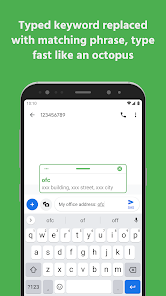
Text expander expands keyword with long phrases. Type fast like an octopus!
Have to type the same phrases again and again, everyday?
Fast Typing text expander can do the job for you.
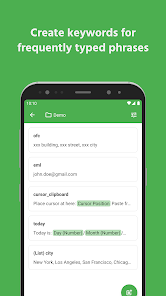
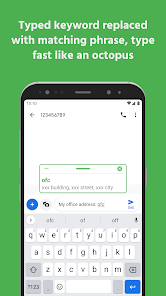
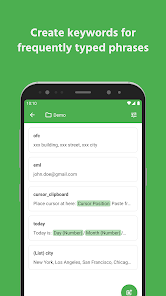
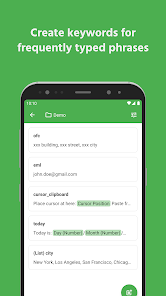
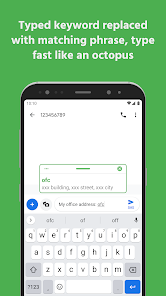
Create a short keyword for long phrase, anytime you type the keyword, text expander will replace it with corresponding full phrase.
No matter how long the sentence is, text expander will type it for you.
Save time for inputing words, sentences, emojis, date time, or anything!
Features
✔️ Text expander
✔️ Folder grouping
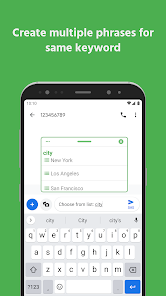
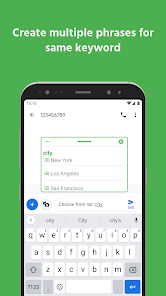
✔️ Show keyword suggestion when you type
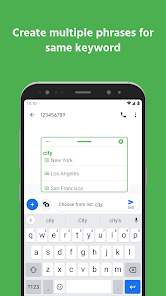
✔️ Phrase list: multiple phrases for one keyword
✔️ Easily paste image or send image to other apps. (Vary by app, depending on the app's capabilities.)
✔️ Instantly open your favorite websites and links. No need to open a browser or type in URLs
✔️ Change phrase case based on keyword case
✔️ Insert date & time
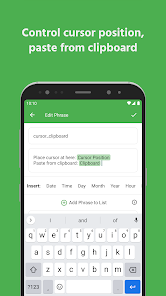
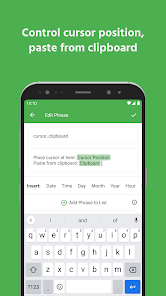
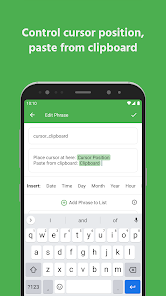
✔️ Cursor position
✔️ Paste from clipboard
✔️ Dark mode
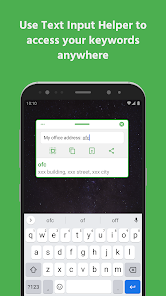
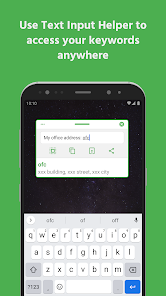
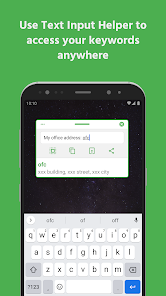
✔️ Text input helper
✔️ Backup & restore
✔️ App blacklist or whitelist
✔️ Pause service when necessary
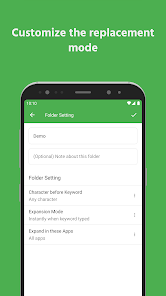
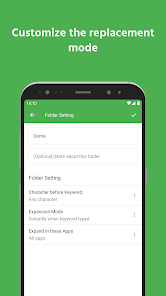
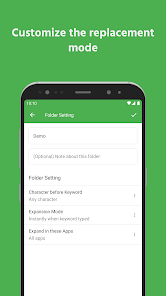
✔️ Trigger replacement instantly or after delimiter typed
✔️ Undo replacement
Important
Accessibility service is required to replace keywords with phrases in other apps.
All usage of accessibility service privileges is exclusively for the purpose of providing Accessibility features to users.
Text expander cannot detect keyword in incompatible apps. Use text input helper to help inputing in incompatible apps.
Useful Links
🔗 Documentation: https://text-expander-app.pages.dev/
🔗 Privacy policy: https://octopus-typing.web.app/privacy_policy.html
🔗 Terms of use: https://octopus-typing.web.app/terms.html
Icon originally created by Freepik - Flaticon: https://www.flaticon.com/free-icons/computer-hardware
Text expander expands keyword with long phrases. Type fast like an octopus!
Have to type the same phrases again and again, everyday?
Fast Typing text expander can do the job for you.
Create a short keyword for long phrase, anytime you type the keyword, text expander will replace it with corresponding full phrase.
No matter how long the sentence is, text expander will type it for you.
Save time for inputing words, sentences, emojis, date time, or anything!
Features
✔️ Text expander
✔️ Folder grouping
✔️ Show keyword suggestion when you type
✔️ Phrase list: multiple phrases for one keyword
✔️ Easily paste image or send image to other apps. (Vary by app, depending on the app's capabilities.)
✔️ Instantly open your favorite websites and links. No need to open a browser or type in URLs
✔️ Change phrase case based on keyword case
✔️ Insert date & time
✔️ Cursor position
✔️ Paste from clipboard
✔️ Dark mode
✔️ Text input helper
✔️ Backup & restore
✔️ App blacklist or whitelist
✔️ Pause service when necessary
✔️ Trigger replacement instantly or after delimiter typed
✔️ Undo replacement
Important
Accessibility service is required to replace keywords with phrases in other apps.
All usage of accessibility service privileges is exclusively for the purpose of providing Accessibility features to users.
Text expander cannot detect keyword in incompatible apps. Use text input helper to help inputing in incompatible apps.
Useful Links
🔗 Documentation: https://text-expander-app.pages.dev/
🔗 Privacy policy: https://octopus-typing.web.app/privacy_policy.html
🔗 Terms of use: https://octopus-typing.web.app/terms.html
Icon originally created by Freepik - Flaticon: https://www.flaticon.com/free-icons/computer-hardware
Updated on
Safety starts with understanding how developers collect and share your data. Data privacy and security practices may vary based on your use, region and age. The developer provided this information and may update it over time.

No data shared with third parties
Learn more about how developers declare sharing

No data collected
Learn more about how developers declare collection

Data is encrypted in transit

Data can’t be deleted

Committed to follow the Play Families policy
Ratings and reviews
4.4
420 reviews

Odunayo Adebayo
- Flag inappropriate
- Show review history
17 October 2025
The App is really good and useful for business owners, please help to work on features that allows one to add multiple images alongside with text together. This will enhance marketing for businesses.
Life & Tech
17 October 2025
Thank you for your review! We're glad the app is "really good and useful." We appreciate your feature request and will consider it. ♥️♥️♥️

Doctor Wi-Fi
- Flag inappropriate
1 November 2023
Best in class. I struggled for years with TextExpand. The service, which has to (obviously) run in the background was always stopping. They always said to blame the OS, not the app. Then it stopped working entirely. (Blessing in disguise) I've now been using Fast Typing for a month and it hasn't stopped once. It has a higher limit of shortcuts on its free version and some other cool looking features that I haven't tried yet. Great work. Pro seems expensive -- otherwise I'd buy it just to support
10 people found this review helpful
Life & Tech
1 November 2023
Hi, glad that you find this app useful to you. In fact, the current price is lower than lots of others. Thank you for the rating and review! ❤️❤️❤️

Vincent Lüders
- Flag inappropriate
- Show review history
9 September 2024
Nice App: two functions that immediately pop into my mind are two actions, one after the other. For example, select all and copy. The copy option on the phone takes way too long. Then, there are still lots of functions that don't work, like undo. All the other keyboard shortcuts would be great if you could just use keyboard shortcuts that trigger functions, like Ctrl Z and Ctrl Y. But since you just started to develop, update me. You get five stars, and I upgraded for one year.
Life & Tech
10 September 2024
Thanks for the feedback and review. Btw, there's the action that you can copy all text. ♥️♥️♥️
What's new
- We've updated our app for full Android 16 compatibility. Please report any issues you find. Thanks for your support!
App support
About the developer
Hou Chang Hong
aslinfei@gmail.com
博颂路37号院12号楼73号
金水区, 郑州市, 河南省
China
450000
undefined


