
ZKB TWINT

4.1star
11.8K reviews
100K+
Downloads

Everyone
info



About this app
With ZKB TWINT, Zürcher Kantonalbank’s free payment app, you can pay conveniently and securely at the checkout, in online shops or among friends.
One app, many advantages:
- Fast: Send, receive and request money around the clock in real time – from smartphone to smartphone.
- Convenient Easy payment in online shops, at supermarket checkouts, in canteens and at vending machines.
- Straightforward: Register in just a few steps using the ZKB Mobile Banking app or ZKB Visa Debit Card.
- Free of charge: Using ZKB TWINT is free of charge; no transaction fees are incurred.
- Secure: Access the app using a six-digit numerical code (PIN), fingerprint, iris scan or 3D facial recognition (the latter two options available with Android 10 or higher). ZKB TWINT also fully meets the security standards of Swiss banks.
- Simple: Debits are charged directly to your bank account. The app does not have to be topped up with money first.
- Widely accepted: Whether among friends, at tills, in restaurants or online shops – you have everything you need with Switzerland's leading payment app.
- Flexible: The ZKB TWINT app shows you the current limits and the amount still available. You can adjust your limits yourself with just a few taps, with immediate effect.
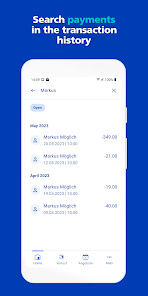
- Transparent: Thanks to the full-text search, you can quickly find your ZKB TWINT transactions in the history section – you can search by contact, merchant name, telephone number or message.
One app, many functions:
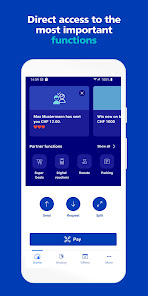
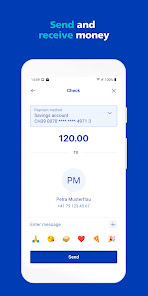
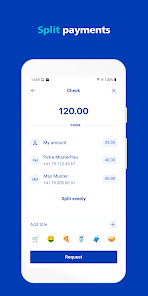
- Send and request money: ZKB TWINT allows you to transfer money in real time – simply from smartphone to smartphone. And you can request and receive amounts from friends or family members. Adding a photo and a few nice words allows you to make your message personal and friendly.
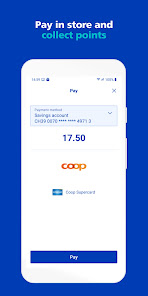
- Pay simply and conveniently: ZKB TWINT lets you pay in online shops, at supermarket tills, in canteens and at vending machines.
- Twint parking fees: Start the parking process directly from the app or scan the QR code on the parking meter and select the desired parking time. Practical: If you return earlier than planned, simply cancel the parking time and the outstanding amount will be refunded to you.
- Donate: With ZKB TWINT, you can pay for your donation to numerous organisations directly from the app.
- Withdraw cash: Using your ZKB TWINT app, you can withdraw cash in over 2,300 shops such as K Kiosks, Volg, pharmacies, fuel stations or restaurants.
- Digital vouchers and credits: Buy digital vouchers and credits for your favourite shops quickly and at any time. Display the code directly or access it at any time via ZKB TWINT. You can also pass on the voucher code directly via email.
- Buy public transport tickets: Simply save ZKB TWINT in your public transport app as your preferred payment method or pay via QR code at vending machines or in online shops.
- Super deals: Every week, you can find especially attractive deals that are only available in the TWINT app.
Easy registration:
1. Install ZKB TWINT on your smartphone
2. Register using the ZKB Mobile Banking app or ZKB Visa Debit Card
3. Twint and benefit from the many advantages
Requirements:
- Possession of a cell phone number with the country code Switzerland (+41), Germany (+49), France (+33), Liechtenstein (+423), Italy (+39) or Austria (+43) and a Swiss residential address
- A smartphone with the following minimum operating system versions: Android 9.0 or newer
- Own transaction account with Zürcher Kantonalbank in Swiss francs, such as a ZKB Private Account or ZKB Private Account Young. Linking with a ZKB corporate account is not possible.
- Active ZKB Mobile Banking on the same device or a ZKB Visa Debit Card issued in your name
- Internet access
- Minimum age: 10 years
Further information:
www.zkb.ch/twint
Zürcher Kantonalbank eBanking: www.zkb.ch/ebanking
One app, many advantages:
- Fast: Send, receive and request money around the clock in real time – from smartphone to smartphone.
- Convenient Easy payment in online shops, at supermarket checkouts, in canteens and at vending machines.
- Straightforward: Register in just a few steps using the ZKB Mobile Banking app or ZKB Visa Debit Card.
- Free of charge: Using ZKB TWINT is free of charge; no transaction fees are incurred.
- Secure: Access the app using a six-digit numerical code (PIN), fingerprint, iris scan or 3D facial recognition (the latter two options available with Android 10 or higher). ZKB TWINT also fully meets the security standards of Swiss banks.
- Simple: Debits are charged directly to your bank account. The app does not have to be topped up with money first.
- Widely accepted: Whether among friends, at tills, in restaurants or online shops – you have everything you need with Switzerland's leading payment app.
- Flexible: The ZKB TWINT app shows you the current limits and the amount still available. You can adjust your limits yourself with just a few taps, with immediate effect.
- Transparent: Thanks to the full-text search, you can quickly find your ZKB TWINT transactions in the history section – you can search by contact, merchant name, telephone number or message.
One app, many functions:
- Send and request money: ZKB TWINT allows you to transfer money in real time – simply from smartphone to smartphone. And you can request and receive amounts from friends or family members. Adding a photo and a few nice words allows you to make your message personal and friendly.
- Pay simply and conveniently: ZKB TWINT lets you pay in online shops, at supermarket tills, in canteens and at vending machines.
- Twint parking fees: Start the parking process directly from the app or scan the QR code on the parking meter and select the desired parking time. Practical: If you return earlier than planned, simply cancel the parking time and the outstanding amount will be refunded to you.
- Donate: With ZKB TWINT, you can pay for your donation to numerous organisations directly from the app.
- Withdraw cash: Using your ZKB TWINT app, you can withdraw cash in over 2,300 shops such as K Kiosks, Volg, pharmacies, fuel stations or restaurants.
- Digital vouchers and credits: Buy digital vouchers and credits for your favourite shops quickly and at any time. Display the code directly or access it at any time via ZKB TWINT. You can also pass on the voucher code directly via email.
- Buy public transport tickets: Simply save ZKB TWINT in your public transport app as your preferred payment method or pay via QR code at vending machines or in online shops.
- Super deals: Every week, you can find especially attractive deals that are only available in the TWINT app.
Easy registration:
1. Install ZKB TWINT on your smartphone
2. Register using the ZKB Mobile Banking app or ZKB Visa Debit Card
3. Twint and benefit from the many advantages
Requirements:
- Possession of a cell phone number with the country code Switzerland (+41), Germany (+49), France (+33), Liechtenstein (+423), Italy (+39) or Austria (+43) and a Swiss residential address
- A smartphone with the following minimum operating system versions: Android 9.0 or newer
- Own transaction account with Zürcher Kantonalbank in Swiss francs, such as a ZKB Private Account or ZKB Private Account Young. Linking with a ZKB corporate account is not possible.
- Active ZKB Mobile Banking on the same device or a ZKB Visa Debit Card issued in your name
- Internet access
- Minimum age: 10 years
Further information:
www.zkb.ch/twint
Zürcher Kantonalbank eBanking: www.zkb.ch/ebanking
Updated on
Safety starts with understanding how developers collect and share your data. Data privacy and security practices may vary based on your use, region, and age. The developer provided this information and may update it over time.

No data shared with third parties
Learn more about how developers declare sharing

This app may collect these data types
Location, Personal info and 7 others

Data is encrypted in transit

You can request that data be deleted
Ratings and reviews
4.1
11.6K reviews

Stephan Markus Schmid
- Flag inappropriate
- Show review history
July 17, 2025
When it was working it was great. Unfortunately since the last update, after authentication, it just crashes. UPDATE: I understand that you want more information, but I don't understand why I should call a 0844 pay number and why you don't check the app crash log.
1 person found this review helpful
Zürcher Kantonalbank
July 17, 2025
We naturally log the App Crashes, but if it is an individual issue, we would need more specific details. However, we are working on resolving current issues for the next app release in mid/end od August.

Scott Cameron Pedigo
- Flag inappropriate
- Show review history
October 9, 2024
Tried to pay for a ZVV monthly pass that I ordered on-line on the SBB website. After scanning the QR-code and clicking on the payment confirmation button, it fails with "technical error" message and no explanation on either side. But the failed provisional payments are still counted against the daily and monthly limits. Most times it works, but it is not reliable.
1 person found this review helpful
Zürcher Kantonalbank
October 15, 2024
Besten Dank für Ihre Nachricht und wir entschuldigen uns für die entstandenen Unannehmlichkeiten. Wir werden nächste Woche eine neue App Version veröffentlichen, welche das Problem mit dem technischen Fehler beheben sollte. Bezüglich den ungerechtfertigten Limitenbeanspruchungen wenden Sie sich bittean unseren Kundensupport 0844 000 020.

Kim Andre Andersen
- Flag inappropriate
- Show review history
November 21, 2024
For some reason you're not allowed to use the app if you have Android developer mode on, but you can turn it off, login, then back on. Why deny it in the first place? And my biggest issue, i have a work and private phone. I need to use twint on both, but I can only be logged into one at the same time. Why?! For ebanking, this makes sense, but twint is supposed to be a lightweight, convenient payment app. Incredibly frustrating.
1 person found this review helpful
Zürcher Kantonalbank
October 22, 2024
Besten Dank für Ihre Nachricht. Der Entwicklermodus muss ausschliesslich für das Reboarding ausgeschaltet sein. Nach erfolgtem Reboarding können Sie ZKB TWINT weiterhin mit eingeschaltetem Entwicklermodus verwenden.
Wenn Sie mit dieser Antwort zufrieden sind, dürfen Sie die Bewertung gerne anpassen.
What’s new
We've updated our scanner with a fresh design to make it easier to use.
App support
phone
Phone number
+41844840140
About the developer
Zürcher Kantonalbank
online@zkb.ch
Bahnhofstrasse 9
8001 Zürich
Switzerland
+41 79 223 79 18


