
doubleTwist Pro music player
In-app purchases
4.0star
2.53K reviews
10K+
Downloads

Everyone
info

About this app
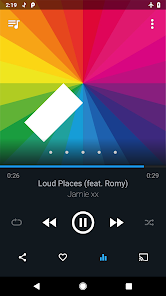
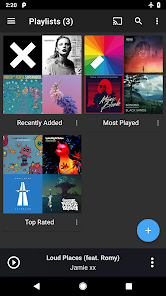
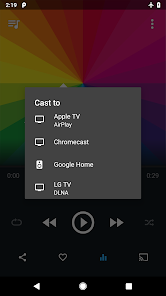
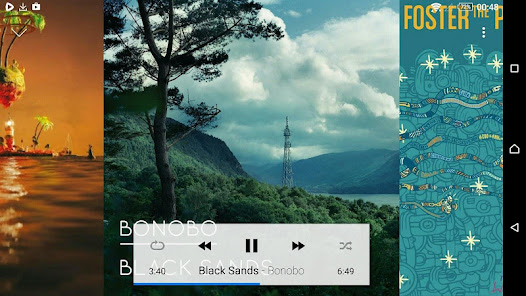
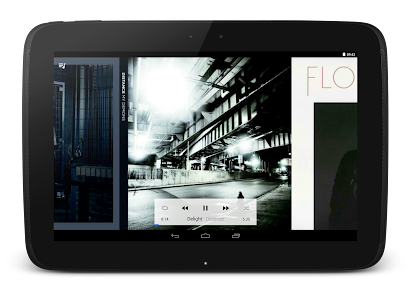
*** Optimized for large screens! *** doubleTwist Pro Lossless Player is the completely revamped premium version of doubleTwist Classic Player. It features a brand new material design UI with multiple themes, 10-band EQ, gapless support, lossless sound with FLAC & ALAC playback, casting support and podcast management.
doubleTwist Classic Player has been recommended by the New York Times, BBC, Wall Street Journal and numerous tech publications.
User Interface:
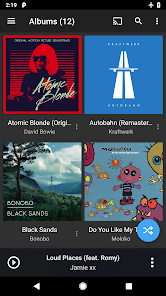
♬ Fast material design UI
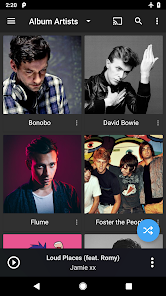
♬ High resolution Album and Artist images
♬ Configurable browsing preferences for Album Artist and Track Artist
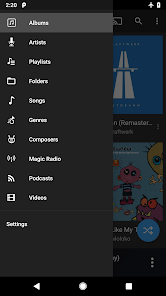
♬ Advanced sorting options for Albums, Artists, Composers, Genres and more
♬ Multiple built-in themes: dark, light, AMOLED black and red
♬ Configurable default start screen and menu listing
♬ Built-in Podcast directory and podcast management features, including variable speed playback for podcasts subscribed through the app.
Premium Sound:
♬ Gapless playback for FLAC, ALAC and MP3, AAC tracks containing gapless metadata
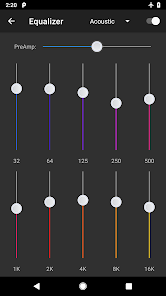
♬ Advanced 10 band equalizer with 17 presets and Preamp
♬ SuperSound™: Customize your sound with headphone enhancement, bass boost and widening effects
♬ Supports lossless formats and can play FLAC, ALAC as well as audiophile 24-bit audio files
♬ Supports MP3, AAC, OGG, WMA, m4a, wav and more
Cast to wireless speakers and devices:
♬ Chromecast support
♬ AirPlay-compatible speaker support
♬ UPnP/DLNA Play To support (PS3/4 are not supported because they don't support Play To)
Other:
♬ Android Wear support
♬ Android Auto support
♬ Scrobble to Last.fm
♬ Beautiful small and large widgets
♬ Configurable bookmarking support for play position
doubleTwist is handmade with ❤ in Austin, Texas, live music's world capital. Thanks to you, we manage music for more than 10 million loyal listeners.
Help? Visit http://www.doubletwist.com/help/platform/android/
Community:
Follow us on Twitter: https://twitter.com/doubletwist
Use of this app is subject to the doubleTwist Terms of Use and Privacy Policy: http://www.doubletwist.com/legal/
doubleTwist Classic Player has been recommended by the New York Times, BBC, Wall Street Journal and numerous tech publications.
User Interface:
♬ Fast material design UI
♬ High resolution Album and Artist images
♬ Configurable browsing preferences for Album Artist and Track Artist
♬ Advanced sorting options for Albums, Artists, Composers, Genres and more
♬ Multiple built-in themes: dark, light, AMOLED black and red
♬ Configurable default start screen and menu listing
♬ Built-in Podcast directory and podcast management features, including variable speed playback for podcasts subscribed through the app.
Premium Sound:
♬ Gapless playback for FLAC, ALAC and MP3, AAC tracks containing gapless metadata
♬ Advanced 10 band equalizer with 17 presets and Preamp
♬ SuperSound™: Customize your sound with headphone enhancement, bass boost and widening effects
♬ Supports lossless formats and can play FLAC, ALAC as well as audiophile 24-bit audio files
♬ Supports MP3, AAC, OGG, WMA, m4a, wav and more
Cast to wireless speakers and devices:
♬ Chromecast support
♬ AirPlay-compatible speaker support
♬ UPnP/DLNA Play To support (PS3/4 are not supported because they don't support Play To)
Other:
♬ Android Wear support
♬ Android Auto support
♬ Scrobble to Last.fm
♬ Beautiful small and large widgets
♬ Configurable bookmarking support for play position
doubleTwist is handmade with ❤ in Austin, Texas, live music's world capital. Thanks to you, we manage music for more than 10 million loyal listeners.
Help? Visit http://www.doubletwist.com/help/platform/android/
Community:
Follow us on Twitter: https://twitter.com/doubletwist
Use of this app is subject to the doubleTwist Terms of Use and Privacy Policy: http://www.doubletwist.com/legal/
Updated on
Safety starts with understanding how developers collect and share your data. Data privacy and security practices may vary based on your use, region, and age. The developer provided this information and may update it over time.

No data shared with third parties
Learn more about how developers declare sharing

This app may collect these data types
Personal info, App activity, and App info and performance

Data is encrypted in transit

You can request that data be deleted
Ratings and reviews
4.0
2.43K reviews

Carol
- Flag inappropriate
- Show review history
November 20, 2024
Thank you for the quick response. I checked, and phone was not selected in the permissions. I fixed that and now the Bluetooth autoplay turns on! Perfect again!! The one remaining problem after the update is that the Bluetooth autoplay will not toggle on. This is particularly annoying when you get in the car and you have to dig around for the phone in order to get the music on. Why ? Other than that, I have no complaints.
3 people found this review helpful
doubleTwist ™
November 19, 2024
Is nothing happening when you tap the Bluetooth Autoplay option in doubleTwist settings (the toggle remains off)? If so, could you go to Android settings -> Apps -> doubleTwist -> Permissions and make sure the following permissions are allowed: Bluetooth/Nearby devices and Phone (the names might differ slightly depending on your Android version).

Lauren Schwartz
- Flag inappropriate
August 15, 2023
The instructions were not at all user-friendly, so I'm taking off a star for that. Took awhile to figure out how to pair the desktop and phone, and to sync my music and playlists. But it appears that everything synced successfully (whew!). BTW, I'm a former user of that other sync app; so far, I like DoubleTwist much better.
2 people found this review helpful

A Google user
- Flag inappropriate
November 10, 2018
I just got a Pixel 2 and I've been trying for the past three hours to get iTunes to sync with it. I tried doubletwist, only to find out that the app doesn't actually sync playlists, like it says it does. It syncs the songs in those playlists, and the albums, and the artists, but not the playlists themselves. This is immensely frustrating. The only reason I didn't just copy the files manually for free is that I wanted to keep all of my individual, meticulously crafted playlists intact. On top of that, it took me ages to figure out how to enable developer options to turn on mass storage to even connect the thing over the cable. When I couldn't figure it out, I tried buying the premium version only to find that the wifi sync is PAINFULLY slow, and I have fiber-optic internet so it's not an issue on my end. I feel like I'm going insane. It would take hours to copy each playlist by hand, why doesn't the app just sync specific playlists rather than each song by what album it's in??? You can select specific playlists, but it'll just individually copy each song in the playlist separately. EDIT: I let it sync with just a couple playlists for a half hour or so, and it turns out that it only shows a playlist once it's completely done syncing. That was very misleading for me and caused me to waste an hour or so looking up what I was doing wrong. Also, on Pixel 2, even if you enable developer mode, which you HAVE to do in order to enable USB debugging, which you supposedly need in order to connect over a physical cable to your computer... It still won't let you connect physically (at least on Mac). You HAVE to sync over WiFi. The free version of this app just does not work at all, if you have a Pixel 2 and/or possibly all Android 8.0 users. You have to buy the app, which for me was on sale for 8 bucks, or at least upgrade for 6 bucks to gain access to WiFi sync. And then you have to wait a very long time, like, a few hours for it to sync. HOWEVER: when you actually manage to figure it out, the app works exactly as intended, just bear in mind that .m4a and .m4b and .m4p audio files will not transfer. You'll need a converter for audiobooks in the .m4- file extension. Or just torrent the MP3. That's faster, cheaper, and easier. And the free version straight-up doesn't sync or even connect. Three stars for a very confusing and frustrating setup, followed by a revelation and relative bliss afterwards. Devs should really make an instruction manual. EDIT 2: Also, podcast functionality on this app isn't great. For that, just get Pocket Casts. LATE 2018 EDIT: I've switched to windows and the sync feature just straight up isn't working at all, it totally messes up all my playlists.
6 people found this review helpful
What’s new
New in v3.5.3:
♬ Fixed Chromecast issue caused by recent Google update to web player running on Chromecast devices.
♬ Fixed Chromecast issue caused by recent Google update to web player running on Chromecast devices.
App support
About the developer
DOUBLETWIST CORP
android-support@doubletwist.com
1606 Headway Cir Ste 9796
Austin, TX 78754-5123
United States
+1 415-738-9975


