

Renetik: Music Studio DAW
In-app purchases

4.5star
105 reviews
10K+
Downloads

Everyone
info




About this app
Complete audio production application
👉 Buy the Full version !
https://play.google.com/store/apps/details?id=com.renetik.instruments.app.full_2_9
👉 More Music Apps !
https://play.google.com/store/apps/dev?id=7192732930930877763
Use existing synth or imported instrument sounds, resample existing tracks, or record instruments and vocals then use them to compose or just perform live, use midi control and audio devices, import/export midi sequences.
Controller Mode:
1. Sampler:
2. Piano:
3. Chord:
3. Guitar:
4. Scale:
5. Pad:
5. Faders:
6. Sequence:
7. Split:
Sequencer Mode:
Use sequence recorder and looper to create music live while playing it with its live oriented design.
Recorder
In recorder you can use any controller to play instruments or samples and record them as sequences to looper. You can select quantization, use metronome, overdub and record performances while looping rest of song. You can use controllers, that you could prepare before and save as presets.
Sequencer
Use looper to perform songs live, adjust tracks tuning and edit key sequences or edit notes and cc.
Effects:
Each track has effect slots, with each slot available for the following effects:
1. Filter: XY pad UI supporting Low Pass, High Pass, Peak, ...
2. EQ3: 3-band equalizer for simple adjustments
3. EQ7: 7-band equalizer for more detailed control
4. Stereo Delay: Supports stereo and mono delays with long times, allow nice effects
5. Three separate Reverb to give space to sound
6. Distortion: make sound desirable trashier
7. Noise Gate: clean background noise while recording
8. Side Chain Compressor: pump up sound
9. Limiter: fine tune from excess loudness
10. Chorus: fine tune from excess loudness
All effects display input and output levels visually and include a button to save presets as named states. Each track also has savable/loadable presets for its effects.
Track Output:
Each track can be controlled with an output fader, mute, solo, and panning options. Each track's output target can be set to one of four mix busses or a device output.
General Features:
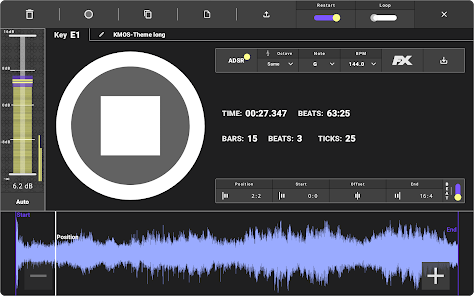
The output of the application can be recorded by pressing the record button. The recorded audio is displayed visually with a seek feature. Recorded audio can be exported as WAV, MP3, FLAC, or MP4.
The application supports MIDI control via cable, Bluetooth, or other apps. Controllable parameters include Record, Panic, Track Pan, Volume, Mute, Solo, and Track FX faders.
The application offers multiple themes, including Dark, Light, and Blue.
A panic button is available to reset audio in case of issues. The app is translated into multiple languages, which can be selected manually or set to follow the system language. Performance-related audio configuration options are available.
Application data can be exported and re-imported for backup purposes.
The app is free with certain feature limitations. Users can upgrade by purchasing individual features or subscribing for full access at a low fee.
Updated on
Safety starts with understanding how developers collect and share your data. Data privacy and security practices may vary based on your use, region, and age. The developer provided this information and may update it over time.

No data shared with third parties
Learn more about how developers declare sharing

No data collected
Learn more about how developers declare collection
Ratings and reviews
4.5
97 reviews

András Fábián
- Flag inappropriate
July 19, 2025
This is a huge surprise. Looks good, much better than on the screenshots and controls are great (finally!!). It's a littlebit underdocumented but on the edge of being intuitive, I could figure it out in a short time. Once it clicks everything fits. Quite pricey though, I'll test it carefully first :)
6 people found this review helpful
Renetik Music Apps
July 20, 2025
thanks, i will try to improve website for documentation and i am considering to release fixed price with fixed version for competitive price with limited upgrades soon... for continuous upgrades with small revenue i currently have i don't know how to price this better.

kent Susan
- Flag inappropriate
July 14, 2024
Ok, the audio is playing right out of my earphones, i thought there was something wrong with my earphones until i went to play something on youtube, my earphones are just fine. So before they try to it's something wrong at my end nope it's not me! it's your app, it's terrible
8 people found this review helpful
Renetik Music Apps
November 17, 2024
There are setting to tune audio output and input configuration for devices where defaults won't work.

PRINCE JOHNSON OLEKACHI
- Flag inappropriate
October 16, 2025
Don't download it doesn't work at all just showing this pictures then go off just waisted my time and money
1 person found this review helpful
Renetik Music Apps
October 16, 2025
this is free app, so you didn't waste money, anyway even if paid you can refund. i will try to find out why it doesn't work on your phone....
What’s new
Feature improvements and bug fixes.
App support
About the developer
Rene Dohan
dohan.rene@gmail.com
Čiližská 1
821 07 Bratislava
Slovakia
undefined


