
Split Screen Launcher
In-app purchases

star
269 reviews

Everyone
info
50K+
Downloads

Everyone
Learn more


About this app
* Works with the latest Android 17
* No ads
* Pro unlocked free for 7 days
Split Screen Launcher lets you save your favorite app combinations as "pairs" and launch both apps at once in split screen (multitasking) with a single tap. No more picking and arranging apps every time — just create a pair and tap.
[New] SideEdge — a sidebar you can pull out from any screen
Swipe in from the edge of the screen and SideEdge opens, letting you launch a saved pair or a single app on the spot — no need to go back to the home screen. It's an ad-free sidebar that works on any Android phone or tablet, and you can adjust the handle's position, size, color, and transparency to your liking.
Miss launching split-screen app pairs from your old phone's sidebar? SideEdge brings that favorite feature back to any Android device.
Common Uses
Photos + Music: Browse your photos while music plays
Video + Social: Watch YouTube while checking Instagram
Research + Notes: Search in Chrome while jotting things down
Work + Comms: Keep Gmail and Slack side by side
Compare + Calculate: Put your browser next to a calculator
Navigate + Chat: Check your route on Maps while sending a message
Automation: Maps and music when you get in the car, Spotify and notes when you plug in your earphones. Your saved pairs are ready when you are (works with automation apps like MacroDroid, Tasker, or Automate).
Key Features
- Create, save, and launch app pairs or single apps with one tap
- SideEdge — a pull-out sidebar to launch pairs and apps from any screen
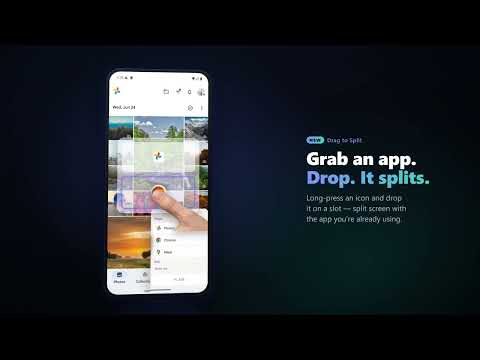
- Drag-to-Split — drag an app from SideEdge onto your current app to split them on the spot
- Android Shortcuts support — open saved pairs or single apps automatically by time, location, or Bluetooth (works with automation apps like MacroDroid, Tasker, or Automate).
- Per-entry screen orientation — auto-rotate on/off, plus portrait and landscape lock for pairs or single apps. Locked pairs open the split already in the right orientation — ideal for landscape games and video
- Home-screen shortcuts — pin a pair to your home screen for one-tap launch
- Organize pairs in folders
- Custom colors
- Reorder pairs by drag and drop
- Backup & restore
- Dark mode
- 15 languages with in-app language switcher
- Lightweight and simple
Note: some apps, such as Camera, can't enter split screen because of how Android works. Changing an Android setting may make them work — see in-app Help for details.
Support the Developer
The free version saves up to 2 slots. Each slot holds either an app pair or a single app. SideEdge, Drag-to-Split, dark mode, and all 15 languages are included at no cost. Everything else — unlimited slots, home-screen shortcuts, folders, custom colors, reordering, Android Shortcuts, and backup & restore — unlocks with Pro. Upgrading to Pro keeps the app ad-free and supports continued independent development.
Thank you to everyone who supports this app!
Accessibility API Usage
This app uses the Accessibility Service for two purposes only:
1) To trigger split-screen mode on Android 9-12 (not needed on Android 12L and newer).
2) So SideEdge can automatically recognize login and password entry screens and hide its handle so it never blocks your taps (it restores automatically once you are done).
The service never reads, collects, or transmits any screen content.
Learn more: https://sakuradevjp.github.io/split-screen-launcher-notes/store/
* No ads
* Pro unlocked free for 7 days
Split Screen Launcher lets you save your favorite app combinations as "pairs" and launch both apps at once in split screen (multitasking) with a single tap. No more picking and arranging apps every time — just create a pair and tap.
[New] SideEdge — a sidebar you can pull out from any screen
Swipe in from the edge of the screen and SideEdge opens, letting you launch a saved pair or a single app on the spot — no need to go back to the home screen. It's an ad-free sidebar that works on any Android phone or tablet, and you can adjust the handle's position, size, color, and transparency to your liking.
Miss launching split-screen app pairs from your old phone's sidebar? SideEdge brings that favorite feature back to any Android device.
Common Uses
Photos + Music: Browse your photos while music plays
Video + Social: Watch YouTube while checking Instagram
Research + Notes: Search in Chrome while jotting things down
Work + Comms: Keep Gmail and Slack side by side
Compare + Calculate: Put your browser next to a calculator
Navigate + Chat: Check your route on Maps while sending a message
Automation: Maps and music when you get in the car, Spotify and notes when you plug in your earphones. Your saved pairs are ready when you are (works with automation apps like MacroDroid, Tasker, or Automate).
Key Features
- Create, save, and launch app pairs or single apps with one tap
- SideEdge — a pull-out sidebar to launch pairs and apps from any screen
- Drag-to-Split — drag an app from SideEdge onto your current app to split them on the spot
- Android Shortcuts support — open saved pairs or single apps automatically by time, location, or Bluetooth (works with automation apps like MacroDroid, Tasker, or Automate).
- Per-entry screen orientation — auto-rotate on/off, plus portrait and landscape lock for pairs or single apps. Locked pairs open the split already in the right orientation — ideal for landscape games and video
- Home-screen shortcuts — pin a pair to your home screen for one-tap launch
- Organize pairs in folders
- Custom colors
- Reorder pairs by drag and drop
- Backup & restore
- Dark mode
- 15 languages with in-app language switcher
- Lightweight and simple
Note: some apps, such as Camera, can't enter split screen because of how Android works. Changing an Android setting may make them work — see in-app Help for details.
Support the Developer
The free version saves up to 2 slots. Each slot holds either an app pair or a single app. SideEdge, Drag-to-Split, dark mode, and all 15 languages are included at no cost. Everything else — unlimited slots, home-screen shortcuts, folders, custom colors, reordering, Android Shortcuts, and backup & restore — unlocks with Pro. Upgrading to Pro keeps the app ad-free and supports continued independent development.
Thank you to everyone who supports this app!
Accessibility API Usage
This app uses the Accessibility Service for two purposes only:
1) To trigger split-screen mode on Android 9-12 (not needed on Android 12L and newer).
2) So SideEdge can automatically recognize login and password entry screens and hide its handle so it never blocks your taps (it restores automatically once you are done).
The service never reads, collects, or transmits any screen content.
Learn more: https://sakuradevjp.github.io/split-screen-launcher-notes/store/
Open two apps in split screen with one tap. Save pairs, multitask faster.
Updated on
Safety starts with understanding how developers collect and share your data. Data privacy and security practices may vary based on your use, region, and age. The developer provided this information and may update it over time.
- No data shared with third partiesLearn more about how developers declare sharing
- No data collectedLearn more about how developers declare collection


Ratings and reviews
240 reviews

Dan Townsley
- Flag inappropriate
July 1, 2026
This app just works! No server-side, data mining. The developer is very attentive and is open to feature requests. I requested a new feature and a day later it was there in an update. Get the "Pro" version!
6 people found this review helpful
sakura.dev.jp
July 1, 2026
Thank you so much for the wonderful review, Dan!
I'm really glad the new shortcut feature works well with your MacroDroid setup. Your detailed feedback and real-world use case helped shape this update, and I truly appreciate you taking the time to test it and share your experience.
Ride safe, and thanks again for your support!

Pramila Mohanty (PM)
- Flag inappropriate
- Show review history
May 21, 2026
Wow, actually great, cuz it has no ads and it's very simple to use, nice UI. thanks for responding lol. can you fix this small issue? basically when I open the app and try changing my colour to default, it glitches a bit.
4 people found this review helpful
sakura.dev.jp
May 21, 2026
Thanks so much for the kind review — glad you love the ad-free, simple design! Great news: I tracked down that glitch when changing the colour to default, and it's fixed. It'll be smooth from the next update. Thanks a lot for reporting it, and for your support — it really helps!

Nurudeen Etseyamhe
- Flag inappropriate
April 2, 2026
This is the best app in its category. I just tested several similar apps and they all require you sacrifice your soul and they don't even work reliably. Then I stumbled upon this and it just works. No questions asked, no unnecessary permissions request and it works completely offline. Big thank you to the developers. For anyone finding it difficult to make it work with whatsapp, just make the whatsapp app be at the bottom. I find that to work for me.
2 people found this review helpful
sakura.dev.jp
April 3, 2026
Thank you for such a kind review! As a solo developer, this truly means the world to me. Great tip about placing WhatsApp at the bottom! You may already have "Force activities to be resizable" enabled in Developer Settings, and adjusting the launch delay in the app's Settings might also help with tricky combinations. Thanks for your support!
What’s new
70,000 downloads (Sep 2, 2026)
80,000 downloads (Sep 15, 2026)
90,000 downloads (Sep 28, 2026)
- Added per-pair screen orientation (portrait & landscape lock)
- Verified launching pairs from MacroDroid, Automate and Tasker (Pro)
- Improved compatibility for apps that exit split screen immediately after launch
- Small bug fixes
80,000 downloads (Sep 15, 2026)
90,000 downloads (Sep 28, 2026)
- Added per-pair screen orientation (portrait & landscape lock)
- Verified launching pairs from MacroDroid, Automate and Tasker (Pro)
- Improved compatibility for apps that exit split screen immediately after launch
- Small bug fixes
Everyone
Learn moreApp support
About the developer
林 亮輔
sakura.dev.jp@gmail.com
星田4丁目13−20−401
交野市, 大阪府 576-0016
Japan


