Password Manager Secure Vault
Contient des annonces
1K+
Téléchargements

Tout public
info
À propos de l'application
Do not store all your Passwords and important data in an insecure notebook.
Password Box, Secure Password Manager encrypts and organizes all your data.
Tired of touching the I always forget my password button when logging in to the web?
Password Box, stored the safest way user accounts, passwords, credit or debit card details, important notes with AES.
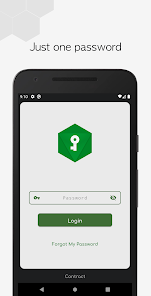
Your data is stored in an encrypted local vault containing a single Master Password that you need to remember.
Secure, Encrypted storage AES-256 bit stores your passwords in a secure and encrypted vault.
Your passwords are yours only, Easily access and edit your passwords.
Features
◆ Different Password Card Types
◆ Easy to Use
◆ Google Materyal Design and Kotlin language
◆ Black, Dark Theme
◆ Best Secure Encryption with 256-bit
◆ Screen Auto exit
◆ Unlimited Card
◆ Private Fields
◆ Secure Notes
◆ Simple & Detail Card Design
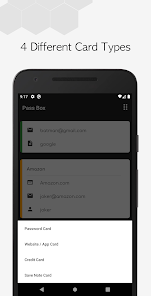
4 Different Password Card Types
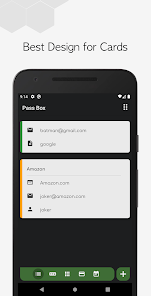
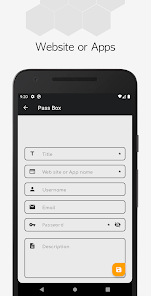
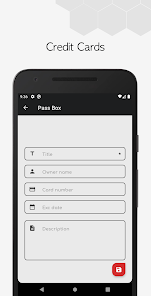
You can store your data in different cards. Password, Website / Application Card, Credit Card and Secure Note, you can store an unlimited of cards encrypted in the application and access them easily.
Easy to Use
Experience a powerful, simple and visual user interface. Focus on your business with simple components.
Google Materyal Design and Kotlin language
Excellent interface was designed with Material Design. The codes of the application were written with Kotlin language, the jetpack components suggested by google were used and brought speed, security and beauty to the application.
AES 256-bit
Your data is stored and protected in the database with 256 bit advanced encryption standard. This standard is used to store important information worldwide.
Coming with Next Update
• Sorting and Searching Password Cards
• Pin and Pattern login options
• Biometric Login with Fingerprint
• Auto Fill in Website Forms and Login- Auto Fill Forms
• Improving Credit and Debit Card Design
• Encrypted Pictures and Files
• Google drive and dropbox, backup and restore features (Google Drive, Dropbox, OneDrive, NAS, ownCloud, WebDAV)
• Password Generator
• Password Analysis and suggestion
Send Mail for Support, Feedback and for more;
otabakoglu@gmail.com
Password Box, Secure Password Manager encrypts and organizes all your data.
Tired of touching the I always forget my password button when logging in to the web?
Password Box, stored the safest way user accounts, passwords, credit or debit card details, important notes with AES.
Your data is stored in an encrypted local vault containing a single Master Password that you need to remember.
Secure, Encrypted storage AES-256 bit stores your passwords in a secure and encrypted vault.
Your passwords are yours only, Easily access and edit your passwords.
Features
◆ Different Password Card Types
◆ Easy to Use
◆ Google Materyal Design and Kotlin language
◆ Black, Dark Theme
◆ Best Secure Encryption with 256-bit
◆ Screen Auto exit
◆ Unlimited Card
◆ Private Fields
◆ Secure Notes
◆ Simple & Detail Card Design
4 Different Password Card Types
You can store your data in different cards. Password, Website / Application Card, Credit Card and Secure Note, you can store an unlimited of cards encrypted in the application and access them easily.
Easy to Use
Experience a powerful, simple and visual user interface. Focus on your business with simple components.
Google Materyal Design and Kotlin language
Excellent interface was designed with Material Design. The codes of the application were written with Kotlin language, the jetpack components suggested by google were used and brought speed, security and beauty to the application.
AES 256-bit
Your data is stored and protected in the database with 256 bit advanced encryption standard. This standard is used to store important information worldwide.
Coming with Next Update
• Sorting and Searching Password Cards
• Pin and Pattern login options
• Biometric Login with Fingerprint
• Auto Fill in Website Forms and Login- Auto Fill Forms
• Improving Credit and Debit Card Design
• Encrypted Pictures and Files
• Google drive and dropbox, backup and restore features (Google Drive, Dropbox, OneDrive, NAS, ownCloud, WebDAV)
• Password Generator
• Password Analysis and suggestion
Send Mail for Support, Feedback and for more;
otabakoglu@gmail.com
Date de mise à jour
La sécurité, c'est d'abord comprendre comment les développeurs collectent et partagent vos données. Les pratiques concernant leur confidentialité et leur protection peuvent varier selon votre utilisation, votre région et votre âge. Le développeur a fourni ces informations et peut les modifier ultérieurement.

Aucune donnée partagée avec des tiers
En savoir plus sur la manière dont les développeurs déclarent le partage

Aucune donnée collectée
En savoir plus sur la manière dont les développeurs déclarent la collecte

Les données sont chiffrées lors de leur transfert

Impossible de supprimer les données
Nouveautés
🔑 added swipe 🖊️ edit or 🗑️ delete function
Assistance de l'appli
À propos du développeur
ozan tabakoğlu
otabakoglu@gmail.com
Menekşe Caddesi No:8
34290 Küçükçekmece/İstanbul
Türkiye


