
TeamDrive SecureOffice

1K+
Téléchargements

Tout public
info

À propos de l'application
View, create, edit and securely sync & share documents from within your TeamDrive SO app.
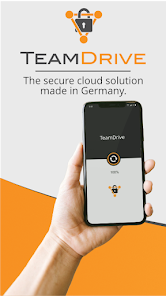
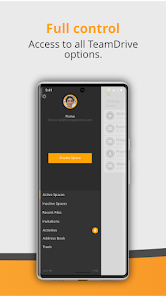
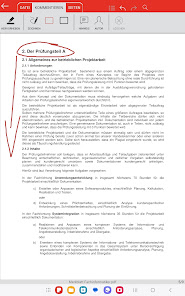
TeamDrive SecureOffice makes viewing, creating, editing, printing and sharing Microsoft® Office and other documents on the move easier through a contextual interface; drag and drop editing; sharing to email in original or PDF format; printing to thousands of wireless printers; and, of course, seamlessly syncing your documents directly into your TeamDrive Spaces all with a single click.
With TeamDrive SecureOffice, shared documents will never leave the app’s secure environment. Even when workers access and send files from their smartphones, TeamDrive SecureOffice provides complete end-to-end encryption so the data are never left unsecured. In comparison to other cloud-based solutions, there are often times when data are transmitted without encryption. For example, the application may send unencrypted data to the cloud provider, and the cloud provider may send unencrypted data to a mobile device. TeamDrive SecureOffice is the first solution of its kind to provide complete end-to-end encryption.
Synchronization
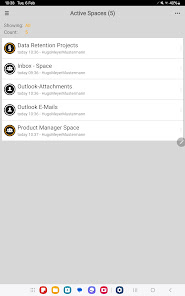
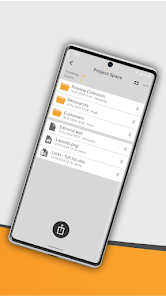
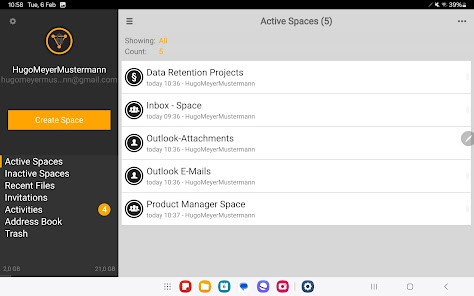
With TeamDrive SecureOffice you can keep your data synchronized between various computers and smartphones easily and automatically. It’s like child’s play to share music, images, documents or folders of any sort with friends, family or work colleagues. TeamDrive SecureOffice offers integrated document handling and is fully compatible with standard versions of TeamDrive and its Spaces. TeamDrive is available for all standard operating systems.
Photo upload
The TeamDrive app includes the direct upload from the Camera App into a TeamDrive Space/Folder.
Offline synchronization
Using a TeamDrive server makes it possible to synchronize data reliably even if one or more computers or smartphones are offline. As soon as the device regains internet access, the data are automatically synchronized. You can therefore work on your documents on a plane or train, for example, without an Internet connection.
Management of access rights
There are four different levels of access that you can allocate to individual group members:
Read-Only, Read-Only (Anonymous), Read/Write, Superuser and Administrator.
Version management
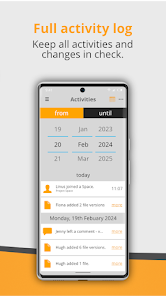
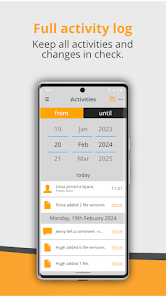
With the TeamDrive version management system (versioning), you have the option to go back to earlier versions of documents and to track all of the changes made by group members.
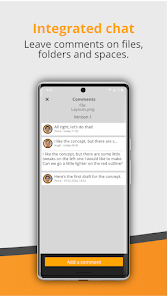
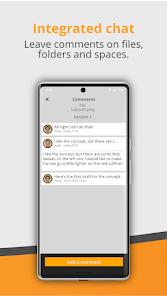
Comments
Every group member can add as many comments to each individual version of a file as he or she wishes. Alternatively, these comments can also be sent simply by e-mail to individual group members or to the whole group.
Conflict management
TeamDrive reliably identifies any conflicts that may arise from simultaneous editing of files by different group members and offers a simple solution for resolving those conflicts.
Security
The security and confidentiality of your data is the highest priority for TeamDrive. Before TeamDrive transfers your data, they are encrypted on your computer (256 bit AES). Only you decide who has access to your data. TeamDrive has been awarded the Data Protection Seal of Privacy of the ULD.
Free choice of server
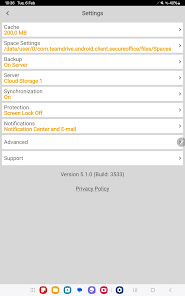
TeamDrive offers two alternatives for synchronizing and safeguarding your data reliably: either you can use the TeamDrive Cloud Services, which means that we take care of everything, or you can use your own servers.
Supported file formats:
Microsoft® Office all versions (1997 and later):
Word, PowerPoint and Excel 97, 2000, XP, 2003, 2007, 2010, doc, docx, xls, xlsx, ppt, pptx.
PDF.
JPEG, PNG, GIF, BMP images, vector WMF and EMF diagrams.
Plain text (viewing).
TeamDrive SecureOffice makes viewing, creating, editing, printing and sharing Microsoft® Office and other documents on the move easier through a contextual interface; drag and drop editing; sharing to email in original or PDF format; printing to thousands of wireless printers; and, of course, seamlessly syncing your documents directly into your TeamDrive Spaces all with a single click.
With TeamDrive SecureOffice, shared documents will never leave the app’s secure environment. Even when workers access and send files from their smartphones, TeamDrive SecureOffice provides complete end-to-end encryption so the data are never left unsecured. In comparison to other cloud-based solutions, there are often times when data are transmitted without encryption. For example, the application may send unencrypted data to the cloud provider, and the cloud provider may send unencrypted data to a mobile device. TeamDrive SecureOffice is the first solution of its kind to provide complete end-to-end encryption.
Synchronization
With TeamDrive SecureOffice you can keep your data synchronized between various computers and smartphones easily and automatically. It’s like child’s play to share music, images, documents or folders of any sort with friends, family or work colleagues. TeamDrive SecureOffice offers integrated document handling and is fully compatible with standard versions of TeamDrive and its Spaces. TeamDrive is available for all standard operating systems.
Photo upload
The TeamDrive app includes the direct upload from the Camera App into a TeamDrive Space/Folder.
Offline synchronization
Using a TeamDrive server makes it possible to synchronize data reliably even if one or more computers or smartphones are offline. As soon as the device regains internet access, the data are automatically synchronized. You can therefore work on your documents on a plane or train, for example, without an Internet connection.
Management of access rights
There are four different levels of access that you can allocate to individual group members:
Read-Only, Read-Only (Anonymous), Read/Write, Superuser and Administrator.
Version management
With the TeamDrive version management system (versioning), you have the option to go back to earlier versions of documents and to track all of the changes made by group members.
Comments
Every group member can add as many comments to each individual version of a file as he or she wishes. Alternatively, these comments can also be sent simply by e-mail to individual group members or to the whole group.
Conflict management
TeamDrive reliably identifies any conflicts that may arise from simultaneous editing of files by different group members and offers a simple solution for resolving those conflicts.
Security
The security and confidentiality of your data is the highest priority for TeamDrive. Before TeamDrive transfers your data, they are encrypted on your computer (256 bit AES). Only you decide who has access to your data. TeamDrive has been awarded the Data Protection Seal of Privacy of the ULD.
Free choice of server
TeamDrive offers two alternatives for synchronizing and safeguarding your data reliably: either you can use the TeamDrive Cloud Services, which means that we take care of everything, or you can use your own servers.
Supported file formats:
Microsoft® Office all versions (1997 and later):
Word, PowerPoint and Excel 97, 2000, XP, 2003, 2007, 2010, doc, docx, xls, xlsx, ppt, pptx.
PDF.
JPEG, PNG, GIF, BMP images, vector WMF and EMF diagrams.
Plain text (viewing).
Date de mise à jour
La sécurité, c'est d'abord comprendre comment les développeurs collectent et partagent vos données. Les pratiques concernant leur confidentialité et leur protection peuvent varier selon votre utilisation, votre région et votre âge. Le développeur a fourni ces informations et peut les modifier ultérieurement.

Aucune donnée partagée avec des tiers
En savoir plus sur la manière dont les développeurs déclarent le partage

Cette appli peut recueillir ces types de données
Informations personnelles, Activité dans l'application

Les données sont chiffrées lors de leur transfert

Vous pouvez demander la suppression des données
Nouveautés
• Minor inbox related bugfixes
• Other minor bugfixes and improvements
• Other minor bugfixes and improvements
Assistance de l'appli
phone
Numéro de téléphone
+494038904433
À propos du développeur
TeamDrive Systems GmbH
development@teamdrive.com
Max-Brauer-Allee 50
22765 Hamburg
Germany
+49 40 607709315


