TSPrint Client
1K+
Téléchargements

Tout public
info
À propos de l'application
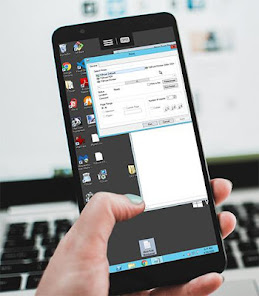
From now on, you can enjoy all the remote desktop printing perks from your Android phone or Chromebook. No ads, no in-app purchases, just a regular TSPrint client application.
Please note that this application isn't a standalone remote desktop application. It requires the TSPrint Server part installed on the remote desktop server to work. More information can be found here: https://www.terminalworks.com/remote-desktop-printing
We have made mobile TSPrint Client extremely easy to use. Three steps are all it takes to set it up:
1. Download
2. Install
3. Run it and keep it open in the background
Just make sure to enable folder redirection in the (mobile) remote desktop client of your choice. However, as there are many remote desktop clients on the Google Playstore, we would recommend using Microsoft Remote Desktop client as it's widely used, and we can guarantee TSPrint will work great alongside it.
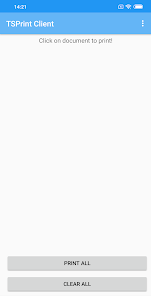
Once the print is initiated on the server, the notification will arrive on your mobile phone, where you can open up the TSPrint Client and select all the print jobs you wish to send to your local printer. You can choose between selecting all the print jobs at once and printing them, or you can print one by one by your choice.
To get more familiar with all the TSPrint features, make sure to check out our knowledgebase section or contact our support department directly at support@terminalworks.com
Our agents will be happy to answer all of the questions you might have.
Please note that this application isn't a standalone remote desktop application. It requires the TSPrint Server part installed on the remote desktop server to work. More information can be found here: https://www.terminalworks.com/remote-desktop-printing
We have made mobile TSPrint Client extremely easy to use. Three steps are all it takes to set it up:
1. Download
2. Install
3. Run it and keep it open in the background
Just make sure to enable folder redirection in the (mobile) remote desktop client of your choice. However, as there are many remote desktop clients on the Google Playstore, we would recommend using Microsoft Remote Desktop client as it's widely used, and we can guarantee TSPrint will work great alongside it.
Once the print is initiated on the server, the notification will arrive on your mobile phone, where you can open up the TSPrint Client and select all the print jobs you wish to send to your local printer. You can choose between selecting all the print jobs at once and printing them, or you can print one by one by your choice.
To get more familiar with all the TSPrint features, make sure to check out our knowledgebase section or contact our support department directly at support@terminalworks.com
Our agents will be happy to answer all of the questions you might have.
Date de mise à jour
La sécurité, c'est d'abord comprendre comment les développeurs collectent et partagent vos données. Les pratiques concernant leur confidentialité et leur protection peuvent varier selon votre utilisation, votre région et votre âge. Le développeur a fourni ces informations et peut les modifier ultérieurement.

Aucune donnée partagée avec des tiers
En savoir plus sur la manière dont les développeurs déclarent le partage

Aucune donnée collectée
En savoir plus sur la manière dont les développeurs déclarent la collecte
Nouveautés
Minor update.
Assistance de l'appli
phone
Numéro de téléphone
+14075670096
À propos du développeur
TERMINALNI POSLOVI d. o. o.
support@terminalworks.com
Skrljevo 206a
51223, Skrljevo
Croatia
+1 407-567-0096


