

Uinta Mapping Software

4,3star
13 ta sharh
1 ming+
Yuklanmalar

Hamma uchun
info

Bu ilova haqida
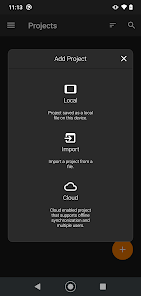
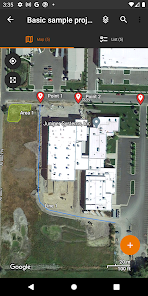
Uinta is a customizable and hassle-free mapping and data collection software. Tired of complex and expensive GIS mapping software with limited abilities to customize for your job? We were too. Train new users in minutes with Uinta.
Top Features
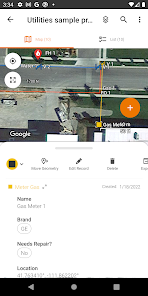
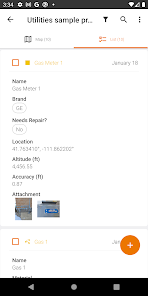
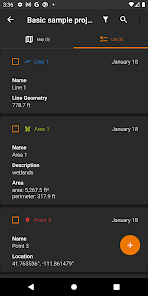
• Efficient Data Capture - Replace paper forms with efficient electronic data entry forms, for use with or without maps
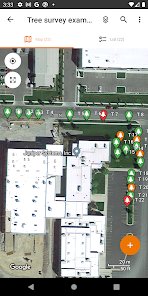
• Professional Mapping - Quickly map points, lines, and areas. High-accuracy mapping supported
• Customizable - Create custom project templates so field-collected data reflects your job(s)
• User-friendly - Simple interface allows users to be trained and collecting data in minutes
• Sharable - Export data to a file, print professional PDF map reports, and create optional cloud projects
• Free & Live Support - Get a jump start on your project with help from Juniper Systems' in-house customer success team
Project templates in Uinta can easily be created to meet data collection needs across various industries and job types. From utility mapping, asset management, or irrigation to more niche applications such as utility pole mapping, Uinta can be tailored to meet your needs.
Top Features
• Efficient Data Capture - Replace paper forms with efficient electronic data entry forms, for use with or without maps
• Professional Mapping - Quickly map points, lines, and areas. High-accuracy mapping supported
• Customizable - Create custom project templates so field-collected data reflects your job(s)
• User-friendly - Simple interface allows users to be trained and collecting data in minutes
• Sharable - Export data to a file, print professional PDF map reports, and create optional cloud projects
• Free & Live Support - Get a jump start on your project with help from Juniper Systems' in-house customer success team
Project templates in Uinta can easily be created to meet data collection needs across various industries and job types. From utility mapping, asset management, or irrigation to more niche applications such as utility pole mapping, Uinta can be tailored to meet your needs.
Oxirgi yangilanish
Xavfsizlik — dastur ishlab chiquvchilar maʼlumotlaringizni qanday jamlashi va ulashishini tushunishdan boshlanadi. Maʼlumotlar maxfiyligi va xavfsizlik amaliyotlari ilovadan foydalanish, hudud va yoshga qarab farq qilishi mumkin. Bu axborot dastur ishlab chiquvchi tomonidan taqdim etilgan va keyinchalik yangilanishi mumkin.

Tashqi hamkorlarga hech qanday axborot ulashilmagan
Dastur ishlab chiquvchilar axborot ulashilishini qanday aytishi haqida batafsil

Ushbu ilova quyidagi axborot turlarini toʻplashi mumkin
Joylashuv, Men haqimda va yana 4 ta

Maʼlumotlar uzatish vaqtida shifrlanadi

Maʼlumotlarni oʻchirishni soʻrashingiz mumkin
Reytinglar va sharhlar
4,2
12 ta sharh
Nima yangiliklar
-Choose your cloud sync preference (manual, active project, or background) on first login, or change it anytime in Settings.
-Export project data to CSV with optional PNEZD or PENZD formatting.
-In Map View, use Multi Select or Area Select to quickly select, delete, or export records (enable in Settings > Preferences).
-New Zoom to Layer button for instantly zooming to the reference layer being edited.
-Added a status bar indicator to show when records need cloud sync.
-Export project data to CSV with optional PNEZD or PENZD formatting.
-In Map View, use Multi Select or Area Select to quickly select, delete, or export records (enable in Settings > Preferences).
-New Zoom to Layer button for instantly zooming to the reference layer being edited.
-Added a status bar indicator to show when records need cloud sync.
Ilova yuzasidan yordam
phone
Telefon raqami
+14357531881
Dasturchi haqida
Juniper Systems, Inc.
techsupport@junipersys.com
1132 W 1700 N
Logan, UT 84321
United States
+1 435-753-1881


