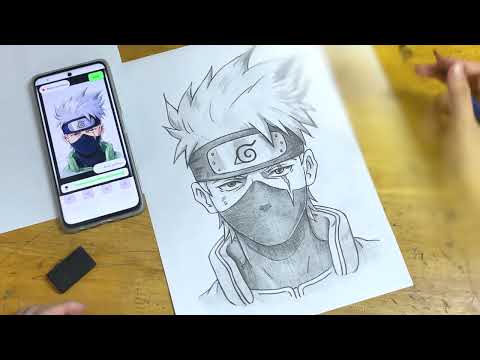

AR Sketch: Learn How to Draw
Contains adsIn-app purchases

star
4.15K reviews

Everyone
info
1M+
Downloads

Everyone
Learn more


About this app
AR Sketch: Learn How to Draw - Trace Any Image On Paper With AR
Turn your phone into an AR Sketch guide and learn to draw the smart way. Whether you’re taking your first steps or leveling up your skills, this app helps you sketch, trace, and practice confidently—right on real paper.
How It Works
1) Pick from 250+ AR templates, import a photo, or search the web for a reference.
2) Place your phone so the camera is parallel to your paper (on a stack of books or a stand).
3) Align the overlay with your page and trace the outlines
4) Save your artwork to My Collection or share to your friends and.
Key Features
1) AR Sketch: Sketch or Trace with 250+ Templates
Practice fundamentals with a growing library of animals, objects, characters, and shapes designed for tracing and study.
2) Import Photo From Device
Turn your own pictures into traceable references - perfect for portraits, pets, and everyday scenes.
3) Step-By-Step Lessons
Learn core techniques (proportions, contour, light & shadow) with guided, bite-size steps for beginners and improvers.
4) Search The Internet For Templates
Built-in search to quickly find new references and expand your practice catalog.
5) My Collection
Autosave your results, revisit earlier drawings, and see how your skills improve over time.
Why Artists Love It?
- Draw on real paper while getting digital guidance from AR.
- Practice consistently with structured lessons and ready-to-trace templates.
- Bring your own ideas to life by importing photos or searching fresh references in seconds.
Start your AR Sketch journey today! Trace, learn, and create on paper with confidence.
Turn your phone into an AR Sketch guide and learn to draw the smart way. Whether you’re taking your first steps or leveling up your skills, this app helps you sketch, trace, and practice confidently—right on real paper.
How It Works
1) Pick from 250+ AR templates, import a photo, or search the web for a reference.
2) Place your phone so the camera is parallel to your paper (on a stack of books or a stand).
3) Align the overlay with your page and trace the outlines
4) Save your artwork to My Collection or share to your friends and.
Key Features
1) AR Sketch: Sketch or Trace with 250+ Templates
Practice fundamentals with a growing library of animals, objects, characters, and shapes designed for tracing and study.
2) Import Photo From Device
Turn your own pictures into traceable references - perfect for portraits, pets, and everyday scenes.
3) Step-By-Step Lessons
Learn core techniques (proportions, contour, light & shadow) with guided, bite-size steps for beginners and improvers.
4) Search The Internet For Templates
Built-in search to quickly find new references and expand your practice catalog.
5) My Collection
Autosave your results, revisit earlier drawings, and see how your skills improve over time.
Why Artists Love It?
- Draw on real paper while getting digital guidance from AR.
- Practice consistently with structured lessons and ready-to-trace templates.
- Bring your own ideas to life by importing photos or searching fresh references in seconds.
Start your AR Sketch journey today! Trace, learn, and create on paper with confidence.
Draw with AR on paper: trace any image or follow step-by-step lessons
Updated on
Safety starts with understanding how developers collect and share your data. Data privacy and security practices may vary based on your use, region, and age. The developer provided this information and may update it over time.


Ratings and reviews
3.97K reviews

Aditya Pandey
- Flag inappropriate
August 21, 2026
you can draw anything you want you can draw so many animals anime character when I was drawing it was very comfortable and also no errors no problem at all my drawing was very beautiful tv
13 people found this review helpful

Merind Lakshana
- Flag inappropriate
- Show review history
July 14, 2026
it's ok for me I draw a many pictures it like it my best improve in draw super, beautiful and lovely in experience to work in draw a school project and persentesun it like this a school in many friends and parents
17 people found this review helpful

Chinmayee's Vlog
- Flag inappropriate
August 1, 2026
when I am using sketch of trace the the ads will pop up which is very hard to control because middle of drawing it is very hard to reset ,
7 people found this review helpful
Everyone
Learn moreApp support
About the developer
XGROWTH JOINT STOCK COMPANY
apps@monkeyenglish.net
Five Star Garden Project, 2 Kim Giang,
G5 Building, Floor 3,
Hà Nội
Vietnam
+84 878 532 644


