
PaperColor
In-app purchases

star
219K reviews

Everyone
info
50M+
Downloads

Everyone
Learn more


About this app
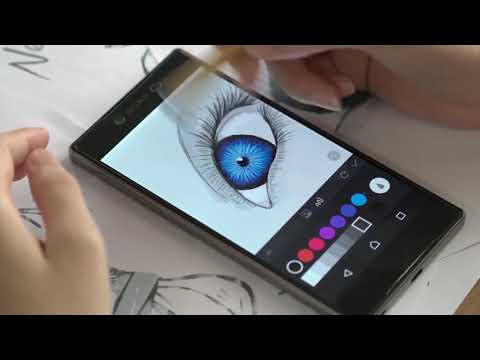
PaperColor is an excellent painting application which is imitating the paintbrush to draw and doodle, graffiti. Easy to paint, learning to paint!
We have different styles paintbrush and colour library. Help you to creating the perfect artworks.
Whether you on journey, stay alone, In the party or just want to waste time in the airplane,It is the best application that you can draw on your phone or tablet.
Exquisite drawing tools!
★Handwriting signature with pen after you have finished the works
★There’s many tools which is imitating the paintbrush , ruler and eraser for you.
★Mark in your photo.
★Draw on picture.
Enjoy the painting time!
An painting application which is easy to help you to show yourself.
Base map help you to learn drawing in straight way.
Choose a photo as the base map and setting to translucent .
Dexterous scaling under your fingertip.
Enjoy the drawing experience, and use the tools to coloring it !
Finished the artwork and share it to internet, showing it !
We have different styles paintbrush and colour library. Help you to creating the perfect artworks.
Whether you on journey, stay alone, In the party or just want to waste time in the airplane,It is the best application that you can draw on your phone or tablet.
Exquisite drawing tools!
★Handwriting signature with pen after you have finished the works
★There’s many tools which is imitating the paintbrush , ruler and eraser for you.
★Mark in your photo.
★Draw on picture.
Enjoy the painting time!
An painting application which is easy to help you to show yourself.
Base map help you to learn drawing in straight way.
Choose a photo as the base map and setting to translucent .
Dexterous scaling under your fingertip.
Enjoy the drawing experience, and use the tools to coloring it !
Finished the artwork and share it to internet, showing it !
Sketchbook imitating the brush, simple to painting
Updated on
Safety starts with understanding how developers collect and share your data. Data privacy and security practices may vary based on your use, region, and age. The developer provided this information and may update it over time.
- No data shared with third partiesLearn more about how developers declare sharing
- This app may collect these data typesLocation and Device or other IDs
- Data isn’t encrypted
- Data can’t be deleted


Ratings and reviews
168K reviews

Ivy g
- Flag inappropriate
October 27, 2022
Easy to learn, pretty good function. This app is not powerful enough to do super sophisticated fine art. It's good for basic sketching, coloring book pages, tracing over photos, and simple drawing. I use it for tracing over photos to create cartoon-like drawings. It's very easy to learn. Not too many tools. The pro version adds layers, a color wheel, and a few more brushes. For the price, it's a good value.
1,316 people found this review helpful

Kessy Vann
- Flag inappropriate
June 8, 2024
I absolutely love this app! I get very few ads. most of the ads I get are when I am have paused a drawing ( left uncompleted). My wich is impressive to me because I am usually drawing for 45 or more minutes before pausing the drawing. it also lets you save uncompleted drawings and continue them later. another plus on this app is it comes with several drawing tools and if those tools aren't enough you can watch ads to get more.
695 people found this review helpful

A Google user
- Flag inappropriate
- Show review history
December 3, 2018
Decent. The app itself works pretty well but the tools in it are pretty sloppy. All of them leave smudges and there is no blending tool. Shading and highlights look really bad, and I must say, overall I regret spending money for the full version. If you just want to doodle on your phone, it's a great app, but I definitely wouldn't recommend for professional art.
669 people found this review helpful
What’s new
Update: Enhanced painting experience! Thank you for your support! This update focuses on improving the performance of the canvas for a smoother creative process!
Highlights:
🚀 Optimized layer limit! Reduce memory pressure, making creation easier and avoiding overflow issues.
🎨 Performance optimization for smoother drawing! Enhance painting performance, ensuring every stroke is effortless.
Update now and enjoy a delightful creative experience! 🌈✨
Highlights:
🚀 Optimized layer limit! Reduce memory pressure, making creation easier and avoiding overflow issues.
🎨 Performance optimization for smoother drawing! Enhance painting performance, ensuring every stroke is effortless.
Update now and enjoy a delightful creative experience! 🌈✨
Everyone
Learn moreApp support
About the developer
EYEWIND LIMITED
eyewind.cc@hotmail.com
Rm 18 8/F PETER LEUNG INDL BLDG
103 WAI YIP ST
觀塘
九龍
Hong Kong
+852 6995 5690


