

Adobe Firefly AI Image & Video
In-app purchases

4.6star
13.1K reviews
1M+
Downloads

Everyone
info




About this app
Adobe Firefly is the AI video, image & audio generator designed for professionals, content creators, and innovators. From AI-generated video to image and sound effects, Firefly gives you the speed and flexibility to create on your terms, with the confidence of commercially safe AI models trained on licensed content. In addition, new AI partner models ensure you have the right model to choose for any task.
You lead the creative process, and Firefly helps you shape original content that reflects your style, your vision, your voice. Whether you’re a professional designer or a first-time creator, you can use Firefly for anything from fast concepts to advanced generative AI creations.
AI Text to Image generation and editing:
▶ AI image generator: create high-resolution, commercially safe images from a simple text prompt.
▶ Image editing tools: add new content, replace the background, or even remove unwanted elements with Generative fill.
AI video generation and editing
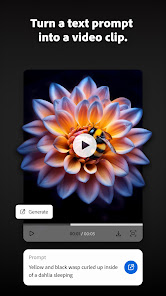
▶ Text to video: turn a text prompt into a video clip right from your phone. Choose from a range of resolutions and aspect ratios to meet your creative needs.
▶ Extend video & animation: add seamless motion and cinematic transitions when you edit and create videos.
▶ Image to video animates your own still images with dynamic motion and edits.
▶ AI video editing: remove distractions, enhance colors, and adjust details in seconds. You can even upload a video as reference to guide your composition.
Firefly isn’t just an AI video or image generator. It’s an end-to-end content creation AI tool on your phone.
▶ Advanced AI tool for video editors, image editors, designers, and content creators to move from idea to execution faster.
▶ Generate studio-quality content – AI video, image & audio generation – in seconds.
▶ Designed for digital artists, filmmakers, and AI creators, with an intuitive experience that lets you learn as you go.
▶ Firefly uses AI models trained on licensed content, giving creators confidence in every asset.
▶ Create projects on your phone and keep them going on web: Firefly creations automatically sync with your Creative Cloud account.
▶ Choose from the industry's top AI partner models, all in one place.
▶ Mobile-first creators: AI video and image generator tools for fast, on-the-go content creation.
▶ Digital artists, photo editors and designers: experiment with AI image generated visuals and enhanced workflows.
▶ Video editors and filmmakers: AI video generation, motion effects, and seamless video editing.
▶ Social media creators and marketers: create scroll-stopping videos, eye-catching images, and dynamic content.
Join the next generation of video creators, photo editors, designers, and digital artists using Firefly mobile to create studio-quality content with next-gen AI tools that are fast, intuitive, and commercially safe.
Terms & Conditions:
Your use of this application is governed by the Adobe General Terms of Use http://www.adobe.com/go/terms_en and the Adobe Privacy Policy http://www.adobe.com/go/privacy_policy_en
Do not sell or share my personal information www.adobe.com/go/ca-rights
You lead the creative process, and Firefly helps you shape original content that reflects your style, your vision, your voice. Whether you’re a professional designer or a first-time creator, you can use Firefly for anything from fast concepts to advanced generative AI creations.
What can you create with Firefly?
AI Text to Image generation and editing:
▶ AI image generator: create high-resolution, commercially safe images from a simple text prompt.
▶ Image editing tools: add new content, replace the background, or even remove unwanted elements with Generative fill.
AI video generation and editing
▶ Text to video: turn a text prompt into a video clip right from your phone. Choose from a range of resolutions and aspect ratios to meet your creative needs.
▶ Extend video & animation: add seamless motion and cinematic transitions when you edit and create videos.
▶ Image to video animates your own still images with dynamic motion and edits.
▶ AI video editing: remove distractions, enhance colors, and adjust details in seconds. You can even upload a video as reference to guide your composition.
Firefly isn’t just an AI video or image generator. It’s an end-to-end content creation AI tool on your phone.
Why Firefly?
▶ Advanced AI tool for video editors, image editors, designers, and content creators to move from idea to execution faster.
▶ Generate studio-quality content – AI video, image & audio generation – in seconds.
▶ Designed for digital artists, filmmakers, and AI creators, with an intuitive experience that lets you learn as you go.
▶ Firefly uses AI models trained on licensed content, giving creators confidence in every asset.
▶ Create projects on your phone and keep them going on web: Firefly creations automatically sync with your Creative Cloud account.
▶ Choose from the industry's top AI partner models, all in one place.
Who is Adobe Firefly for?
▶ Mobile-first creators: AI video and image generator tools for fast, on-the-go content creation.
▶ Digital artists, photo editors and designers: experiment with AI image generated visuals and enhanced workflows.
▶ Video editors and filmmakers: AI video generation, motion effects, and seamless video editing.
▶ Social media creators and marketers: create scroll-stopping videos, eye-catching images, and dynamic content.
Join the next generation of video creators, photo editors, designers, and digital artists using Firefly mobile to create studio-quality content with next-gen AI tools that are fast, intuitive, and commercially safe.
Terms & Conditions:
Your use of this application is governed by the Adobe General Terms of Use http://www.adobe.com/go/terms_en and the Adobe Privacy Policy http://www.adobe.com/go/privacy_policy_en
Do not sell or share my personal information www.adobe.com/go/ca-rights
Updated on
Safety starts with understanding how developers collect and share your data. Data privacy and security practices may vary based on your use, region, and age. The developer provided this information and may update it over time.


Ratings and reviews
4.6
13K reviews

Emily Kramer
- Flag inappropriate
- Show review history
July 5, 2025
Generation is extremely costly - for low res (and many times poor-resulting) images/video that you don't get second chances on it you don't like it. . The system ignores specific requests like "cinematic" or "realistic" and there are more cartoon-y results. Freezes while scrolling, back button doesn't work, and it often forces a restart to unfreeze. Frustrating.
1,212 people found this review helpful
Adobe
July 7, 2025
Hi Emily! This sounds really disappointing, and we totally get how that can affect your creative flow. While we work on improving results and performance, please share the details with a screenshot and screen recording with our community experts here: https://adobe.ly/fireflycommunity. We would like to investigate this for you. ^Sam

Tim Labor
- Flag inappropriate
July 18, 2025
Usually a trial is enough to get you at least *one* good image to hook you. I wasn't even half there in revising my very first prompt before software wanted $. Extremely disappointing. I'll check in about 3 months to see if they're still hiding, but in the meantime I'll be looking for an alternative. Unexpected misfire from the marketing division of a major company.
44 people found this review helpful
Adobe
July 18, 2025
Hey Tim! We hear you, and we're really sorry it felt like a letdown. If you decide to give it another shot, this guide might help you get the most out of your prompts: https://adobe.ly/textpromptsguide. Hope to see you back soon. Thanks^ Sam

David Schlabach
- Flag inappropriate
October 27, 2025
I think it's a little clunky to use at first. And honestly, the quality of video was significantly lower than Grok's. The animations looked plastic and very much like it came from a 1990s 3D modeling software. In addition, it rejected using many of my own images, all of which were either taken with my camera or created by me on a computer.
6 people found this review helpful
What’s new
This update helps Adobe Firefly stay in step with your creativity, no matter what you're making.
- Powerful AI tools now deliver results with more speed and precision.
- Interface tweaks make navigating and creating easier.
- Stabililty upgrades give you reliable AI tools you can count on.
- Background improvements and bug fixes help your artistic process stay frustration-free.
Every update is created to keep pace with your ideas.
- Powerful AI tools now deliver results with more speed and precision.
- Interface tweaks make navigating and creating easier.
- Stabililty upgrades give you reliable AI tools you can count on.
- Background improvements and bug fixes help your artistic process stay frustration-free.
Every update is created to keep pace with your ideas.
App support
About the developer
Adobe Inc.
google-app-notifs@adobe.com
345 Park Ave
San Jose, CA 95110
United States
+1 408-536-6000


