Screen Lock - Time Password
Contains adsIn-app purchases
4.4star
151K reviews
10M+
Downloads

Everyone
info



About this app
Are you worried about exposing your PIN while you unlock your phone?
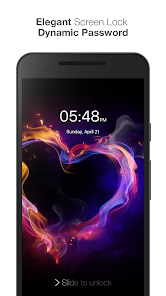
★ Screen lock Here comes Screen Lock - Time Password (Dynamic Password) for the rescue.You can make your phone current time its lock screen password.And time changes every minute, so does the password too, so no one can even guess it.
★ Vault (Hide/protect photos & videos): Keep your secret photos and videos in a safe place.
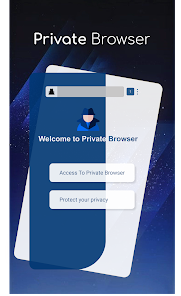
★ Private Browser: With Private browser, your internet surf will leave no traces behind.
NEW FEATURES
★ Cool iPhone style lock screen for your android.
★ Support on most of android phone.
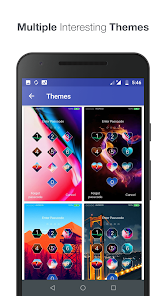
★ Fully customisable lock screen.
★ Highly secure lock screen.
★ One of the best parallax effect Lock.
★ Customise sliding text. You can put your name or your friend's name on your lock screen.
Features
✔ Customise wallpaper for lock screen
You can apply HD Screen wallpaper or choose from Gallery.
✔ Unlock sound enable/disable.
✔ Unlock vibration enable/disable.
✔ 12 hour and 24 hour format both supported.
✔ Consume less memory and battery, Simple and Clean device.
✔ 100% safe and secure Screen Lock- Time Password
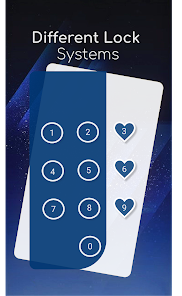
✔ Choose your own lock type
You can choose your own way to lock your android phone(Passcode change dynamically).
► Current Time : It is default password of your lock screen. e.g. If the time is 01:47, your PIN will be 0147.
► Pin Passcode - User can choose any password.
► Pin + Minute Passcode - e.g. if you choose digit is 12 and the time is 01:45 your PIN will be 1245.
► Pin + Current Time Passcode - e.g. if your choose digit is 45 and the time is 02:37 your PIN will be 450237.
► Pin + Day Passcode - e.g. if your choose digit is 45 and the date is 4 July 2017 your PIN will be 450407.
► Pin + Hour Passcode - e.g. if you choose digit is 12 and the time is 01:45 your PIN will be 4501.
---FAQ---
★How to open hidden Screen Lock - Time Password?
1. Go to app info page (Settings > Applications >Screen Lock > Storage) and tap to Manage space/Clear storage button.
★ How to lock Xiaomi / MI phones?
►Xiaomi / MI phones have different permission management style. To use Screen Lock - Time Password on Xiaomi / MI phones, please follow the following steps.
1. Open Security App -> permissions.
Choose option permissions -> Screen Lock - Time Password -> Allow all the permissions.
2. Go back to Permissions -> Auto Start -> Allow Screen Lock - Time Password to Auto Start.
★ Explanation for the permissions:
android.permission.INTERNET
android.permission.READ_PHONE_STATE
android.premission.ACCESS_NETWORK_STATE
AD company need read phone state and network state to display and improve there AD quality.
android.permission.SYSTEM_ALERT_WINDOW : to lock screen
android.permission.RECEIVE_BOOT_COMPLETED : To lock device as soon as it restarts
android.permission.CAMERA : Image capture for lock screen wallpaper
android.permission.READ_EXTERNAL_STORAGE : For change lock screen wallpaper
android.permission.PROCESS_OUTGOING_CALLS : For open lock screen
★ IMPORTANT: Do not uninstall this app before restoring your personal files otherwise it will be lost forever.
Screen Lock - Time Password will not collect your any information.
★ Screen lock Here comes Screen Lock - Time Password (Dynamic Password) for the rescue.You can make your phone current time its lock screen password.And time changes every minute, so does the password too, so no one can even guess it.
★ Vault (Hide/protect photos & videos): Keep your secret photos and videos in a safe place.
★ Private Browser: With Private browser, your internet surf will leave no traces behind.
NEW FEATURES
★ Cool iPhone style lock screen for your android.
★ Support on most of android phone.
★ Fully customisable lock screen.
★ Highly secure lock screen.
★ One of the best parallax effect Lock.
★ Customise sliding text. You can put your name or your friend's name on your lock screen.
Features
✔ Customise wallpaper for lock screen
You can apply HD Screen wallpaper or choose from Gallery.
✔ Unlock sound enable/disable.
✔ Unlock vibration enable/disable.
✔ 12 hour and 24 hour format both supported.
✔ Consume less memory and battery, Simple and Clean device.
✔ 100% safe and secure Screen Lock- Time Password
✔ Choose your own lock type
You can choose your own way to lock your android phone(Passcode change dynamically).
► Current Time : It is default password of your lock screen. e.g. If the time is 01:47, your PIN will be 0147.
► Pin Passcode - User can choose any password.
► Pin + Minute Passcode - e.g. if you choose digit is 12 and the time is 01:45 your PIN will be 1245.
► Pin + Current Time Passcode - e.g. if your choose digit is 45 and the time is 02:37 your PIN will be 450237.
► Pin + Day Passcode - e.g. if your choose digit is 45 and the date is 4 July 2017 your PIN will be 450407.
► Pin + Hour Passcode - e.g. if you choose digit is 12 and the time is 01:45 your PIN will be 4501.
---FAQ---
★How to open hidden Screen Lock - Time Password?
1. Go to app info page (Settings > Applications >Screen Lock > Storage) and tap to Manage space/Clear storage button.
★ How to lock Xiaomi / MI phones?
►Xiaomi / MI phones have different permission management style. To use Screen Lock - Time Password on Xiaomi / MI phones, please follow the following steps.
1. Open Security App -> permissions.
Choose option permissions -> Screen Lock - Time Password -> Allow all the permissions.
2. Go back to Permissions -> Auto Start -> Allow Screen Lock - Time Password to Auto Start.
★ Explanation for the permissions:
android.permission.INTERNET
android.permission.READ_PHONE_STATE
android.premission.ACCESS_NETWORK_STATE
AD company need read phone state and network state to display and improve there AD quality.
android.permission.SYSTEM_ALERT_WINDOW : to lock screen
android.permission.RECEIVE_BOOT_COMPLETED : To lock device as soon as it restarts
android.permission.CAMERA : Image capture for lock screen wallpaper
android.permission.READ_EXTERNAL_STORAGE : For change lock screen wallpaper
android.permission.PROCESS_OUTGOING_CALLS : For open lock screen
★ IMPORTANT: Do not uninstall this app before restoring your personal files otherwise it will be lost forever.
Screen Lock - Time Password will not collect your any information.
Updated on
Safety starts with understanding how developers collect and share your data. Data privacy and security practices may vary based on your use, region, and age. The developer provided this information and may update it over time.

No data shared with third parties
Learn more about how developers declare sharing

This app may collect these data types
App activity, App info and performance, and Device or other IDs

Data is encrypted in transit

Data can’t be deleted
Ratings and reviews
4.4
148K reviews

A Google user
- Flag inappropriate
- Show review history
February 24, 2019
I am concerned about this app. I mean it worked and everything but it asked for insane permissions like taking pictures, making calls, and accessing my files. also, every time I opened my phone it made a picture taking sound but didn't actually take one. Also on the lock screen it changed the look of it and put verizon wireless at the top even though I use tracphone. like many others said, the lock screen doesn't actually work half of the time. the theme doesn't change i may delete
249 people found this review helpful
A Google user
- Flag inappropriate
- Show review history
March 30, 2020
I really like the app. It's very efficient and runs perfectly. My only problem and the biggest one is that pop up ads keep appearing on my home screen every few minutes which is very annoying. For that reason, I'm giving it the worst rating. Don't download this app unless you want to see pop up ads on your home screen every five seconds. Thumbs down👎
927 people found this review helpful

Hameed Olami
- Flag inappropriate
- Show review history
April 15, 2024
It's just amazing like I can't find a way to bypass the app, I restarted my phone and after a minute or two it popped up right on top of my screen like it was meant to be there.
30 people found this review helpful
What's new
- Remove ads option enabled
- Added password recovery
- Minor bug fixed.
- Performance improvement.
- If you like application, Please appreciate our developer work with 5 star rating.
- Added password recovery
- Minor bug fixed.
- Performance improvement.
- If you like application, Please appreciate our developer work with 5 star rating.


