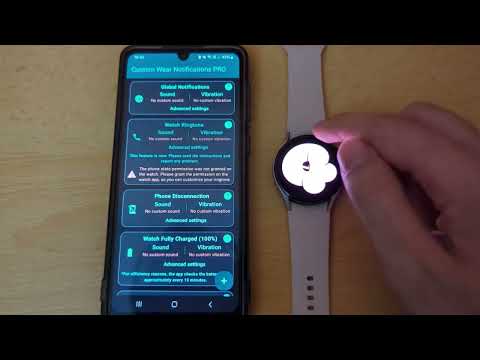

Custom Wear Notifications
Contains adsIn-app purchases

star
182 reviews

Everyone
info
10K+
Downloads

Everyone
Learn more


About this app
Take control of your Wear OS notifications and know exactly what's happening on your phone, right from your wrist. Custom Wear Notifications lets you personalize how your smartwatch alerts you, turning generic vibrations into instantly recognizable signals.
Stop missing important alerts or constantly checking your phone! With Custom Wear Notifications, you can set unique sounds and vibration patterns for different apps, or keywords in your notifications.
✨ Key Features:
🔔 Instant Recognition: Assign unique sounds and vibrations to any phone app notification. Know if it's a work email, a family message, or a social media alert without even looking!
📞 Custom Ringtone: Set a distinct ringtone for incoming calls on your watch.
🔑 Keyword Rules: Get special alerts for specific words or names within your notifications (perfect for messaging apps!). You can even use regular expressions (Regex), for more advanced use cases.
🎛️ Total Customization: Create your own unique vibration patterns and use your favorite sound files for the custom notifications.
⏰ Notification Reminders: Gently nudge yourself about unread notifications with custom reminders.
🗣️ Hear Your Alerts: Use Text-to-Speech to have notification content read aloud for specific apps.
🔋 Watch Event Alerts: Get custom alerts for important watch events like low battery, charging status, or phone disconnection.
🤫 Ignore DND: Ensure crucial notifications from selected apps or keywords still alert you, even when your watch is in Do Not Disturb.
🌙 Silent Hours: Configure specific silent hours for different days of the week.
⏸️ Cool-down: Prevent notification spam from chatty apps with customizable cooldown intervals.
⌚ Manage Multiple Watches? No Problem!
If you have more than one Wear OS device connected to your phone, you can customize notification settings for each one individually within the app.
Please install the companion app on your Wear OS watch for Custom Wear Notifications to function correctly and play your custom notifications. The watch app plays the custom sounds and vibrations that you've configured in the phone app and allows you to quickly and conveniently turn the custom notifications On or Off and stay informed about things that are preventing you from hearing the custom notifications (like the notifications volume being muted).
Some of the app's features, such as Text-to-Speech, Keyword Rules, or Custom Ringtone, are available only in the PRO Version of the app.
🔒Permissions Used: Your privacy is important to us. We only request permissions necessary for the app's functionality, such as:
- Notification Access, which allows the app to know when a notification is received, so that it can play your custom notifications.
- Internet access permission, used for showing ads in the free version and showcasing our other apps.
- Phone call state permission, so that the app knows when you're receiving a call, in case you want to customize the ringtone of your watch.
This application is intended only for Wear OS smartwatches.
Have questions or need support? Contact us directly – we're here to help!
Stop missing important alerts or constantly checking your phone! With Custom Wear Notifications, you can set unique sounds and vibration patterns for different apps, or keywords in your notifications.
✨ Key Features:
🔔 Instant Recognition: Assign unique sounds and vibrations to any phone app notification. Know if it's a work email, a family message, or a social media alert without even looking!
📞 Custom Ringtone: Set a distinct ringtone for incoming calls on your watch.
🔑 Keyword Rules: Get special alerts for specific words or names within your notifications (perfect for messaging apps!). You can even use regular expressions (Regex), for more advanced use cases.
🎛️ Total Customization: Create your own unique vibration patterns and use your favorite sound files for the custom notifications.
⏰ Notification Reminders: Gently nudge yourself about unread notifications with custom reminders.
🗣️ Hear Your Alerts: Use Text-to-Speech to have notification content read aloud for specific apps.
🔋 Watch Event Alerts: Get custom alerts for important watch events like low battery, charging status, or phone disconnection.
🤫 Ignore DND: Ensure crucial notifications from selected apps or keywords still alert you, even when your watch is in Do Not Disturb.
🌙 Silent Hours: Configure specific silent hours for different days of the week.
⏸️ Cool-down: Prevent notification spam from chatty apps with customizable cooldown intervals.
⌚ Manage Multiple Watches? No Problem!
If you have more than one Wear OS device connected to your phone, you can customize notification settings for each one individually within the app.
Please install the companion app on your Wear OS watch for Custom Wear Notifications to function correctly and play your custom notifications. The watch app plays the custom sounds and vibrations that you've configured in the phone app and allows you to quickly and conveniently turn the custom notifications On or Off and stay informed about things that are preventing you from hearing the custom notifications (like the notifications volume being muted).
Some of the app's features, such as Text-to-Speech, Keyword Rules, or Custom Ringtone, are available only in the PRO Version of the app.
🔒Permissions Used: Your privacy is important to us. We only request permissions necessary for the app's functionality, such as:
- Notification Access, which allows the app to know when a notification is received, so that it can play your custom notifications.
- Internet access permission, used for showing ads in the free version and showcasing our other apps.
- Phone call state permission, so that the app knows when you're receiving a call, in case you want to customize the ringtone of your watch.
This application is intended only for Wear OS smartwatches.
Have questions or need support? Contact us directly – we're here to help!
Customize your Wear OS watch notifications and ringtone!
Updated on
Safety starts with understanding how developers collect and share your data. Data privacy and security practices may vary based on your use, region, and age. The developer provided this information and may update it over time.
- No data shared with third partiesLearn more about how developers declare sharing
- This app may collect these data typesLocation, App activity and 2 others
- Data is encrypted in transit
- Data can’t be deleted


Ratings and reviews
155 reviews

Brandon Taylor
- Flag inappropriate
- Show review history
May 2, 2026
3 stars alone for how helpful this app is in allowing custom notification sounds. Can't believe Pixel has no option for that stock, even if it's behind a paywall like it used to be 20 years ago. 4 stars for how useful it is. Negative is that it doesn't seem to be consistent every time and the vibration won't always play along with the sound. Still, this app is the best option I've found for this purpose and I bought Premium to support the creator. Hopefully we get QoL updates for this app!
2 people found this review helpful
AndyXSoft
May 2, 2026
Thank you for your kind feedback! On Pixel watches, it is necessary to disable the built-in vibrations by going into watch settings and setting the "Vibration Intensity" slider to 0 for notifications. Hopefully, this will fix the inconsistency issues. If this doesn't solve the problem, you can contact us by email to investigate the problem further.

Ian Gager
- Flag inappropriate
September 7, 2025
My new, and my first wear watch has awful ringtones. This app fixed that problem. It walks you through the process and anything you've missed is highlighted in red. Great job by the dev, well worth the price of a cheap coffee. Cheers!
2 people found this review helpful
AndyXSoft
September 8, 2025
Thank you so much for your kind words! We're glad the app helped improve your watch experience. Have a wonderful day!

Valerie
- Flag inappropriate
April 15, 2026
Followed all the steps but it does not work with Google pixel watch 2 for phone calls. unfortunate because it worked on other apps and it would have been perfect. wasted money on the pro version but still didn't work.
1 person found this review helpful
AndyXSoft
April 15, 2026
Hi! Can you please contact us by email to help you with the issue? Maybe we can find a solution together. We can also offer you a refund.
What’s new
1. You can now use Regular expressions (Regex) for your keyword rules.
2. You can now reorder your rules by long-pressing and dragging them to a new position.
3. Minor UI improvements.
2. You can now reorder your rules by long-pressing and dragging them to a new position.
3. Minor UI improvements.
Everyone
Learn moreApp support
About the developer
ȚOCU ANDREI-COSMIN
support@andyxsoft.com
Str. Egalității Nr. 3
bl. COCOR2, sc.1, et. 3, ap. 8
800029 Galați
Romania


