Proximity Sensor Screen On Off
Contains ads
3.3star
3.12K reviews
1M+
Downloads

Everyone
info
About this app
TUTORIALS
https://youtube.com/playlist?list=PLUskUU-NvGqh9VAfl7NtArAaJsa6-ZRme
TROUBLESHOOTING
https://julietapp.blogspot.com/p/troubleshooting-general.html
TEST THIS APP BEFORE ENABLING THE SERVICE
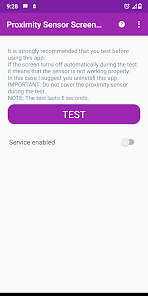
It is strongly recommended that you test before using this app.
Just click on the "TEST" button to start a new test.
If the screen turns off automatically during the test it means that the sensor is not working properly.
In this case I suggest you uninstall this app.
IMPORTANT: Do not cover the proximity sensor during the test.
NOTE: The test lasts 5 seconds.
HOW TO UNINSTALL
https://www.youtube.com/watch?v=WTXDJexF1Xk
Device administration must be disabled before uninstalling.
Just click on the button at the top and select the "Remove active admin" option.
This app allows you to turn the display on or off using the proximity sensor.
Just cover the proximity sensor to turn the display on or off.
NOTE: The proximity sensor usually sits up near the top speaker.
FEATURES AND BENEFITS
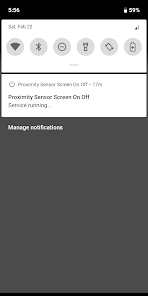
• Persistent service: Background service
Autostart on boot and after update
• No root
• Easy to use
OPTIONS
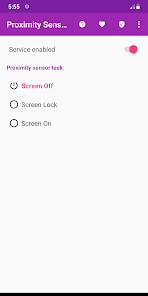
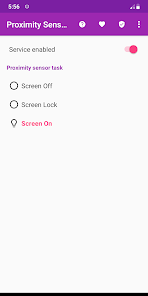
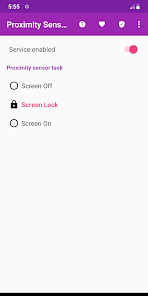
• Screen Off
• Screen Lock
• Screen On
NOTE
This service does not interfere with the proximity sensor during a call
DISCLAIMER
Do not use this app if the sensor is faulty.
I do not take any responsibility for any problems arising from the use of this app.
https://youtube.com/playlist?list=PLUskUU-NvGqh9VAfl7NtArAaJsa6-ZRme
TROUBLESHOOTING
https://julietapp.blogspot.com/p/troubleshooting-general.html
TEST THIS APP BEFORE ENABLING THE SERVICE
It is strongly recommended that you test before using this app.
Just click on the "TEST" button to start a new test.
If the screen turns off automatically during the test it means that the sensor is not working properly.
In this case I suggest you uninstall this app.
IMPORTANT: Do not cover the proximity sensor during the test.
NOTE: The test lasts 5 seconds.
HOW TO UNINSTALL
https://www.youtube.com/watch?v=WTXDJexF1Xk
Device administration must be disabled before uninstalling.
Just click on the button at the top and select the "Remove active admin" option.
This app allows you to turn the display on or off using the proximity sensor.
Just cover the proximity sensor to turn the display on or off.
NOTE: The proximity sensor usually sits up near the top speaker.
FEATURES AND BENEFITS
• Persistent service: Background service
Autostart on boot and after update
• No root
• Easy to use
OPTIONS
• Screen Off
• Screen Lock
• Screen On
NOTE
This service does not interfere with the proximity sensor during a call
DISCLAIMER
Do not use this app if the sensor is faulty.
I do not take any responsibility for any problems arising from the use of this app.
Updated on
Safety starts with understanding how developers collect and share your data. Data privacy and security practices may vary based on your use, region, and age. The developer provided this information and may update it over time.


Ratings and reviews
3.3
3.08K reviews

Pegasus Contract Security
- Flag inappropriate
January 12, 2026
If your sensor is damaged do not use this app. It just took 20 minutes to gain control of my touchscreen by holding the bottom corner and slowly moving my finger. Take a look at the side of your phone in a dark room. If you see the back light shining through, then the sensor is damaged. It was so a $15 fix at the store.
1 person found this review helpful

yuvan m
- Flag inappropriate
January 18, 2026
works... but add this to the notification setting tile or make a home screen button to toggle on the mode

Mavis Pratt
- Flag inappropriate
August 17, 2022
OK when it works! Then all of a sudden it just stops. Once you go back into the app and straight our again, it starts working again. All permissions granted, auto start etc, and battery optimised properly but keeps doing it. This of course means the battery drains much quicker because it's stopped working. If no solution found then it's pointless!
23 people found this review helpful
Argon Dev
August 17, 2022
Thank you for your feedback.
To solve this problem you may find this link useful:
https://julietapp.blogspot.com/p/troubleshooting-general.html
What’s new
General improvements
App support
About the developer
Arcangelo Muschitiello
argonhelp@gmail.com
Italy


