
ABC (Home Launcher)
4.1star
2.09K reviews
500K+
Downloads

Everyone
info


About this app
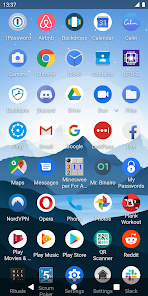
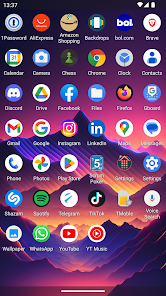
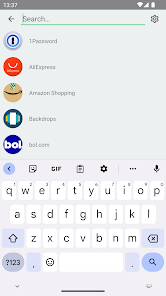
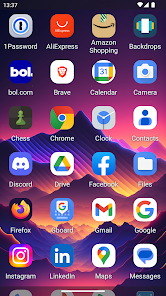
Discover a fast, customizable, and ad-free Android Home Launcher designed to put your apps at your fingertips. ABC (Home Launcher) is all about simplicity and efficiency, providing you with a lightning-fast app drawer to easily access and manage your Android applications.
Key Features:
- Quick vertical scrolling for effortless app navigation
- Swipe horizontally for a seamless paging experience
- Instant access to your favorite apps for speedy launches
- Sort apps alphabetically, by install time, or last update time
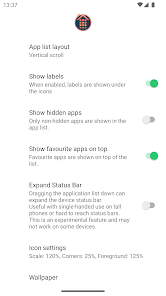
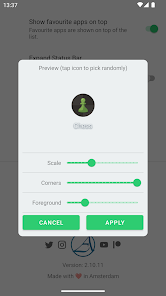
- Customize icon scale and corners for a personalized look
- Enjoy smooth app animations when opening and closing
- Translucent status bar for a sleek and modern feel
- Long-press on an app for easy access to features like:
- Marking/unmarking as a favorite
- App info and details
- Direct link to the Google Play Store
- Hide apps without uninstalling for a cleaner interface
- Uninstall apps effortlessly
- Right-to-Left support for enhanced accessibility
- Accessibility Text-to-Speech Support: Enable accessibility text-to-speech feature to have app titles read out loud, ensuring an inclusive experience, providing enhanced accessibility for users with visual impairments.
- Wide Device Compatibility: Install and use the app on various handheld devices, including gaming devices, for a versatile experience.
- Multi-Input Support: Seamlessly interact with the app using different input methods, such as mouse, keyboard, and game controllers, offering flexible and comfortable navigation options.
- Regular updates introducing new features and improvements
Discover the joy of a clutter-free Android experience with ABC (Home Launcher). Say goodbye to complex interfaces and enjoy the simplicity and speed of having all your apps neatly organized in an alphabetical grid. Download now and make the most of your Android device!
We value your feedback and suggestions. Please feel free to reach out and share your thoughts with us.
Key Features:
- Quick vertical scrolling for effortless app navigation
- Swipe horizontally for a seamless paging experience
- Instant access to your favorite apps for speedy launches
- Sort apps alphabetically, by install time, or last update time
- Customize icon scale and corners for a personalized look
- Enjoy smooth app animations when opening and closing
- Translucent status bar for a sleek and modern feel
- Long-press on an app for easy access to features like:
- Marking/unmarking as a favorite
- App info and details
- Direct link to the Google Play Store
- Hide apps without uninstalling for a cleaner interface
- Uninstall apps effortlessly
- Right-to-Left support for enhanced accessibility
- Accessibility Text-to-Speech Support: Enable accessibility text-to-speech feature to have app titles read out loud, ensuring an inclusive experience, providing enhanced accessibility for users with visual impairments.
- Wide Device Compatibility: Install and use the app on various handheld devices, including gaming devices, for a versatile experience.
- Multi-Input Support: Seamlessly interact with the app using different input methods, such as mouse, keyboard, and game controllers, offering flexible and comfortable navigation options.
- Regular updates introducing new features and improvements
Discover the joy of a clutter-free Android experience with ABC (Home Launcher). Say goodbye to complex interfaces and enjoy the simplicity and speed of having all your apps neatly organized in an alphabetical grid. Download now and make the most of your Android device!
We value your feedback and suggestions. Please feel free to reach out and share your thoughts with us.
Updated on
Safety starts with understanding how developers collect and share your data. Data privacy and security practices may vary based on your use, region, and age. The developer provided this information and may update it over time.

This app may share these data types with third parties
App activity, App info and performance, and Device or other IDs

No data collected
Learn more about how developers declare collection

Data is encrypted in transit
Ratings and reviews
4.2
2.03K reviews

User5001B
- Flag inappropriate
June 5, 2023
Works like a charm. Gotta luv that horizontal screen scroll. One of the best out of many that I have tried. It's clean, simple and very lite weight. And there lies the small, personal preference of it being too simple. I seek more customization possibilities. Maybe, if it came with a few wallpapers, too? Oh! Just remembered (bumping it to 5 * 's), it's not intrusive or annoyingly littered with ads! 'Nuff said.
241 people found this review helpful

Simone Preston
- Flag inappropriate
December 8, 2024
Pointless launcher with no intuitiveness or helpfulness. A home screen with large icons and writing, default app logos and sorted in alphabetical order for easy browsing, but it doesn't look good, it isn't styled well, personalised or thought out at all. Removing apps is easy and effortless compared to others and there's no ads, compared to other launchers that are excessive with the amount of ads, but I'd rather deal with ads than an ugly phone. Uninstalling this. Next.
5 people found this review helpful

Muhammed Ashik UK
- Flag inappropriate
June 25, 2022
i loved the launcher. it is absolutely minimal. but when i arrange apps and then home screen shows only some apps. it not showing whole apps list. i think it is hidden. but when it is checked, it not hidden. a bug occurred. so i turn back to default launcher. i tried many ways. but failed to solve this issue. app drawer / home screen only shows 20 apps if there is 60 apps in phone. i can't find the other apps when this launcher is set as default.
140 people found this review helpful
What’s new
- Performance Boost: Enjoy faster app launches and seamless navigation.
- Sort Settings: Customize app organization with sorting options.
- Favorite Placement: Choose where your favorite apps appear in the list.
- Enhanced Favorite Indicators: Quickly identify your most-loved apps.
- Enhanced About Page: Access essential features and support.
- Performance Enhancements: Enjoy improved stability and reliability.
- General Improvements: Streamlined interface and clearer information.
- Sort Settings: Customize app organization with sorting options.
- Favorite Placement: Choose where your favorite apps appear in the list.
- Enhanced Favorite Indicators: Quickly identify your most-loved apps.
- Enhanced About Page: Access essential features and support.
- Performance Enhancements: Enjoy improved stability and reliability.
- General Improvements: Streamlined interface and clearer information.
App support
About the developer
artArmin
info@artarmin.com
Amerbos 437
1025 ZJ Amsterdam
Netherlands
+31 6 52595848


