
Remote Mouse & Keyboard | AX
Contains adsIn-app purchases


Everyone
info
10K+
Downloads

Everyone
Learn more


About this app
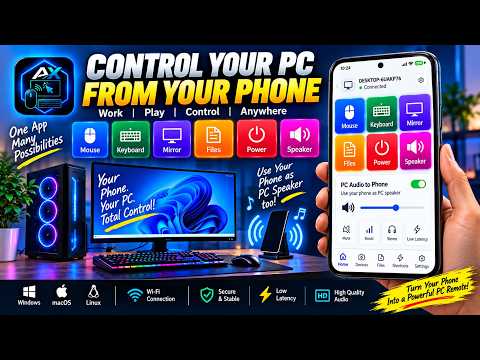
Use your phone as a wireless mouse, keyboard and touchpad for your Windows PC — mirror and record your screen, play PC audio through your phone's speaker, share files and chat — all over your own Wi-Fi.
FIRST, INSTALL THE FREE RECEIVER ON YOUR PC
Search the Microsoft Store for "AX: Remote Keyboard & Mouse Receiver", or open:
https://apps.microsoft.com/detail/9pp1flc3g9d1
Or download it directly:
https://ax.huntbits.com/download/
This app is the remote. Your PC needs AX: Remote Keyboard & Mouse Receiver running before the two can talk. Put both devices on the same Wi-Fi and open the app — your PC appears in the list, or scan the QR code the receiver shows. Confirm the 6-digit code on both screens and you're connected. After that, reconnecting is automatic. Want to look around first? Try the Demo PC — nothing is really controlled.
Control your PC from across the room. Play music or a movie from the sofa, advance slides without walking back to the laptop, or type a long password on your phone's keyboard. Whenever the mouse is out of reach, your phone is already in your hand.
PICK A TOOL
• Mouse — a precision touchpad: one finger to move, tap to click, two fingers to scroll, a scroll rail and left, middle and right buttons
• Keyboard — full landscape keys with a built-in touchpad. Compact, Full, Numpad and Function Keys layouts, in phone or tablet size
• Screen — mirror your PC, record it, take screenshots, lock the PC, or turn the display off and wake it
• Speaker — play your PC's sound through your phone, great when the PC has no speakers or you're across the room
• Chat — send text and your clipboard both ways; tap any message to copy it
• File transfer — send files from your phone to the PC's Downloads folder, or accept files the PC sends, with progress and cancel
• Media — play, pause, skip and volume
• Browser — back, forward, refresh, tabs, zoom and fullscreen, open an address on the PC, and your own bookmarks
• Shortcuts — copy, paste, cut, undo, redo, save, print, task manager and more, one tap each
MAKE IT YOURS
• Dark or light appearance, and glass surfaces
• Eight accent colours
• Touchpad styles, natural scrolling, tap to click, haptics and sound
• Arrange the bottom bar with the tools you use most
BUILT TO BE PRIVATE
Your keystrokes are your passwords, so this app keeps them yours.
• No account, no sign-up, no login.
• Your input never leaves your network. Keystrokes, mouse movement, chat and files go straight from your phone to your PC.
• Encrypted end to end. Every session uses the Noise protocol with modern cryptography.
• Pairing is an explicit decision. A 6-digit code must match on both screens — being on the same Wi-Fi grants nothing.
• Revoke any time. Unpair a device from either end and it must pair again from scratch.
PREMIUM
The app is free with ads.
• Lifetime Premium Features — a one-time purchase that unlocks premium features in this app, forever.
• AX Ecosystem subscription — ad-free, with every premium feature in every AX app.
Already subscribed in another AX app? Link AX apps and use it here.
WHAT YOU NEED
• An Android phone or tablet
• A Windows PC with the free AX: Remote Keyboard & Mouse Receiver — from the Microsoft Store or https://ax.huntbits.com/download/
• Both on the same Wi-Fi network
Support for controlling Mac and other devices is in development.
FIRST, INSTALL THE FREE RECEIVER ON YOUR PC
Search the Microsoft Store for "AX: Remote Keyboard & Mouse Receiver", or open:
https://apps.microsoft.com/detail/9pp1flc3g9d1
Or download it directly:
https://ax.huntbits.com/download/
This app is the remote. Your PC needs AX: Remote Keyboard & Mouse Receiver running before the two can talk. Put both devices on the same Wi-Fi and open the app — your PC appears in the list, or scan the QR code the receiver shows. Confirm the 6-digit code on both screens and you're connected. After that, reconnecting is automatic. Want to look around first? Try the Demo PC — nothing is really controlled.
Control your PC from across the room. Play music or a movie from the sofa, advance slides without walking back to the laptop, or type a long password on your phone's keyboard. Whenever the mouse is out of reach, your phone is already in your hand.
PICK A TOOL
• Mouse — a precision touchpad: one finger to move, tap to click, two fingers to scroll, a scroll rail and left, middle and right buttons
• Keyboard — full landscape keys with a built-in touchpad. Compact, Full, Numpad and Function Keys layouts, in phone or tablet size
• Screen — mirror your PC, record it, take screenshots, lock the PC, or turn the display off and wake it
• Speaker — play your PC's sound through your phone, great when the PC has no speakers or you're across the room
• Chat — send text and your clipboard both ways; tap any message to copy it
• File transfer — send files from your phone to the PC's Downloads folder, or accept files the PC sends, with progress and cancel
• Media — play, pause, skip and volume
• Browser — back, forward, refresh, tabs, zoom and fullscreen, open an address on the PC, and your own bookmarks
• Shortcuts — copy, paste, cut, undo, redo, save, print, task manager and more, one tap each
MAKE IT YOURS
• Dark or light appearance, and glass surfaces
• Eight accent colours
• Touchpad styles, natural scrolling, tap to click, haptics and sound
• Arrange the bottom bar with the tools you use most
BUILT TO BE PRIVATE
Your keystrokes are your passwords, so this app keeps them yours.
• No account, no sign-up, no login.
• Your input never leaves your network. Keystrokes, mouse movement, chat and files go straight from your phone to your PC.
• Encrypted end to end. Every session uses the Noise protocol with modern cryptography.
• Pairing is an explicit decision. A 6-digit code must match on both screens — being on the same Wi-Fi grants nothing.
• Revoke any time. Unpair a device from either end and it must pair again from scratch.
PREMIUM
The app is free with ads.
• Lifetime Premium Features — a one-time purchase that unlocks premium features in this app, forever.
• AX Ecosystem subscription — ad-free, with every premium feature in every AX app.
Already subscribed in another AX app? Link AX apps and use it here.
WHAT YOU NEED
• An Android phone or tablet
• A Windows PC with the free AX: Remote Keyboard & Mouse Receiver — from the Microsoft Store or https://ax.huntbits.com/download/
• Both on the same Wi-Fi network
Support for controlling Mac and other devices is in development.
PC mouse, keyboard & touchpad, plus screen mirroring and phone as a PC speaker
Updated on
Safety starts with understanding how developers collect and share your data. Data privacy and security practices may vary based on your use, region, and age. The developer provided this information and may update it over time.


What’s new
New: Sign in with Huntbits
• One account for all AX apps. Find it at the top of Settings.
• Earn AX Points for using the app: connecting to your PC, typing, sending files, viewing your screen.
• New AX Points page: see how to earn, join pools, or trade points for Premium days.
• New Refer a friend page: share your link and you both get AX Points.
• Codes and purchases are now kept on your account.
• AX Ecosystem works on every phone you sign in to.
• One account for all AX apps. Find it at the top of Settings.
• Earn AX Points for using the app: connecting to your PC, typing, sending files, viewing your screen.
• New AX Points page: see how to earn, join pools, or trade points for Premium days.
• New Refer a friend page: share your link and you both get AX Points.
• Codes and purchases are now kept on your account.
• AX Ecosystem works on every phone you sign in to.
Everyone
Learn moreApp support
About the developer
P VENKATESWARAN
appfeedback@outlook.in
110,Main Road ,Nasiyanur
Erode, Tamil Nadu 638107
India


