
LazyBoard - Phrase Keyboard.
In-app purchases

4.4star
1.48K reviews
100K+
Downloads

Everyone
info
About this app
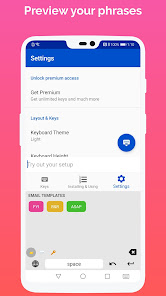
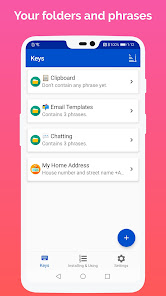
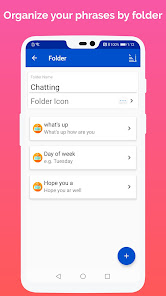
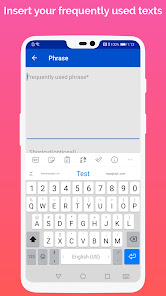
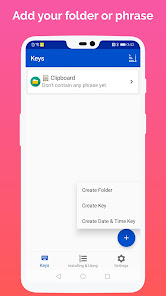
Tired of typing the same thing over and over again? With LazyBoard, create custom keys with predefined phrases for one-tap input.
●Features:
• Clipboard folder to track of what you copy into your system's clipboard, then allows you to easily access them and paste them wherever you want.
• Widget for Clipboard folder to access its phrases from Home Screen.
• Built-In Alphanumeric Keyboard
• Media folder to add photos.
• Trash folder contains deleted phrases and folders to restore them or delete them permanently.
• Random Phrases.
• Sub folders
• Dynamic Variables ( dear {{customer name}}, %CURSOR%, %CLIPBOARD)
• Dark Mode.
● Premium Version:
- Adding unlimited phrases.
- Adding unlimited photos.
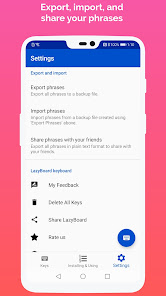
- Export, import, and share phrases with your friends.
- Custom colors for phrases.
We value your feedback to make LazyBoard a helpful keyboard app. Send us your thoughts at lazyboardapp@gmail.com.
●Features:
• Clipboard folder to track of what you copy into your system's clipboard, then allows you to easily access them and paste them wherever you want.
• Widget for Clipboard folder to access its phrases from Home Screen.
• Built-In Alphanumeric Keyboard
• Media folder to add photos.
• Trash folder contains deleted phrases and folders to restore them or delete them permanently.
• Random Phrases.
• Sub folders
• Dynamic Variables ( dear {{customer name}}, %CURSOR%, %CLIPBOARD)
• Dark Mode.
● Premium Version:
- Adding unlimited phrases.
- Adding unlimited photos.
- Export, import, and share phrases with your friends.
- Custom colors for phrases.
We value your feedback to make LazyBoard a helpful keyboard app. Send us your thoughts at lazyboardapp@gmail.com.
Updated on
Safety starts with understanding how developers collect and share your data. Data privacy and security practices may vary based on your use, region, and age. The developer provided this information and may update it over time.

No data shared with third parties
Learn more about how developers declare sharing

No data collected
Learn more about how developers declare collection
Ratings and reviews
4.4
1.42K reviews

James Copeland
- Flag inappropriate
- Show review history
September 3, 2020
Absolutely amazing I love this app, I often have to say the same things over and again, this app let's me save those things and organize them easily. Only feature I would like to see added is the ability to share my keys to other phones or users. I have more than one phone so adding the keys and setup to all the company phones is tedious, but the app itself is amazing!!! Highly recommend.
48 people found this review helpful
Elsayed Hussein
September 3, 2020
Thank you for your feedback. We are working on export and import phrases feature to share them with your friends we and will bring them in next update.

Jupiter Starr
- Flag inappropriate
January 31, 2022
I have no idea what happened but the app deleted all of my folders aside from my first two. I pay for the premium version and had 6 different folders for bots I play. Reorganized my keys to make them more convenient then when I hit the back arrow it cleared everything. Very disappointing. Will have to re-type everything again. Lesson learned, keep a back up code.
23 people found this review helpful
Elsayed Hussein
January 31, 2022
Hello, sorry about the issue. We would like to help. Please contact us at lazyboardapp@gmail.com to fix the issue and restore your phrases.

Claire Lynch
- Flag inappropriate
October 12, 2020
First impressions are that it's not too bad. Paid for Premium so that I can have unlimited folders and scripts. Not too bad for £1.89. Folder icons I'm not too sure on. I'd rather just be able to have a folder name that I can click, or a word shortcut that I could attribute to each folder - there's not really enough relevant emojis go use as icons that I'd know what they meant without going into them, which is obviously adding time. Need more colours to choose from. Maybe add Hex colour picker?
27 people found this review helpful
Elsayed Hussein
October 12, 2020
Thanks for your feedback!,, For Emoji you need them to assign them to folder, so in LazyBoard keyboard can use this Emoji to switch between folders, for custom color we provide this feature in last update for premium users, and you can get it in Phrase screen first button with color plate icon. Please contact us at lazyboardapp@gmail.com for more.
What's new
- Showing current user subscription plan, and allowing him to change between them.
- Add yy-MM-dd Date format.
- Add yy-MM-dd Date format.
App support
About the developer
Elsayed Hussein
elsayed.hussein13@gmail.com
العمره - ش التوحيد
أبوتشت
قنا
Egypt
undefined


