
EverBook: Offline Reader
Contains ads

Everyone
info
500+
Downloads




About this app
📖 EverBook — your perfect eBook reader
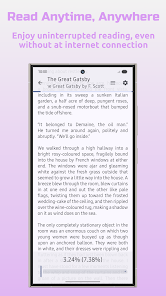
EverBook is your ideal companion for comfortable reading anywhere, anytime. Just load your books and dive into their stories. The app remembers your reading progress and picks up exactly where you left off.
✨ Features
📄 Support for popular formats: PDF, EPUB, TXT, FB2, ZIP, HTML, HTM, MD
🎨 Full reader customization: choose fonts, colors, and themes
📚 Organized library: sort books by categories and chapters
🌍 Instant translation: double-tap text to translate with external apps
📱 Tablet optimization: interface adapted for larger screens
🚀 Simple and intuitive design: focus on reading without distractions
🔄 Automatic updates: get notified about new features on startup
🔓 Open Source
EverBook is based on the Acclorite: Book's Story project (GPL-3.0 license).
Source code:
• Book's Story – github.com/Acclorite/book-story
• EverBook – github.com/ByteFlipper-58/book-story
Learn more:
• Official website – byteflipper.com/everbook
• Privacy Policy – byteflipper.com/privacy-policy
📥 Download EverBook today and enjoy a seamless, personalized reading experience!
EverBook is your ideal companion for comfortable reading anywhere, anytime. Just load your books and dive into their stories. The app remembers your reading progress and picks up exactly where you left off.
✨ Features
📄 Support for popular formats: PDF, EPUB, TXT, FB2, ZIP, HTML, HTM, MD
🎨 Full reader customization: choose fonts, colors, and themes
📚 Organized library: sort books by categories and chapters
🌍 Instant translation: double-tap text to translate with external apps
📱 Tablet optimization: interface adapted for larger screens
🚀 Simple and intuitive design: focus on reading without distractions
🔄 Automatic updates: get notified about new features on startup
🔓 Open Source
EverBook is based on the Acclorite: Book's Story project (GPL-3.0 license).
Source code:
• Book's Story – github.com/Acclorite/book-story
• EverBook – github.com/ByteFlipper-58/book-story
Learn more:
• Official website – byteflipper.com/everbook
• Privacy Policy – byteflipper.com/privacy-policy
📥 Download EverBook today and enjoy a seamless, personalized reading experience!
EverBook — a convenient eBook reader supporting multiple book formats.
Updated on
Safety starts with understanding how developers collect and share your data. Data privacy and security practices may vary based on your use, region, and age. The developer provided this information and may update it over time.
- This app may share these data types with third partiesLocation, App activity and 2 others
- No data collectedLearn more about how developers declare collection
- Data is encrypted in transit
- Data can’t be deleted


What’s new
📝 Highlights, notes, bookmarks and annotation colors
📚 New annotations tab in the reader drawer
☀️ Adjust brightness with a swipe along screen edges
▶️ Auto-scroll with speed and control panel settings
🔤 Import custom TTF and OTF fonts
🌐 Better offline translation model downloads
📚 New annotations tab in the reader drawer
☀️ Adjust brightness with a swipe along screen edges
▶️ Auto-scroll with speed and control panel settings
🔤 Import custom TTF and OTF fonts
🌐 Better offline translation model downloads
App support
phone
Phone number
+48729250399
About the developer
Ibragim maltsagov
ibremminer837.dev@gmail.com
Sidorska 101A/9
21-500 Biała Podlaska
Poland


