
ArtFlow: Paint Draw Sketchbook
Contains adsIn-app purchases

star
33.9K reviews

Everyone
info
5M+
Downloads
Enjoy this app for free, plus many more free of ads and in-app purchases, with a Google Play Pass subscription. Learn more


About this app
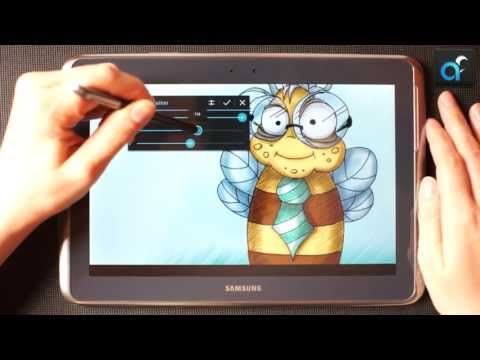
Convert your device into a digital sketchbook with more than 80 paint brushes, smudge, fill and an eraser tool. This fast and intuitive painting and drawing application will unlock the full power of your imagination. With support for pressure sensitive pens (like Samsung's S Pen) your device will be transformed into a real canvas.
Important: this is a free application with advanced features requiring a pro license in-app purchase. Single licence purchase will activate all devices associated with your Google account.
Features (some functions require pro license):
• High performance (GPU accelerated) paint engine
• Canvases up to 6144x6144 with 50 layers*
• Stylus pressure support
• Pressure simulation for touches†
• 100+ brushes and tools (including smudge tool and gradient fill)
• Create custom brushes from imported images
• Selection and selection masks
• Layer clipping mask
• 10 layer filters (HSV adjust, brightness & saturation, color curves and more)
• Material design inspired, fast, fluid, intuitive and accessible user interface
• Import and export supports PNG, JPG and PSD (Photoshop Document)
• NVIDIA DirectStylus support
• Palm rejection - no more accidental zooming and panning when drawing†
*) depending on device and available memory
†) some devices are incompatible with pressure simulation and palm rejection
You can paint, sketch and draw with ease thanks to fast and fluid brush engine. ArtFlow aims to replace your physical sketchpad and become universal art studio type application for Android™.
Artworks by:
Oleg Stepanko (https://instagram.com/rwidon)
Miguel Alvarado (https://www.instagram.com/3d.mike)
David Rivera (http://www.facebook.com/BlownHand)
Jon Mietling Portal Dragon (http://portaldragon.com)
Rob Pennycook
Marco Hurtado
Joel Ukeni (https://www.instagram.com/j.ukeni/)
Enrico Natoli
Andrew Easter
Andrei Lanuza (http://plus.google.com/+AndreiLanuza)
David Mingorance (http://davidmingorance.weebly.com)
EB Leung
Geremy Arene (http://www.youtube.com/geremy902)
ViBu (http://candynjuice.blogspot.com)
Oskar Stalberg
Unlicensed version limitation:
• 20 basic tools
• 3 layers
• Undo limited to 6 steps
• No PSD export
Important: this is a free application with advanced features requiring a pro license in-app purchase. Single licence purchase will activate all devices associated with your Google account.
Features (some functions require pro license):
• High performance (GPU accelerated) paint engine
• Canvases up to 6144x6144 with 50 layers*
• Stylus pressure support
• Pressure simulation for touches†
• 100+ brushes and tools (including smudge tool and gradient fill)
• Create custom brushes from imported images
• Selection and selection masks
• Layer clipping mask
• 10 layer filters (HSV adjust, brightness & saturation, color curves and more)
• Material design inspired, fast, fluid, intuitive and accessible user interface
• Import and export supports PNG, JPG and PSD (Photoshop Document)
• NVIDIA DirectStylus support
• Palm rejection - no more accidental zooming and panning when drawing†
*) depending on device and available memory
†) some devices are incompatible with pressure simulation and palm rejection
You can paint, sketch and draw with ease thanks to fast and fluid brush engine. ArtFlow aims to replace your physical sketchpad and become universal art studio type application for Android™.
Artworks by:
Oleg Stepanko (https://instagram.com/rwidon)
Miguel Alvarado (https://www.instagram.com/3d.mike)
David Rivera (http://www.facebook.com/BlownHand)
Jon Mietling Portal Dragon (http://portaldragon.com)
Rob Pennycook
Marco Hurtado
Joel Ukeni (https://www.instagram.com/j.ukeni/)
Enrico Natoli
Andrew Easter
Andrei Lanuza (http://plus.google.com/+AndreiLanuza)
David Mingorance (http://davidmingorance.weebly.com)
EB Leung
Geremy Arene (http://www.youtube.com/geremy902)
ViBu (http://candynjuice.blogspot.com)
Oskar Stalberg
Unlicensed version limitation:
• 20 basic tools
• 3 layers
• Undo limited to 6 steps
• No PSD export
Simple yet powerful sketch and paint application for artist of all ages
Updated on
Safety starts with understanding how developers collect and share your data. Data privacy and security practices may vary based on your use, region, and age. The developer provided this information and may update it over time.


Ratings and reviews
20.9K reviews

Gaius Augustus
- Flag inappropriate
- Show review history
August 29, 2026
I've been using this app (paid version) for many years. I draw on my phone with my finger, and this app has provided me a way to make beautiful art without having to pull out my laptop. There are features I'd love to see added, like CMYK color selection & export (for printing) and a few more effects. But I've tried dozens of other apps on the Play store, and I always come back to this one.

Ty w
- Flag inappropriate
March 26, 2024
This has been my go to sketching app for a few years now. The paid version is cheap, works like a charm and is nice and lean with a few minor quirks. It's easy and fast to import and export as psd to send to a more robust program for retirement. The biggest drawback: no folders, and no selecting multiple layers at the same time. I could get so much more done before exporting. If they add that in the future, i'll gladly change to a five star rating!
45 people found this review helpful

Brandon Poulsen
- Flag inappropriate
March 28, 2024
This drawing & painting app is full of features and is one of my favorites. I use several, but this one is in my top tier, and I am thankful I found it. I don't understand complaints about a paywall. This is a nice piece of software, and nothing is truly free. You have options to watch ads to unlock a feature for a time if you don't want to purchase the license outright. I hate wasting my life watching ads. Ads ≠ free. It was six dollars for the pro license, which seems very reasonable to me. 🙂
103 people found this review helpful
What’s new
Play Billing library update to v8.0.0
Supported android version update (target SDK level update)
Supported android version update (target SDK level update)
App support
About the developer
BYTESTORM SOFTWARE BARTŁOMIEJ JANUSZ
bjanusz@artflowstudio.com
166a Ul. Wyzwolenia
41-710 Ruda Śląska
Poland
+48 605 788 781


