
Blur Lens:DSLR Blur Editor Pro


Everyone
info
5+
Downloads

Everyone
Learn more


About this app
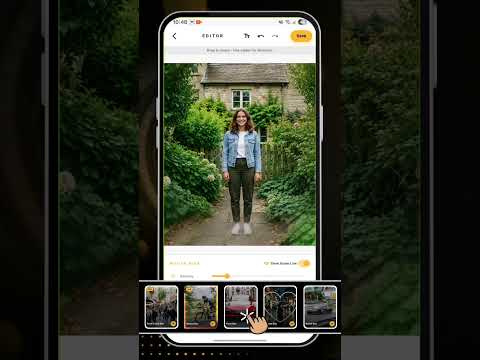
Blur Lens Pro: DSLR Blur Studio is a paid photo editing app that helps you add DSLR-style blur, bokeh, depth, focus, portrait blur and motion effects to your photos.
With Blur Lens Pro, you can import a photo from your device, choose a blur mode, adjust the effect, and save the edited image. The app is designed for users who want a clean photo editing experience with multiple blur tools in one place.
Blur Lens Pro is a one-time paid app. No subscription is required.
Key Features
DSLR-Style Background Blur:
Create a soft blurred background effect to make your subject stand out and give your photo a focused look.
Bokeh Effects:
Add smooth bokeh-style blur effects to enhance portraits, product photos, close-up shots and creative edits.
Portrait Blur:
Apply subject-focused blur effects to give your photos a portrait-style appearance.
Point Focus:
Keep a selected area clear while applying blur around it. Useful for product images, close-up photos and attention-focused edits.
Point Blur:
Blur a selected area of the photo to reduce distractions or highlight another part of the image.
Linear Blur:
Apply a smooth blur across a selected direction. This can be used for tilt-shift style edits and creative depth effects.
Radial Blur:
Create a circular blur effect around a selected point to guide attention toward the center of the photo.
Shape Blur:
Apply creative blur effects using visual shapes such as hearts, stars and other supported styles.
Free Style Blur:
Use touch controls to manually paint blur where you want it. This gives you more control over the final image.
Spin Blur:
Add a circular motion-style blur effect for creative and dynamic photo edits.
Zoom Blur:
Create a zoom-style blur effect that gives a sense of speed and movement.
Motion Blur:
Apply directional blur effects to simulate movement, panning, or fast-action photo styles.
Why Choose Blur Lens Pro?
- One-time paid app
- No subscription required
- No third-party ads
- Multiple blur modes in one editor
- Simple photo editing flow
- Gallery import and image save support
- Useful for portraits, products, social media photos and creative edits
Simple Editing Flow
1. Open the app
2. Select a photo from your gallery
3. Choose a blur mode
4. Adjust the effect
5. Save the edited image
Privacy-Friendly Photo Editing
Blur Lens Pro is built for photo editing on your device. Photos are used only for editing and saving the final result. The app does not require account registration to use the main editing features.
Who Can Use This App?
Blur Lens Pro is useful for:
- Portrait photo editing
- Background blur effects
- Bokeh photo effects
- Product photo enhancement
- Social media photo edits
- Creative blur and motion effects
- Focus-based image editing
- Motion-style photo effects
Blur Lens Pro: DSLR Blur Studio gives you simple tools to create clean, focused and creative photo edits with multiple blur styles in one app.
With Blur Lens Pro, you can import a photo from your device, choose a blur mode, adjust the effect, and save the edited image. The app is designed for users who want a clean photo editing experience with multiple blur tools in one place.
Blur Lens Pro is a one-time paid app. No subscription is required.
Key Features
DSLR-Style Background Blur:
Create a soft blurred background effect to make your subject stand out and give your photo a focused look.
Bokeh Effects:
Add smooth bokeh-style blur effects to enhance portraits, product photos, close-up shots and creative edits.
Portrait Blur:
Apply subject-focused blur effects to give your photos a portrait-style appearance.
Point Focus:
Keep a selected area clear while applying blur around it. Useful for product images, close-up photos and attention-focused edits.
Point Blur:
Blur a selected area of the photo to reduce distractions or highlight another part of the image.
Linear Blur:
Apply a smooth blur across a selected direction. This can be used for tilt-shift style edits and creative depth effects.
Radial Blur:
Create a circular blur effect around a selected point to guide attention toward the center of the photo.
Shape Blur:
Apply creative blur effects using visual shapes such as hearts, stars and other supported styles.
Free Style Blur:
Use touch controls to manually paint blur where you want it. This gives you more control over the final image.
Spin Blur:
Add a circular motion-style blur effect for creative and dynamic photo edits.
Zoom Blur:
Create a zoom-style blur effect that gives a sense of speed and movement.
Motion Blur:
Apply directional blur effects to simulate movement, panning, or fast-action photo styles.
Why Choose Blur Lens Pro?
- One-time paid app
- No subscription required
- No third-party ads
- Multiple blur modes in one editor
- Simple photo editing flow
- Gallery import and image save support
- Useful for portraits, products, social media photos and creative edits
Simple Editing Flow
1. Open the app
2. Select a photo from your gallery
3. Choose a blur mode
4. Adjust the effect
5. Save the edited image
Privacy-Friendly Photo Editing
Blur Lens Pro is built for photo editing on your device. Photos are used only for editing and saving the final result. The app does not require account registration to use the main editing features.
Who Can Use This App?
Blur Lens Pro is useful for:
- Portrait photo editing
- Background blur effects
- Bokeh photo effects
- Product photo enhancement
- Social media photo edits
- Creative blur and motion effects
- Focus-based image editing
- Motion-style photo effects
Blur Lens Pro: DSLR Blur Studio gives you simple tools to create clean, focused and creative photo edits with multiple blur styles in one app.
Pro Photo blur editor with bokeh, portrait, motion and focus effects no ads
Updated on
Safety starts with understanding how developers collect and share your data. Data privacy and security practices may vary based on your use, region, and age. The developer provided this information and may update it over time.
- No data shared with third partiesLearn more about how developers declare sharing
- No data collectedLearn more about how developers declare collection


What’s new
Updated the Android version for better user compatibility.
Everyone
Learn moreApp support
About the developer
CONVERSANTECH
developer@conversantech.com
303, Shivam Complex, Sarveshwar Chowk, Dr. Yagnik Road
Rajkot, Gujarat 360001
India
+91 91041 98781


