

DaRemote:ssh,linux,docker,sftp
In-app purchases

4.7star
501 reviews
10K+
Downloads

Everyone
info


About this app
✨ Free for up to 3 servers.💯
✨ 6-day full-function trial.💯
NO NEED to install any additional tools on the SERVER side.
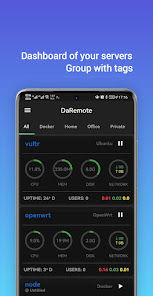
DaRemote is a powerful remote server management app that allows you to monitor and manage your Linux servers, Docker containers, and SSH/SFTP connections from your phone. With its intuitive interface and comprehensive features, DaRemote is the perfect tool for developers, system administrators, and anyone who needs to manage their servers on the go.
It supports the monitoring and management of the following systems:
* Linux (Ubuntu, CentOS, Debian, Fedora, OpenWrt, Busybox, etc.)
* FreeBSD
* macOS
* Docker
---
✔Monitoring Functions:
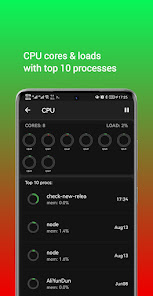
CPU: the current load of each core, temperature, etc.
Process: top 10 processes online time and resource usage.
Memory: total amount of memory and usage.
Disk: the corresponding mount point for each partition, as well as the capacity and current read/write speed, etc.
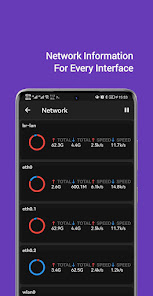
Network: inbound and outbound speeds per network interface, total amount of data, tcp connections, etc.
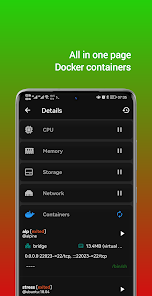
Docker: show and manage containers, including start, restart, pause/unpause, stop.
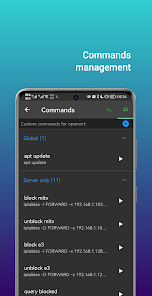
✔Script and command snippet management:
Script organization, editing, running, result display, etc.
✔Proxy supported:
SSH Tunnel
HTTP Proxy
SOCKS5 Proxy
✔SSH client:
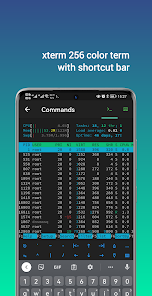
xterm-256 color compatible terminal emulation
⚡️[NEW] Use biometric authentication to input sudo password
✔SFTP supported.
Support languages: English, Simplified Chinese, Traditional Chinese
Support themes: dark, light
Material You supported
---
Privacy Statement:
The app does not collect or upload any user data or information, including your server's information. Sensitive server information is encrypted and stored locally.
✨ 6-day full-function trial.💯
NO NEED to install any additional tools on the SERVER side.
DaRemote is a powerful remote server management app that allows you to monitor and manage your Linux servers, Docker containers, and SSH/SFTP connections from your phone. With its intuitive interface and comprehensive features, DaRemote is the perfect tool for developers, system administrators, and anyone who needs to manage their servers on the go.
It supports the monitoring and management of the following systems:
* Linux (Ubuntu, CentOS, Debian, Fedora, OpenWrt, Busybox, etc.)
* FreeBSD
* macOS
* Docker
---
✔Monitoring Functions:
CPU: the current load of each core, temperature, etc.
Process: top 10 processes online time and resource usage.
Memory: total amount of memory and usage.
Disk: the corresponding mount point for each partition, as well as the capacity and current read/write speed, etc.
Network: inbound and outbound speeds per network interface, total amount of data, tcp connections, etc.
Docker: show and manage containers, including start, restart, pause/unpause, stop.
✔Script and command snippet management:
Script organization, editing, running, result display, etc.
✔Proxy supported:
SSH Tunnel
HTTP Proxy
SOCKS5 Proxy
✔SSH client:
xterm-256 color compatible terminal emulation
⚡️[NEW] Use biometric authentication to input sudo password
✔SFTP supported.
Support languages: English, Simplified Chinese, Traditional Chinese
Support themes: dark, light
Material You supported
---
Privacy Statement:
The app does not collect or upload any user data or information, including your server's information. Sensitive server information is encrypted and stored locally.
Updated on
Safety starts with understanding how developers collect and share your data. Data privacy and security practices may vary based on your use, region, and age. The developer provided this information and may update it over time.

No data shared with third parties
Learn more about how developers declare sharing

No data collected
Learn more about how developers declare collection
Ratings and reviews
4.7
467 reviews

Robert Ansel
- Flag inappropriate
July 11, 2024
super handy app for doing routine monitoring/status checks and without having to install ANYTHING on your servers. being able to restart stopped containers quickly or jump into a terminal to investigate closer is a HUGE killer feature! thanks for all the work on this its a great app for monitoring stuff in my homelab when things are acting funny. huge time saver!
2 people found this review helpful

Matthew Rodde
- Flag inappropriate
March 16, 2024
I've only been using daremote for a few hours, but so far, fantastic. Ease of ssh connection, cloud server monitoring. Very clear and easy to use. I didn't have any issues with my keyboard appearing or utilizing the shortcut buttons on top. Yes the text wraps on the screen so it may be beneficial to offer the option of not wrapping. So far, my experience is spectacular, especially when compared to the other competitors I've tried. Definitely buying the Pro version.
2 people found this review helpful

jon rurka
- Flag inappropriate
- Show review history
July 3, 2023
This is the best SSH client for Android, apparently, and in still only barely useable. Has several issues: * Disconnects incredibly easily if you minimize the app momentarily (unless you are in an active tmux session for some reason). * "copy" doesn't work at random times when you have text highlighted. The "copy/paste" menu doesn't dissapear when you press copy and doesnt appear in my clipboard. * Random error messages that seem to be related to FTP. I do not have FTP on the server.
5 people found this review helpful
What's new
v4.6.4
1. Fixed the issue where the 'Add Server' button was always visible on the overview.
2. Fixed an issue with navigation on the command page, where returning would go directly to the overview page instead of the list page.
3. Reduced the time it takes for the 'Add Server' button to hide.
1. Fixed the issue where the 'Add Server' button was always visible on the overview.
2. Fixed an issue with navigation on the command page, where returning would go directly to the overview page instead of the list page.
3. Reduced the time it takes for the 'Add Server' button to hide.


