
PrintHand Mobile Print
In-app purchases

star
33.4K reviews

Everyone
info
5M+
Downloads


About this app
THIS APP IS NOT FREE. It is free to try: add your printer, print the test page and see it work. Real pages need Premium Mode, a one-time Perpetual License or a subscription bought in the app. The one thing that stays free is printing through PrintHand on a computer, at home or remotely: the receiving end carries the licence, not your phone.
Print from your phone or tablet straight to the printer. No computer, no cloud account, no printer app from the manufacturer: PrintHand has its own drivers.
PRINTERS
• Thousands of models from HP, Canon, Epson, Brother, Samsung, Kyocera, Lexmark, Ricoh, Xerox, OKI, Dell and others, plus Zebra and Star Micronics label and receipt printers
• Drivers are downloaded on demand; a printer that is not listed often works with a generic driver
• Check your model at printhand.com/supported_printers.php
CONNECTIONS
• Wi-Fi: printers on your network are found automatically, or type the IP address
• Wi-Fi Direct, Bluetooth, USB cable (with a USB OTG adapter)
• Printers plugged into a router, or shared by a Windows, Mac or Linux computer, including office networks with Active Directory
• Even simpler: any printer on a computer running our free PrintHand software for Windows or Mac, at home or anywhere through PrintHand Remote
WHAT YOU PRINT
PDF, photos and images, Word, Excel, PowerPoint and text files, web pages, email with attachments, contacts, calendar, clipboard text, files shared from other apps and from Google Drive, Dropbox, Box or OneDrive. PrintHand is also an Android print service, so the Print command of any app can use it.
Options follow the printer: paper size, orientation, margins, copies, page range, two-sided, pages per sheet, quality, color or grayscale, tray and paper type.
Scanning from multifunction printers to the phone is included as an experimental feature.
FOR BUSINESS
• Managed configuration: every feature and printer type can be switched off or preset from your MDM/EMM
• Licensing by activation code, volume licences and builds with the licence built in
• SDK and intent API to print from your own app, with samples on printhand.com/for_developers.php
• Custom builds: your branding, your printers only, no cloud, no remote printing
Write to support@printhand.com to discuss your deployment.
PRIVACY
Pages are rendered on your device and sent to the printer. Permissions are asked for only when you print that kind of content and never to collect data. Privacy policy: printhand.com/privacy.php
Questions or a printer that does not work? support@printhand.com, we answer every message.
Requires Android 6.0 or later.
Print from your phone or tablet straight to the printer. No computer, no cloud account, no printer app from the manufacturer: PrintHand has its own drivers.
PRINTERS
• Thousands of models from HP, Canon, Epson, Brother, Samsung, Kyocera, Lexmark, Ricoh, Xerox, OKI, Dell and others, plus Zebra and Star Micronics label and receipt printers
• Drivers are downloaded on demand; a printer that is not listed often works with a generic driver
• Check your model at printhand.com/supported_printers.php
CONNECTIONS
• Wi-Fi: printers on your network are found automatically, or type the IP address
• Wi-Fi Direct, Bluetooth, USB cable (with a USB OTG adapter)
• Printers plugged into a router, or shared by a Windows, Mac or Linux computer, including office networks with Active Directory
• Even simpler: any printer on a computer running our free PrintHand software for Windows or Mac, at home or anywhere through PrintHand Remote
WHAT YOU PRINT
PDF, photos and images, Word, Excel, PowerPoint and text files, web pages, email with attachments, contacts, calendar, clipboard text, files shared from other apps and from Google Drive, Dropbox, Box or OneDrive. PrintHand is also an Android print service, so the Print command of any app can use it.
Options follow the printer: paper size, orientation, margins, copies, page range, two-sided, pages per sheet, quality, color or grayscale, tray and paper type.
Scanning from multifunction printers to the phone is included as an experimental feature.
FOR BUSINESS
• Managed configuration: every feature and printer type can be switched off or preset from your MDM/EMM
• Licensing by activation code, volume licences and builds with the licence built in
• SDK and intent API to print from your own app, with samples on printhand.com/for_developers.php
• Custom builds: your branding, your printers only, no cloud, no remote printing
Write to support@printhand.com to discuss your deployment.
PRIVACY
Pages are rendered on your device and sent to the printer. Permissions are asked for only when you print that kind of content and never to collect data. Privacy policy: printhand.com/privacy.php
Questions or a printer that does not work? support@printhand.com, we answer every message.
Requires Android 6.0 or later.
Print PDFs, photos and documents to Wi-Fi, Bluetooth and USB printers. Try free.
Updated on
Safety starts with understanding how developers collect and share your data. Data privacy and security practices may vary based on your use, region, and age. The developer provided this information and may update it over time.
- No data shared with third partiesLearn more about how developers declare sharing
- This app may collect these data typesApp activity, App info and performance, and Device or other IDs
- Data is encrypted in transit
- Data can’t be deleted


Ratings and reviews
29K reviews

Daniel Drummond
- Flag inappropriate
November 7, 2026
Makes you have to pay as soon as you press print.
6 people found this review helpful

A Google user
- Flag inappropriate
April 17, 2020
Used this app for YEARS without a problem, now all of a sudden I can't print anything unless I pay. I've had it so long I can't even remember if I paid for the full version originally, but I assume I must have. Either way, be transparent and upfront with new users about the cost, and maintain current agreements with existing users. Whether your costs have increased or not, don't look to existing users as 'easy money'! Uninstalling.
701 people found this review helpful
PrintHand
May 11, 2020
Please contact us at support@printhand.com and provide more information about your setup and the problem.
We will need to know the make and model of the device on which you installed PrintHand app; the make and model of your printer;
and the interface you are using to print: Wi-Fi, Bluetooth or USB.
A Google user
- Flag inappropriate
- Show review history
March 9, 2020
Looooong time user. I purchased this app about a decade ago prior to the existence of any other printing app except for HP (no need to go any further on that topic). I've had 6 phones since and had trouble re-installing on my Note 9, but support was very responsive and problem solved in 3 minutes. Lots of free apps out there these days, but this one prints every time, everywhere, every printer. Also very handy as there is no need for a separate PDF converter.
1,588 people found this review helpful
PrintHand
March 24, 2020
Glad the app is to your liking! Please tell your friends about it!
What’s new
• Print to printers connected to a computer or a router, shared by Windows, macOS or Linux, or by our free PrintHand software
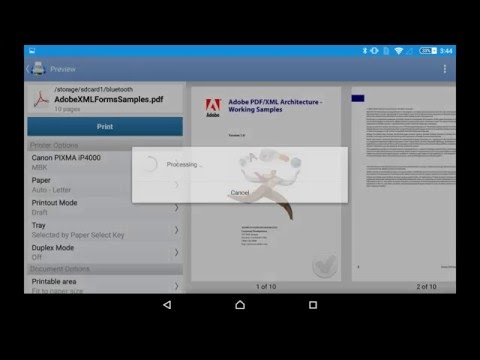
• Redesigned print preview: see the actual sheets and adjust the job right there
• Wi-Fi Direct works with more printers
• Printer status at a glance for every connection type
• Better language support, Turkish and Italian added
• Miscellaneous fixes and improvements
• Redesigned print preview: see the actual sheets and adjust the job right there
• Wi-Fi Direct works with more printers
• Printer status at a glance for every connection type
• Better language support, Turkish and Italian added
• Miscellaneous fixes and improvements
App support
phone
Phone number
+19138843369
About the developer
Dynamix Usa, LLC
mpastushkov@dynamixsoftware.com
15215 Dearborn St
Overland Park, KS 66223-3222
United States
+1 913-406-6476


