
Lock & Alert
2.7star
480 reviews
100K+
Downloads

Everyone
info

About this app
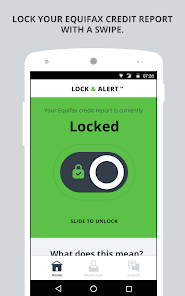
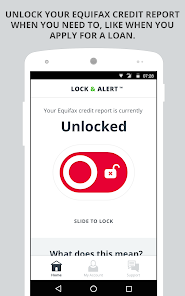
Lock & Alert puts you in charge of who can access your Equifax credit report, with certain exceptions.¹ Lock or unlock your Equifax credit report with just a simple click or swipe, and we’ll alert you each time your Equifax credit report is locked or unlocked.
• Lock & Alert is free for U.S. consumers.
• Lock your Equifax credit report to help better protect against identity theft.
• Applying for credit? Open the app, and unlock with one simple swipe or click. Then simply swipe or click again to lock when you're done.
• We'll alert you each time your Equifax credit report is locked or unlocked.
• Having trouble or need a quick answer while using the app? Visit the Support tab in the app to find the answers to frequently asked questions, or to contact customer service.
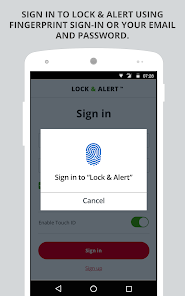
• Sign in to the Lock & Alert app using biometrics, or enter your user name and password.
Important Note: Lock & Alert and myEquifax use separate accounts. Your Lock & Alert credentials would be different from your myEquifax username and password, unless you registered with the same username and password for both. If this is your first time using Lock & Alert, please choose “Sign up”.
¹ Locking your Equifax credit report will prevent access to it by certain third parties. Locking your Equifax credit report will not prevent access to your credit report at any other credit reporting agency. Entities that may still have access to your Equifax credit report include: companies like Equifax Consumer Services LLC, which provide you with access to your credit report or credit score, or monitor your credit report as part of a subscription or similar service; companies that provide you with a copy of your credit report or credit score, upon your request; federal, state and local government agencies and courts in certain circumstances; companies using the information in connection with the underwriting of insurance, or for employment, tenant or background screening purposes; companies that have a current account or relationship with you, and collection agencies acting on behalf of those whom you owe; companies that authenticate a consumer's identity for purposes other than granting credit, or for investigating or preventing actual or potential fraud; and companies that wish to make pre-approved offers of credit or insurance to you. To opt out of such pre-approved offers, visit www.optoutprescreen.com.
• Lock & Alert is free for U.S. consumers.
• Lock your Equifax credit report to help better protect against identity theft.
• Applying for credit? Open the app, and unlock with one simple swipe or click. Then simply swipe or click again to lock when you're done.
• We'll alert you each time your Equifax credit report is locked or unlocked.
• Having trouble or need a quick answer while using the app? Visit the Support tab in the app to find the answers to frequently asked questions, or to contact customer service.
• Sign in to the Lock & Alert app using biometrics, or enter your user name and password.
Important Note: Lock & Alert and myEquifax use separate accounts. Your Lock & Alert credentials would be different from your myEquifax username and password, unless you registered with the same username and password for both. If this is your first time using Lock & Alert, please choose “Sign up”.
¹ Locking your Equifax credit report will prevent access to it by certain third parties. Locking your Equifax credit report will not prevent access to your credit report at any other credit reporting agency. Entities that may still have access to your Equifax credit report include: companies like Equifax Consumer Services LLC, which provide you with access to your credit report or credit score, or monitor your credit report as part of a subscription or similar service; companies that provide you with a copy of your credit report or credit score, upon your request; federal, state and local government agencies and courts in certain circumstances; companies using the information in connection with the underwriting of insurance, or for employment, tenant or background screening purposes; companies that have a current account or relationship with you, and collection agencies acting on behalf of those whom you owe; companies that authenticate a consumer's identity for purposes other than granting credit, or for investigating or preventing actual or potential fraud; and companies that wish to make pre-approved offers of credit or insurance to you. To opt out of such pre-approved offers, visit www.optoutprescreen.com.
Updated on
Safety starts with understanding how developers collect and share your data. Data privacy and security practices may vary based on your use, region, and age. The developer provided this information and may update it over time.


Ratings and reviews
2.7
459 reviews

Jim Bob
- Flag inappropriate
October 18, 2024
I agree with all of the other complaints that I have read about this app, plus one that I haven't seen yet: the app account only allows a password up to 15 characters. Seriously? The website account allows many more characters than that (like, 64 I think?). It is absolutely ridiculous that the app cannot sign in to an existing account. Too bad they don't allow zero stars. [UNINSTALLED]
9 people found this review helpful
Equifax Incorporated
October 18, 2024
Thank you for your feedback regarding your Lock & Alert app experience. We will include it in our continuous improvement process. It is always our goal to provide helpful and courteous service to consumers. We sincerely apologize for any inconvenience this issue may have caused. - Equifax Digital Care Team

L Z
- Flag inappropriate
- Show review history
January 2, 2024
Update: Still complete GARBAGE. Literally never works. I login...it says, Give us a call. We can't complete the request. So I call, give them the error code and they NEVER have a clue what the error code even means. So they futz around and I have to go through the wait and time for them to unfreeze my account. What's the point of this app if I have to call EVERY TIME?
29 people found this review helpful

Todd Sherman
- Flag inappropriate
August 19, 2024
Can't complete signup process. As a professional software developer, I can say with confidence this app does not. The app is pointing to their web site as you enter you information. It has multiple fails. After approximately 10 attempts I gave up. Basic features, such as dismissing an alert or entering data fails consistently. I now have a partially created account in their database of which I have no idea how to remove or access. Don't try calling. After being on hold for an hour I hung up.
34 people found this review helpful
Equifax Incorporated
August 19, 2024
Thanks for taking the time to provide feedback. We take all feedback seriously as we work on Lock & Alert app improvements. -Equifax Digital Care Team
What’s new
Minor bug fixes.
Please update your app to the latest version (v2.9.9) or enable automatic updates to keep using Lock & Alert.
Thanks for using Lock & Alert!
Please update your app to the latest version (v2.9.9) or enable automatic updates to keep using Lock & Alert.
Thanks for using Lock & Alert!
App support
phone
Phone number
+18885487878
About the developer
Equifax Inc.
mobile.core@equifax.com
1550 Peachtree St NW
Atlanta, GA 30309
United States
+1 404-771-0853


