
G-CPU:Monitor CPU, RAM, Widget
Contains adsIn-app purchases

4.3star
46.5K reviews
1M+
Downloads

Everyone
info
About this app
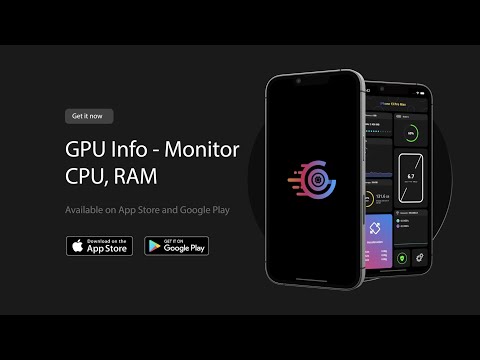
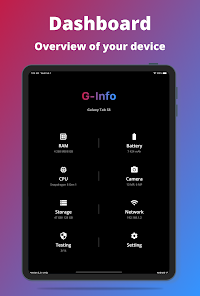
G-CPU is a simple, powerful, and free application that gives you complete information about your mobile device and tablet with advanced user interfaces and widgets. G-CPU includes information about CPU, RAM, OS, Sensors, Storage, Battery, Network, System Apps, Display, Camera, etc. Also, G-CPU can benchmark your device with hardware tests.
What's Inside :
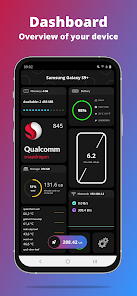
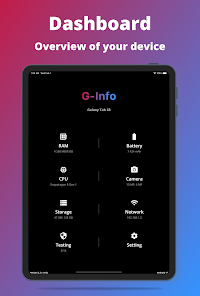
- Dashboard: RAM, Internal Storage, External Storage, Battery, CPU, Sensors Available, Tests, Network, and Settings App
- Device: Device Name, Model, Manufacturer, Device, Board, Hardware, Brand, Build Fingerprint
- System: OS, OS Type, OS State, Version, Build Number, Multitasking, Initial OS Version, Max Supported OS Version, Kernel Info, Boot Time, Up Time
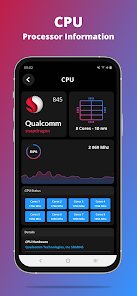
- CPU: Load Percent, Chipset Name, Launched, Design, Common manufacturer, Max CPU clock rate, Process, Cores, Instruction set, GPU name, GPU Cores.
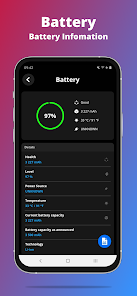
- Battery: Health, Level, Status, Power Source, Technology, Temperature, Voltage & Capacity
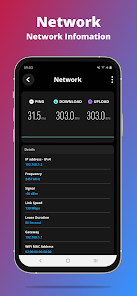
- Network: IP Address, Gateway, Subnet Mask, DNS, Lease Duration, Interface, Frequency & Link Speed
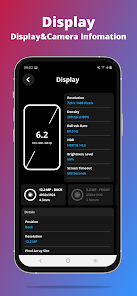
- Display: Resolution, Density, Physical Size, Supported Refresh Rates, Brightness Level & Mode, Screen Timeout, Orientation
- Memory: RAM, RAM Type, RAM Frequency, ROM, Internal Storage & External Storage
- Sensors: True Heading, Acceleration, Altimeter, Raw Magnetic, Magnetic, Rotate
- Device Tests :
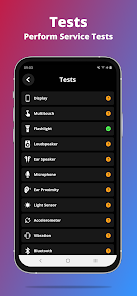
Benchmark your device with the following parts and optimize your device with Automatic tests. You can test Display, Multi-touch, Flashlight, Loudspeaker, Ear Speaker, Microphone, Ear Proximity, Accelerometer, Vibration, WI-Fi, Fingerprint, Volume Up Button & Volume Down Button
- Camera: All the features supported by your camera
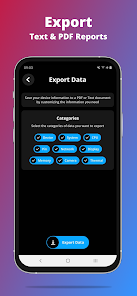
- Export Reports: Export customizable reports, Export Text Reports, Export PDF Reports
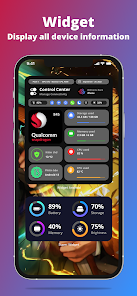
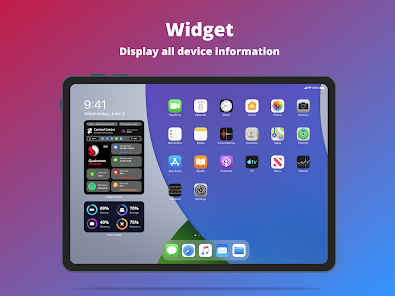
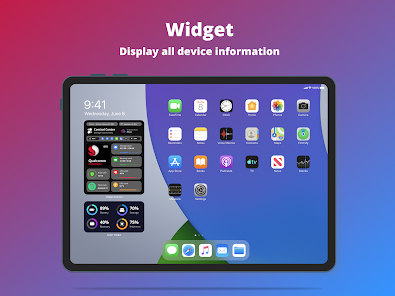
- Widget supports: Control center, memory, battery, network, and storage
- Support Compass
*****************
Feel free to contact us via Facebookhttps://www.youtube.com/watch?v=yQrFch9InZA&ab_channel=V%C5%A9H%E1%BA%ADu at G-CPU
What's Inside :
- Dashboard: RAM, Internal Storage, External Storage, Battery, CPU, Sensors Available, Tests, Network, and Settings App
- Device: Device Name, Model, Manufacturer, Device, Board, Hardware, Brand, Build Fingerprint
- System: OS, OS Type, OS State, Version, Build Number, Multitasking, Initial OS Version, Max Supported OS Version, Kernel Info, Boot Time, Up Time
- CPU: Load Percent, Chipset Name, Launched, Design, Common manufacturer, Max CPU clock rate, Process, Cores, Instruction set, GPU name, GPU Cores.
- Battery: Health, Level, Status, Power Source, Technology, Temperature, Voltage & Capacity
- Network: IP Address, Gateway, Subnet Mask, DNS, Lease Duration, Interface, Frequency & Link Speed
- Display: Resolution, Density, Physical Size, Supported Refresh Rates, Brightness Level & Mode, Screen Timeout, Orientation
- Memory: RAM, RAM Type, RAM Frequency, ROM, Internal Storage & External Storage
- Sensors: True Heading, Acceleration, Altimeter, Raw Magnetic, Magnetic, Rotate
- Device Tests :
Benchmark your device with the following parts and optimize your device with Automatic tests. You can test Display, Multi-touch, Flashlight, Loudspeaker, Ear Speaker, Microphone, Ear Proximity, Accelerometer, Vibration, WI-Fi, Fingerprint, Volume Up Button & Volume Down Button
- Camera: All the features supported by your camera
- Export Reports: Export customizable reports, Export Text Reports, Export PDF Reports
- Widget supports: Control center, memory, battery, network, and storage
- Support Compass
*****************
Feel free to contact us via Facebookhttps://www.youtube.com/watch?v=yQrFch9InZA&ab_channel=V%C5%A9H%E1%BA%ADu at G-CPU
Updated on
Safety starts with understanding how developers collect and share your data. Data privacy and security practices may vary based on your use, region, and age. The developer provided this information and may update it over time.

No data shared with third parties
Learn more about how developers declare sharing

No data collected
Learn more about how developers declare collection
Ratings and reviews
4.3
45.7K reviews

Dean Oliver (Deano)
- Flag inappropriate
March 29, 2026
This app looked very promising, that is until I clicked on anything in the app. Clicking any icon will force you to watch multiple ads. No way to back out of the app other than killing the process. You can't even go to the settings page. Immediately uninstalled. Offer a "pro" version, no ads for a few bucks and you might have a customer. Until then, enjoy your greed.

Austin Gilmore
- Flag inappropriate
- Show review history
March 30, 2024
Very nice! I've got a few suggestions/ideas, though. Nothing bad. 1. What if there was a picture-on-picture feature so I could see like my Ram usage, for example, while playing a game and overlaying my devices performance on the game. 2. An "advanced mode" or something would show RAM, CPU, network, etc. as a graph (similar to Windows' task manager performance tab). That's all I've got. Of course, these are concepts, so I don't NEED this, just some ideas.
306 people found this review helpful

Del Dollens
- Flag inappropriate
September 14, 2025
an important feature of monitoring cpu loading is to be able immediately switch over to g-cpu when you notice an issue, like lagging. Unfortunately, as soon as you switch over, another ad pops up. By the time the ad is finished, the issue is no longer there. I understand you need ads, but maybe don't put them at a crucial time when you need the app.
35 people found this review helpful
What’s new
- Optimize performance when opening the app
- Fix crashes
- Add features to monitor battery charging, discharging, and charge cycles
- Add a Public IP checking feature
- Add functionality for Widget Manager
- Add support for temperature unit conversion (°C to °F and °R)
- Support display of additional new Snapdragon and Exynos chipset models
- Fix crashes
- Add features to monitor battery charging, discharging, and charge cycles
- Add a Public IP checking feature
- Add functionality for Widget Manager
- Add support for temperature unit conversion (°C to °F and °R)
- Support display of additional new Snapdragon and Exynos chipset models
App support
About the developer
VU DINH HAU
joseph.hauvudinh.vietnam@gmail.com
365 Tay Lac, An Chu, Bắc Sơn, Trảng Bom
Đồng Nai
76313
Vietnam


