
Internet Speed Meter

star
8.74K reviews

Everyone
info
100K+
Downloads

Everyone
Learn more


About this app
Internet Speed Meter displays your internet speed in status bar and shows the amount of data used in notification pane. This helps you to monitor network connection anytime while using your device.
Lite Features
- Real time speed update in status bar and notification.
- Daily traffic usage in notification.
- Separate stats for Mobile network and WiFi network.
- Monitors your traffic data for the last 30 days.
- Battery efficient
Pro Features
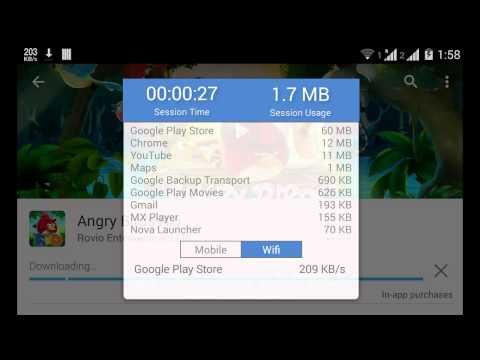
Notification Dialog
A notification dialog appears when you tap the notification having
- Graph to monitor last minute internet activity
- Time and usage of current session
Smarter notifications
Notification appears only when you are connected to internet.
Themes support
You can manually select the color of UI.
Blue status bar icon
Option to choose between blue or white status bar icon. (only for KitKat and below versions of Android)
Upload and Download Speed
Option to show upload and download speed in separate notifications.
Warning: Do not move this app to SD card. It will stop (Force close) when you remove the card.
A simple and convenient tool to keep track of your Internet Speed and Data Usage
Updated on
Safety starts with understanding how developers collect and share your data. Data privacy and security practices may vary based on your use, region, and age. The developer provided this information and may update it over time.
- No data shared with third partiesLearn more about how developers declare sharing
- No data collectedLearn more about how developers declare collection


Ratings and reviews
8.37K reviews

A Google user
- Flag inappropriate
September 12, 2018
Simple. Lightweight. Easy to configure and use. I have used this app for moar than several years across multiple OS-s and devices. And I still love it. This app needs an update for stability for newer devices. No update in nearly two years. It doesn't seem to track monthly data usage correctly. And some apps aren't detected using data..It shows usage, but nothing listed. It also won't calculate for tethered data, either.
445 people found this review helpful
A Google user
- Flag inappropriate
- Show review history
September 20, 2018
The data recording has gotten messed up. On multiple occasions, it showed more than 1.5 GB was used when it hadn't even crossed a couple of hundred MB. The app freezes in the notification bar frequently and I have to touch and open it up to unfreeze. What is going on? How does the free version work better than this? Please fix these issues.
147 people found this review helpful

Brendan Weibrecht
- Flag inappropriate
June 24, 2026
Very handy app! I've been using it since 2013. For Android 16 on my Pixel 9 Pro XL, to still have the icon shown in the status bar without vibrating constantly, I simply had to make the notification silent and use: Settings -> Notifications -> disable 'Hide silent notifications in status bar'
1 person found this review helpful
What’s new
Added support for Android 15
Everyone
Learn moreApp support
About the developer
Sourabh Garg
speedmeterapp@gmail.com
103 , Radha 2 A
Omaxe Enternity Vrindavan
Vrindavan, Uttar Pradesh 281121
India


