
JK BMS
3.1star
2.19K reviews
500K+
Downloads

Teen
info
About this app
Chengdu Jikong Technology Co., Ltd. is a high-tech enterprise focusing on the research and development, production and sales of lithium battery management system. Relying on high-power active balancing technology with independent intellectual property rights, the company is committed to becoming a leader in active balancing management systems for lithium batteries.
At present, the company's main products are Smart BMS with active balancer,Active balancer, lithium battery Voltage difference repair instrument.
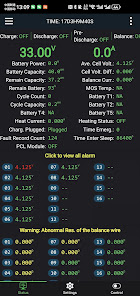
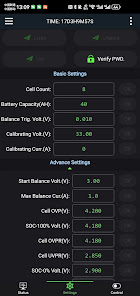
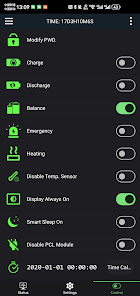
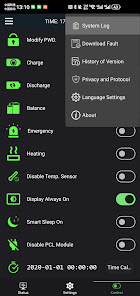
"JK BMS" APP is a mobile phone management software for active balance series products launched by Chengdu Jikong Technology Co., Ltd. Through the APP, you can easily view and modify the performance parameters of the lithium battery.
Key Features:
- Real-time parameter display:
Connect your battery to your phone and you can view the battery's parameters at any time, understanding its status and health condition.
- Active balancer settings:
Through the software, you can set the parameters of the active balancer to ensure battery balance and extend battery life.
- User-friendly interface:
With a user-friendly interface design, you can easily get started and quickly master battery management skills.
Advantages and Benefits:
- Extended battery life:
By setting the active balancer, you can prolong the battery's lifespan and reduce the frequency of battery replacement.
- Energy-saving:
With real-time parameter display, you can timely understand the battery's status and use it reasonably, saving energy.
- Convenient and efficient:
The software is easy to operate, with one-click battery connection, making battery management effortless and time-saving.
Contact number: +8618628129012 。
Official website: www.jk-bms.com/
Authorized Distributor Alibaba:https://jkbms.en.alibaba.com
At present, the company's main products are Smart BMS with active balancer,Active balancer, lithium battery Voltage difference repair instrument.
"JK BMS" APP is a mobile phone management software for active balance series products launched by Chengdu Jikong Technology Co., Ltd. Through the APP, you can easily view and modify the performance parameters of the lithium battery.
Key Features:
- Real-time parameter display:
Connect your battery to your phone and you can view the battery's parameters at any time, understanding its status and health condition.
- Active balancer settings:
Through the software, you can set the parameters of the active balancer to ensure battery balance and extend battery life.
- User-friendly interface:
With a user-friendly interface design, you can easily get started and quickly master battery management skills.
Advantages and Benefits:
- Extended battery life:
By setting the active balancer, you can prolong the battery's lifespan and reduce the frequency of battery replacement.
- Energy-saving:
With real-time parameter display, you can timely understand the battery's status and use it reasonably, saving energy.
- Convenient and efficient:
The software is easy to operate, with one-click battery connection, making battery management effortless and time-saving.
Contact number: +8618628129012 。
Official website: www.jk-bms.com/
Authorized Distributor Alibaba:https://jkbms.en.alibaba.com
Updated on
Safety starts with understanding how developers collect and share your data. Data privacy and security practices may vary based on your use, region, and age. The developer provided this information and may update it over time.

No data shared with third parties
Learn more about how developers declare sharing

No data collected
Learn more about how developers declare collection
Ratings and reviews
3.2
2.12K reviews

John Hanzales
- Flag inappropriate
- Show review history
January 21, 2026
To be honest, compared to the other two apps, one had an auto-connect feature, and the other has nice in-app logs with timestamps and graphs. There is always room for improvement. Still, connecting to and configuring the BMS was very easy. After reading some comments and reviews, I am now scared to change the password 😄 PS: According to the manual, to calibrate the SoC, fully discharge and then fully charge the pack until the BMS stops. After that, it should show correct values.
2 people found this review helpful

Sreenath Es
- Flag inappropriate
- Show review history
November 21, 2025
update 21.11.2025-now working fine but its looks like there is a bug with latest update. whenever we are connecting to bms its log is increasing because its automatically doing time calibration. old review - Not properly working in Android 15, we can't see the top menu for Android device list after connecting first time(area that shows time). Just seeing a cropped vesion.
23 people found this review helpful

Roman Antoniuc
- Flag inappropriate
- Show review history
October 23, 2025
The app is good. But there is one issue. SOC all the time shows wrong. As far you use the batteries with JK bms as a bigger difference between real SOC and shown in the app. One per few days, I have to discharge my battery to the lowest voltage, and only after that the BMS starts showing SOC correctly. But only for the first day. After that, as far you use your battery as a bigger difference.
34 people found this review helpful
App support
phone
Phone number
+8618628129012
About the developer
张鹏
18628129012@139.com
China


