
Cello Tuner & Metronome
Contains adsIn-app purchases

star
97 reviews

Everyone
info
10K+
Downloads

Everyone
Learn more


About this app
Include Standard, 5th Suite, Zoltán Kodály, Whole step down modes.
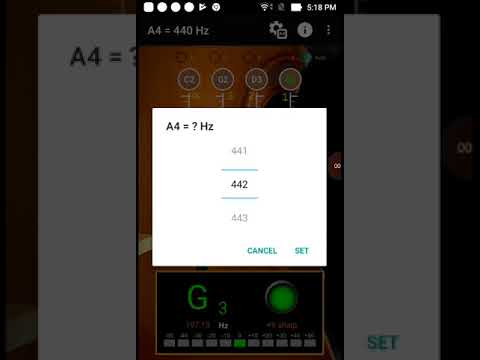
With auto noise filtering. First step is choose the frequency at top of screen, then choose the tuning at the middle of the screen. When you play instrument, the pitch will be shown on the panel for the individual string by indicating signal high or low.
[Tuner]
- Calibrate Piano Sound : Click on an open string then calibrate the sound with your instrument. Piano Sound A4=442.
- A4 Frequency adjustment: choose 428~452 frequencies for A4 string.
- The scale for precision tuning is 10 Quantile for every sub-bit. The green arrow means pitch is accurate and it will turn white once the pitch difference exceeds more than a sub-bit.
[Metronome]
- The operation screen is intuitive and easy to use. All functions can be set on the same page.
- Intuitive beat mode selection, 18 types, including: Grave 25-45 / Largo 40-60 / Lento 45-60 / Larghetto 60-66 / Adagio 66-76 / Adagietto 72-76 / Andante 76-108 / Andantino 80- 108 / Marcia moderato 83-85 /Andante moderato 92-112 / Moderato 108-120 / Allegretto 112-120 / 116-120/ Allegro 120-156 / Vivace 156-176 / Vivacissimo 172-176 / Presto 168-200 / Prestissimo 200 Bpm and over
- Support for "segment beat" function, double, triple and quad beat subdivision
- Support pendulum display mode
- Timing display Helps control the practice time
- Use RTP (Real Time Playback) mode, precise beat, and support dynamic shifting
With auto noise filtering. First step is choose the frequency at top of screen, then choose the tuning at the middle of the screen. When you play instrument, the pitch will be shown on the panel for the individual string by indicating signal high or low.
[Tuner]
- Calibrate Piano Sound : Click on an open string then calibrate the sound with your instrument. Piano Sound A4=442.
- A4 Frequency adjustment: choose 428~452 frequencies for A4 string.
- The scale for precision tuning is 10 Quantile for every sub-bit. The green arrow means pitch is accurate and it will turn white once the pitch difference exceeds more than a sub-bit.
[Metronome]
- The operation screen is intuitive and easy to use. All functions can be set on the same page.
- Intuitive beat mode selection, 18 types, including: Grave 25-45 / Largo 40-60 / Lento 45-60 / Larghetto 60-66 / Adagio 66-76 / Adagietto 72-76 / Andante 76-108 / Andantino 80- 108 / Marcia moderato 83-85 /Andante moderato 92-112 / Moderato 108-120 / Allegretto 112-120 / 116-120/ Allegro 120-156 / Vivace 156-176 / Vivacissimo 172-176 / Presto 168-200 / Prestissimo 200 Bpm and over
- Support for "segment beat" function, double, triple and quad beat subdivision
- Support pendulum display mode
- Timing display Helps control the practice time
- Use RTP (Real Time Playback) mode, precise beat, and support dynamic shifting
Include Standard, 5th Suite, Zoltán Kodály, Whole step down tuning modes.
Updated on
Safety starts with understanding how developers collect and share your data. Data privacy and security practices may vary based on your use, region, and age. The developer provided this information and may update it over time.
- No data shared with third partiesLearn more about how developers declare sharing
- No data collectedLearn more about how developers declare collection
- Data isn’t encrypted
- Data can’t be deleted


Ratings and reviews
90 reviews

A Google user
- Flag inappropriate
August 7, 2019
It's hard to understand how to use at first. It's not accurate and almost impossible to get the right note, it'll go from "too low" to "too high" after a miniscule adjustment. I broke my D string trying to figure out this app.
7 people found this review helpful
KME Software
August 18, 2019
Sorry, let you have a bad feeling, we will try to improve. Thank you.
A Google user
- Flag inappropriate
- Show review history
December 13, 2018
I pereonwlly hated this ad, i hink ths app i way too complicates than it ahould be. The interface is way too busy. Keep it simple!
5 people found this review helpful
KME Software
August 18, 2019
Thank you for your suggestion, we will consider how to simplify. Thank you.
A Google user
- Flag inappropriate
April 3, 2020
Stupid apps! Not even working!!!! Just full of ads!!!!!!!!!!!!
2 people found this review helpful
What’s new
- Correct UI misalignment issues on some devices
Everyone
Learn moreApp support
About the developer
薛幸甫
tunerpitch@gmail.com
達觀路22巷1號
14樓
新店區
新北市, Taiwan 23155


