
GPS Land Measurement & Survey
In-app purchases

star
1.04K reviews

Everyone
info
100K+
Downloads

Everyone
Learn more


About this app
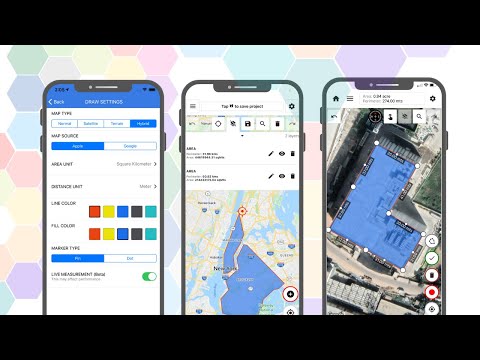
GPS Area Measure - Mapulator is the perfect map calculator for anyone needing precise area measurement, perimeter, and distance calculations on a map. Ideal for land measurement, agriculture, surveying, and construction, this area app delivers accurate results. 🌍
Unleash the power of accurate area and distance measurement with GPS Area Measure - Mapulator, the ultimate mapping tool for professionals and enthusiasts alike. Whether you're a land surveyor, real estate agent, farmer (using agro-measure map pro), construction manager, or simply curious about the dimensions of your surroundings, Mapulator provides the precision and flexibility you need. Effortlessly calculate areas (area app, area land calculator), distances (measured distance), and radii (radius map) directly on the map, transforming your mobile device into a powerful measurement instrument (measurable).📱
Key Features of GPS Area Measure - Mapulator:
• 5 Measurement Tools: This area measurement app offers five tools for area calculators for land, perimeter and area, and radius map measurements.
• Supports Area, Distance, and Radius: Calculate GPS measurement accurately, whether acres, hectares, or other units.
• Multiple Layers within a Project: Organize land area calculator projects with multiple layers.
• 9 Area and 6 Distance Units: Measure land area units such as acres, hectares, square feet(Sq ft),
• Customizable Appearance: Adjust line width, line color, and fill color.
• Multiple Map Types: Use map measurement with satellite, terrain, and hybrid maps.
• GPS Live Measurement: Measure the land area in real-time using the Live GPS field area measure app.
• Location Search: Find any location for accurate agro-measure map pro results.
• Undo/Redo: Correct errors using your land area calculator app.
Export and Share: Share your area survey and GPS measure results in KML or GeoJson.
Why Choose GPS Area Measure - Mapulator?
• Precision: Get GPS area measurement with reliable accuracy.
• User-Friendly: This area measurement app is excellent for professionals and beginners alike.
• Versatile: Ideal for agro-measure map pro needs, land measure, and area land calculator uses.
• Customizable Tools: Perfect for land measurement, perimeter, and area calculations.
• Real-Time GPS Measurement: Walk and measure with GPS area measure.
Who Can Benefit?
• Farmers: Use the area app for agro-measure map pro and land area calculator tasks.
• Surveyors: Conduct accurate area surveys with this GPS field area measure app.
• Construction Pros: Manage land measurement efficiently.
• Real Estate Agents: Provide clients with Accurate perimeter and area data.
• Outdoor Enthusiasts: Measure trails with the area measurement app.
• Roof layers or other roofing needs.
How to Use the App?
• Select Tool: Choose area measure or distance.
• Mark Points: Use the map measurement tool.
• Settings: Adjust line width and color.
• Use GPS Live: Enable GPS measurement in real-time.
• Save/Export: Export your land area calculator projects.
Customize Your Measurements:
Personalize your measurements with Mapulator's customization options. Adjust the line width for clear visibility, choose from a spectrum of line colors to differentiate between measurements, and apply fill colors to area measurements for enhanced visualization. These customization options help you create clear, informative maps that meet your needs. 👈
Multiple Map Types:
Visualize your measurements on your preferred map type. Mapulator supports multiple map types, allowing you to choose the view that best suits your project. Whether you prefer a detailed street map, a topographic view, or a satellite image, provides the flexibility to adapt to your needs.🥰
Integrate with other tools:
Export KML and GeoJSON for area calculations.
Make land measurement, GPS measure, and perimeter and area calculations effortless.
→ Privacy policy: https://mapulator.app/privacy-policy/
→ Terms of Use: https://mapulator.app/terms-and-conditions/
Unleash the power of accurate area and distance measurement with GPS Area Measure - Mapulator, the ultimate mapping tool for professionals and enthusiasts alike. Whether you're a land surveyor, real estate agent, farmer (using agro-measure map pro), construction manager, or simply curious about the dimensions of your surroundings, Mapulator provides the precision and flexibility you need. Effortlessly calculate areas (area app, area land calculator), distances (measured distance), and radii (radius map) directly on the map, transforming your mobile device into a powerful measurement instrument (measurable).📱
Key Features of GPS Area Measure - Mapulator:
• 5 Measurement Tools: This area measurement app offers five tools for area calculators for land, perimeter and area, and radius map measurements.
• Supports Area, Distance, and Radius: Calculate GPS measurement accurately, whether acres, hectares, or other units.
• Multiple Layers within a Project: Organize land area calculator projects with multiple layers.
• 9 Area and 6 Distance Units: Measure land area units such as acres, hectares, square feet(Sq ft),
• Customizable Appearance: Adjust line width, line color, and fill color.
• Multiple Map Types: Use map measurement with satellite, terrain, and hybrid maps.
• GPS Live Measurement: Measure the land area in real-time using the Live GPS field area measure app.
• Location Search: Find any location for accurate agro-measure map pro results.
• Undo/Redo: Correct errors using your land area calculator app.
Export and Share: Share your area survey and GPS measure results in KML or GeoJson.
Why Choose GPS Area Measure - Mapulator?
• Precision: Get GPS area measurement with reliable accuracy.
• User-Friendly: This area measurement app is excellent for professionals and beginners alike.
• Versatile: Ideal for agro-measure map pro needs, land measure, and area land calculator uses.
• Customizable Tools: Perfect for land measurement, perimeter, and area calculations.
• Real-Time GPS Measurement: Walk and measure with GPS area measure.
Who Can Benefit?
• Farmers: Use the area app for agro-measure map pro and land area calculator tasks.
• Surveyors: Conduct accurate area surveys with this GPS field area measure app.
• Construction Pros: Manage land measurement efficiently.
• Real Estate Agents: Provide clients with Accurate perimeter and area data.
• Outdoor Enthusiasts: Measure trails with the area measurement app.
• Roof layers or other roofing needs.
How to Use the App?
• Select Tool: Choose area measure or distance.
• Mark Points: Use the map measurement tool.
• Settings: Adjust line width and color.
• Use GPS Live: Enable GPS measurement in real-time.
• Save/Export: Export your land area calculator projects.
Customize Your Measurements:
Personalize your measurements with Mapulator's customization options. Adjust the line width for clear visibility, choose from a spectrum of line colors to differentiate between measurements, and apply fill colors to area measurements for enhanced visualization. These customization options help you create clear, informative maps that meet your needs. 👈
Multiple Map Types:
Visualize your measurements on your preferred map type. Mapulator supports multiple map types, allowing you to choose the view that best suits your project. Whether you prefer a detailed street map, a topographic view, or a satellite image, provides the flexibility to adapt to your needs.🥰
Integrate with other tools:
Export KML and GeoJSON for area calculations.
Make land measurement, GPS measure, and perimeter and area calculations effortless.
→ Privacy policy: https://mapulator.app/privacy-policy/
→ Terms of Use: https://mapulator.app/terms-and-conditions/
Calculate map area, distance & acreage for land surveys, roofs, fields & more.
Updated on
Safety starts with understanding how developers collect and share your data. Data privacy and security practices may vary based on your use, region, and age. The developer provided this information and may update it over time.
- No data shared with third partiesLearn more about how developers declare sharing
- No data collectedLearn more about how developers declare collection
- Data is encrypted in transit
- You can request that data be deleted


Ratings and reviews
992 reviews

Jared Cyfers
- Flag inappropriate
- Show review history
July 30, 2026
when I try to plot coordinates, it keeps starting me at the wv Pennsylvania state line 2 states away. the keyboard doesn't have the - symbol and it also keeps trying to start me in Asia. its so much extra work than it should be and I haven't gotten it right yet.
LogiSian
July 30, 2026
Thank you for your feedback, and we’re sorry to hear about your experience. This doesn’t sound like the expected behavior. Please contact us at support@mapulator.app with your device model, OS version, and a screen recording of the issue. We’ll investigate it and do our best to get it resolved as quickly as possible. Team Mapulator

Jason S
- Flag inappropriate
July 10, 2026
Amazing map tool! Can be used for everything, from plotting waypoints for gps, to recording metes and bounds! AMAZING! Highly recommended if you want to get precise distances and gps coordinates!
2 people found this review helpful
LogiSian
July 13, 2026
Thank you for your feedback. We’re thrilled to hear that Mapulator is helping with everything from plotting GPS waypoints to recording metes and bounds. Your recommendation and support mean a lot to us and motivate us to keep improving the app. If you ever have any suggestions or ideas, we’d love to hear them. Team Mapulator

Cheryle Daniels
- Flag inappropriate
September 8, 2026
App won't open. As someone else stated, all you can do is change your language. Other than that, it's frozen.
LogiSian
September 8, 2026
Thank you for your feedback, and we’re sorry you experienced this issue. We’ve identified and fixed the bug that was causing the app to get stuck on the language screen. Please update Mapulator to the latest version and try opening the app again. We appreciate your patience and hope the updated version works well for you. Team Mapulator.
What’s new
• Bug fixes and performance improvements.
Everyone
Learn moreApp support
About the developer
LogiSian Technology Solutions Pvt. Ltd.
support@logisian.in
Harikripa
Govt Quarters Road
Mangaluru, Karnataka 575006
India
+91 80885 72172


