oneSafe 5 Password Manager
3.3star
2.03K reviews
50K+
Downloads

Everyone
info


About this app
oneSafe secures all your confidential info, it's Fort Knox in your pocket!
Forgot your PIN? Can’t find your frequent flyer number? Need your passport scan? Struggling to remember all those usernames and passwords to your bank accounts, email and social media? Relax. oneSafe will take care of it.
oneSafe is a super-secure "password manager" app that lets you store all your confidential information in one place with complete security.
With its sleek design, adaptable templates and intuitive user interface, the app is a breeze to use on your device putting all your personal information at your fingertips whenever and wherever you may happen to need it.
oneSafe allows you to:
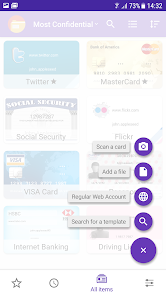
• Easily create, view and edit items (passwords, web accounts, ID, credit cards, passport scan ...) and keep them well organized
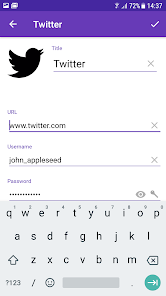
• Take advantage of ready-made templates to enter details quickly
• Easily copy and paste complex usernames and passwords
• Mark any item as a favorite for quick access
• Share your data securely in a password protected archive
• Secure highly secure information in double-protection categories
• Quickly capture information using the 'Scan a Card' feature
Features:
• The highest level of encryption available on mobile device; AES 256 to give watertight protection from any possible cyber attack
• Dropbox integration to allow synchronization with multiple devices (Android, iOS and Mac versions of oneSafe)
• Email and device backup function to safeguard your information
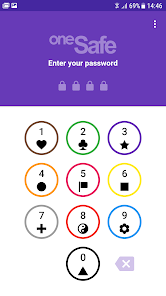
• Multiple authentication methods to choose from
• Ready-made categories to better organize your information
• In-built password generator to create strong passwords.
• Quickly capture information via your camera
oneSafe combines security, simplicity and a sleek design in a password storage application. Download it now and protect any hackers or wandering eyes from getting a sneak peek at your personal data!
Forgot your PIN? Can’t find your frequent flyer number? Need your passport scan? Struggling to remember all those usernames and passwords to your bank accounts, email and social media? Relax. oneSafe will take care of it.
oneSafe is a super-secure "password manager" app that lets you store all your confidential information in one place with complete security.
With its sleek design, adaptable templates and intuitive user interface, the app is a breeze to use on your device putting all your personal information at your fingertips whenever and wherever you may happen to need it.
oneSafe allows you to:
• Easily create, view and edit items (passwords, web accounts, ID, credit cards, passport scan ...) and keep them well organized
• Take advantage of ready-made templates to enter details quickly
• Easily copy and paste complex usernames and passwords
• Mark any item as a favorite for quick access
• Share your data securely in a password protected archive
• Secure highly secure information in double-protection categories
• Quickly capture information using the 'Scan a Card' feature
Features:
• The highest level of encryption available on mobile device; AES 256 to give watertight protection from any possible cyber attack
• Dropbox integration to allow synchronization with multiple devices (Android, iOS and Mac versions of oneSafe)
• Email and device backup function to safeguard your information
• Multiple authentication methods to choose from
• Ready-made categories to better organize your information
• In-built password generator to create strong passwords.
• Quickly capture information via your camera
oneSafe combines security, simplicity and a sleek design in a password storage application. Download it now and protect any hackers or wandering eyes from getting a sneak peek at your personal data!
Updated on
Safety starts with understanding how developers collect and share your data. Data privacy and security practices may vary based on your use, region, and age. The developer provided this information and may update it over time.


Ratings and reviews
3.5
1.94K reviews

A Google user
- Flag inappropriate
January 15, 2019
Had this app on iOS and was delighted to bith find and buy it on the play store. Worked normally for a while, using Dropbox to sync and having a variety of security features that are nice. For some reason, this app no longer plays well with my camera (Pixel XL on Pie) - it is unable to focus or change exposure when scanning in a card. With no manual controls, this makes the app useless for me. Really was a decent app before so I hope this gets fixed.
22 people found this review helpful
A Google user
- Flag inappropriate
- Show review history
December 6, 2018
Keep in mind this app is to store your passwords and that's what it does. You have to input them which is a bit time consuming, but definitely worth it. Lots of options to organize. This is one of the best features, you can make categories and then design each entry. There is a password generator to create difficult passwords that you would never remember. It has been great to change my passwords and have completely different ones for different sites. You can scan cards, import files, take photos. Really handy for business cards. Lots of uses, really like this app. Would give 5 stars if it was easier to add all my passwords.
33 people found this review helpful
A Google user
- Flag inappropriate
November 1, 2019
Used this app for more than 10 years, paid for the upgrade when required, loved it. Haven't experienced any problems until now. I recently received a new phone & tried importing my files into it. I received the message I needed to upgrade. I tried restoring my files, received the message that OneSafe has no record of my payment and I need to upgrade...again. Repeated emails to Customer service have gone unanswered, all of my passwords & files remain on the old device. Will look for another app.
5 people found this review helpful
Lunabee Studio
November 5, 2019
Hi, we answered you on the 24th of October. Didn't you receive our email ? The issue should be fixed with the latest version. If not please contact us at onesafe-support@lunabee.com
What's new
- Fix jammy cool in dark mode
App support
About the developer
LUNABEE STUDIO
studio@lunabee.com
25 RUE CROIX D OR
73000 CHAMBERY
France
+33 4 79 70 04 13


