
MSI Remote Display
2.6star
477 reviews
100K+
Downloads

Everyone
info


About this app
MSI Remote Display for Gaming Monitors
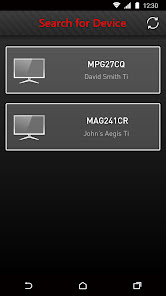
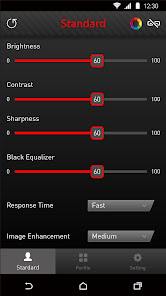
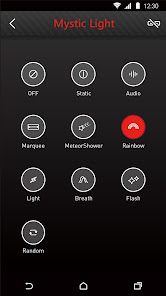
Customize your gaming monitor with MSI Remote Display which allows you to control its settings, including the contrast ratio, brightness and black equalizer, etc., right from your mobile phone. You can even choose the LED effects for the selected gaming monitor with MSI Mystic Light to match your personal style.
* Support with Gaming OSD: version 0.0.2.3 or above (available on MSI official website)
* For Gaming monitor support model list, please visit https://www.msi.com/Landing/MSI-Commander-Unit
Customize your gaming monitor with MSI Remote Display which allows you to control its settings, including the contrast ratio, brightness and black equalizer, etc., right from your mobile phone. You can even choose the LED effects for the selected gaming monitor with MSI Mystic Light to match your personal style.
* Support with Gaming OSD: version 0.0.2.3 or above (available on MSI official website)
* For Gaming monitor support model list, please visit https://www.msi.com/Landing/MSI-Commander-Unit
Updated on
Safety starts with understanding how developers collect and share your data. Data privacy and security practices may vary based on your use, region, and age. The developer provided this information and may update it over time.

No data shared with third parties
Learn more about how developers declare sharing

No data collected
Learn more about how developers declare collection
Ratings and reviews
2.5
460 reviews

Panos Baltzis
- Flag inappropriate
November 21, 2025
What is the reason of having this app when is not really working as intended... If you have the kvm of the monitor to type c, then you can't find your monitor unless your other device is also on the WiFi network not just the same network. MSI you could do better than this....

Lee Mccreight
- Flag inappropriate
February 13, 2022
If the app doesn't find your MSI monitor, ensure that your network profile is set to 'Private' and not 'Public' on your PC/laptop. This fixed it for me, hope it'll work for you :). Another tip: If the 'Gaming OSD 2.0' app on your PC/laptop doesn't launch correctly, turn your monitor off and back on while on the app and it should connect providing all the USB cables supplied are also connected.
25 people found this review helpful

A Google user
- Flag inappropriate
October 28, 2019
App is broken for RGB use, I just purchased a MAG321CURV display from them and I cannot access or change any of the displays settings for the rgb. I have been trying to turn it and cant. So ultimately I just used the built in osd on the display an shut it off. Seems like this is an abandoned app, MSI just inst invested enough in there apps or programs other than afterburner, seems like most of the end user soft is subpar nowadays. Still love ya though MSI
16 people found this review helpful
What’s new
Added support for MPG341CQR QD-OLED X36
Need Gaming Intelligence V0.1.4.4
Need Gaming Intelligence V0.1.4.4
App support
About the developer
微星科技股份有限公司
msiappadm@msi.com
235030台湾新北市中和區
立德街69號
+886 916 979 510


