
PDF Editor: MyPDF Pro
Contains ads


Everyone
info
100+
Downloads

Everyone
Learn more


About this app
A powerful and easy-to-use mobile PDF editor that keeps your documents private. MyPDF Editor Pro provides a complete toolkit to edit, sign, and manage PDFs entirely on your device.
Here are the key features and benefits:
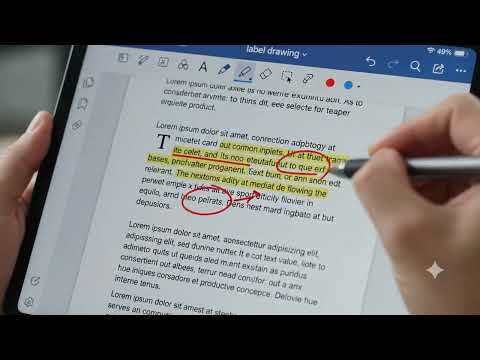
Edit Text and Annotate: Directly edit text within your PDF files. Add notes, highlight sections, and underline important text for effective document markup.
Sign and Create Signatures: Easily create your signature and apply it to documents. Our flexible signature tools let you resize and place your signature exactly where you need it on contracts and forms.
1-Tap Fast & Easy Export: Save and share your documents with a single tap. Our fast export feature lets you quickly share your edited PDF without complex menus or multiple steps.
Zero Cloud Risk - Offline Privacy: Your documents are processed 100% locally on your phone. MyPDF Editor Pro ensures complete privacy, so your sensitive files never leave your device.
Advanced Multilingual Support: View and edit documents in multiple languages. Our app reliably supports Chinese, Korean, Japanese, Arabic, Thai, Hindi, Cyrillic, and CJK text, preventing font or character display issues.
Region Capture and Snipping: Isolate and extract specific content. Use our snipping tool to capture charts, tables, or text sections directly from your PDF for easy reuse.
Optimized Mobile Viewing: Find documents quickly with a clean visual grid. Our optimized viewer allows for fast browsing and easy pinch-to-zoom navigation on mobile screens.
Here are the key features and benefits:
Edit Text and Annotate: Directly edit text within your PDF files. Add notes, highlight sections, and underline important text for effective document markup.
Sign and Create Signatures: Easily create your signature and apply it to documents. Our flexible signature tools let you resize and place your signature exactly where you need it on contracts and forms.
1-Tap Fast & Easy Export: Save and share your documents with a single tap. Our fast export feature lets you quickly share your edited PDF without complex menus or multiple steps.
Zero Cloud Risk - Offline Privacy: Your documents are processed 100% locally on your phone. MyPDF Editor Pro ensures complete privacy, so your sensitive files never leave your device.
Advanced Multilingual Support: View and edit documents in multiple languages. Our app reliably supports Chinese, Korean, Japanese, Arabic, Thai, Hindi, Cyrillic, and CJK text, preventing font or character display issues.
Region Capture and Snipping: Isolate and extract specific content. Use our snipping tool to capture charts, tables, or text sections directly from your PDF for easy reuse.
Optimized Mobile Viewing: Find documents quickly with a clean visual grid. Our optimized viewer allows for fast browsing and easy pinch-to-zoom navigation on mobile screens.
PDF Editor, Viewer, Sign, Label, Add Text & Fast Export With No Subscription
Updated on
Safety starts with understanding how developers collect and share your data. Data privacy and security practices may vary based on your use, region, and age. The developer provided this information and may update it over time.
- No data shared with third partiesLearn more about how developers declare sharing
- No data collectedLearn more about how developers declare collection


What’s new
- Updated to SDK36 to ensure more phone was able to use;
- Completely fixed working PDF export with multilanguage;
- Implemented dynamic baseline text rendering alignment metrics to prevent layout truncation;
- Enhanced global user support with native integration for mixed Chinese, English, Arabic, and Thai, Korea, Japan, and Russia character scripts;
- Unlimited Export with working multilanguage text export feature;
- Completely fixed working PDF export with multilanguage;
- Implemented dynamic baseline text rendering alignment metrics to prevent layout truncation;
- Enhanced global user support with native integration for mixed Chinese, English, Arabic, and Thai, Korea, Japan, and Russia character scripts;
- Unlimited Export with working multilanguage text export feature;


