
NetBlade: WiFi & LAN Scanner
Contains adsIn-app purchases

star
60 reviews

Everyone
info
500+
Downloads

Everyone
Learn more


About this app
NetBlade turns your phone into a complete network toolkit — scan your LAN, probe ports, analyze Wi-Fi, run pro diagnostics and even SSH into your servers, all in a clean, modern, privacy-first interface. Built for sysadmins, IT pros and curious power users. Your scans never leave the device.
▸ LAN SCANNER
Discover every device in seconds: IP, MAC and vendor, hostname, latency and role (gateway, your device). Live MAC recovery via the router's SNMP table (Android hides MACs). Devices are remembered with a NEW badge, custom names, notes, icons and tags (Home, Work…).
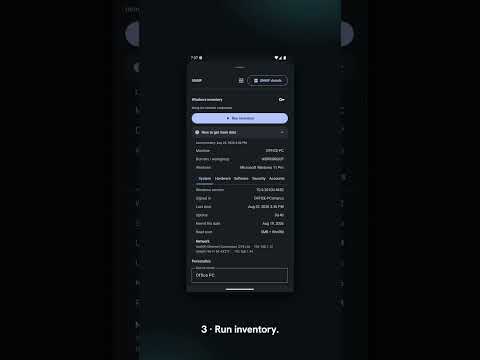
▸ WINDOWS PC INVENTORY (NO AGENT)
Point NetBlade at a Windows PC and it reads the machine itself over SMB and WinRM — nothing to install on it. Exact build, hardware, disks, running services, installed programs with their versions, updates, shares, local accounts and admins. And the defences that matter: antivirus and whether it is really running, firewall profile by profile, BitLocker per volume, TPM, SMB1.
▸ KNOWN VULNERABILITIES
For every program it can name exactly, NetBlade asks the National Vulnerability Database which published flaws affect that version — worst first, with the CVSS score and a link to the entry. A saved network shows the whole picture: every flaw across it, and which machines carry it.
▸ DEVICE INSIGHT
Open any device to see its sharing & services, browse its real SMB shared folders (with optional credentials), and identify it locally — NetBIOS name, OS guess and web-server banner. A rich SNMP panel shows printers (toner, page count), NAS and servers (storage, CPU) and switches, with a live interface-traffic graph. No cloud, no account.
▸ PORT SCANNER
Fast TCP scan with service names, descriptions and a risk rating, plus real UDP service probes (DNS, NTP, TFTP, mDNS, NetBIOS, SNMP). Stealth/firewall detection and quick CVE lookups.
▸ WI-FI ANALYZER
List nearby networks with channel, signal and security. See 2.4 / 5 / 6 GHz channel usage, get a best-channel recommendation and measure Wi-Fi coverage room by room.
▸ SSH & DIAGNOSTICS
Built-in SSH terminal to your servers and switches, with saved hosts. Plus DNS records (A/AAAA/MX/TXT/SRV/CAA…), a latency/jitter/loss monitor, scan any subnet, ping, traceroute, WHOIS, subnet calculator, Wake-on-LAN, TLS certificate inspector, SNMP v1/v2c/v3, Bluetooth LE scanner, speed test and public-IP / WAN info.
▸ MONITORING & ALERTS
Optional background monitoring per saved network: get notified when devices arrive or leave. High-priority alerts for new cameras or devices exposing risky services. An internet uptime monitor (outages + uptime %) and a network events timeline. Quiet hours and per-device mute.
▸ SAVE & SHARE
Save scans and export to CSV, JSON or PDF. Share device details with a QR code. Full backup & restore. Home-screen widgets and a Quick Settings tile.
▸ MADE FOR YOU
Light and dark themes, Material You colors. Available in 42 languages.
PRIVACY
NetBlade works offline. Scan results are stored only on your device and are never uploaded.
Note: some data (MAC / vendor of other devices) depends on your Android version — Android 10+ restricts ARP access for non-rooted apps; NetBlade recovers it via your router's SNMP.
Vulnerability checks are opt-in and send only the name and version of recognised programs — never the machine name, the software list or your credentials.
Optional app lock: fingerprint, face or PIN before opening, because saved scans hold addresses, credentials and known flaws.
Free, ad-supported. Remove ads with a one-time purchase.
▸ LAN SCANNER
Discover every device in seconds: IP, MAC and vendor, hostname, latency and role (gateway, your device). Live MAC recovery via the router's SNMP table (Android hides MACs). Devices are remembered with a NEW badge, custom names, notes, icons and tags (Home, Work…).
▸ WINDOWS PC INVENTORY (NO AGENT)
Point NetBlade at a Windows PC and it reads the machine itself over SMB and WinRM — nothing to install on it. Exact build, hardware, disks, running services, installed programs with their versions, updates, shares, local accounts and admins. And the defences that matter: antivirus and whether it is really running, firewall profile by profile, BitLocker per volume, TPM, SMB1.
▸ KNOWN VULNERABILITIES
For every program it can name exactly, NetBlade asks the National Vulnerability Database which published flaws affect that version — worst first, with the CVSS score and a link to the entry. A saved network shows the whole picture: every flaw across it, and which machines carry it.
▸ DEVICE INSIGHT
Open any device to see its sharing & services, browse its real SMB shared folders (with optional credentials), and identify it locally — NetBIOS name, OS guess and web-server banner. A rich SNMP panel shows printers (toner, page count), NAS and servers (storage, CPU) and switches, with a live interface-traffic graph. No cloud, no account.
▸ PORT SCANNER
Fast TCP scan with service names, descriptions and a risk rating, plus real UDP service probes (DNS, NTP, TFTP, mDNS, NetBIOS, SNMP). Stealth/firewall detection and quick CVE lookups.
▸ WI-FI ANALYZER
List nearby networks with channel, signal and security. See 2.4 / 5 / 6 GHz channel usage, get a best-channel recommendation and measure Wi-Fi coverage room by room.
▸ SSH & DIAGNOSTICS
Built-in SSH terminal to your servers and switches, with saved hosts. Plus DNS records (A/AAAA/MX/TXT/SRV/CAA…), a latency/jitter/loss monitor, scan any subnet, ping, traceroute, WHOIS, subnet calculator, Wake-on-LAN, TLS certificate inspector, SNMP v1/v2c/v3, Bluetooth LE scanner, speed test and public-IP / WAN info.
▸ MONITORING & ALERTS
Optional background monitoring per saved network: get notified when devices arrive or leave. High-priority alerts for new cameras or devices exposing risky services. An internet uptime monitor (outages + uptime %) and a network events timeline. Quiet hours and per-device mute.
▸ SAVE & SHARE
Save scans and export to CSV, JSON or PDF. Share device details with a QR code. Full backup & restore. Home-screen widgets and a Quick Settings tile.
▸ MADE FOR YOU
Light and dark themes, Material You colors. Available in 42 languages.
PRIVACY
NetBlade works offline. Scan results are stored only on your device and are never uploaded.
Note: some data (MAC / vendor of other devices) depends on your Android version — Android 10+ restricts ARP access for non-rooted apps; NetBlade recovers it via your router's SNMP.
Vulnerability checks are opt-in and send only the name and version of recognised programs — never the machine name, the software list or your credentials.
Optional app lock: fingerprint, face or PIN before opening, because saved scans hold addresses, credentials and known flaws.
Free, ad-supported. Remove ads with a one-time purchase.
LAN/Wi-Fi scanner with Windows PC inventory, CVE checks, SSH & SNMP
Updated on
Featured stories

Safety starts with understanding how developers collect and share your data. Data privacy and security practices may vary based on your use, region, and age. The developer provided this information and may update it over time.
- This app may share these data types with third partiesDevice or other IDs
- No data collectedLearn more about how developers declare collection
- Data is encrypted in transit


Ratings and reviews
59 reviews

Arlind Igrishti
- Flag inappropriate
August 28, 2026
great app, quite a lot of functionality in there, I'm just curious if it has that functionality for lan connection because I haven't had the chance to test it yet, if it could also have a static IP changer it would even greater, but either way, intuitive app and good functionality !!
Innovatek Software
August 28, 2026
Thank you! Yes — the LAN scan is the heart of it: every device on the network you are on, with IP, MAC, vendor, hostname and open ports. A static IP changer is sadly out of reach: Android only lets its own Wi-Fi settings set that, no app can. Keep the ideas coming though!

i s
- Flag inappropriate
September 8, 2026
The app is very useful, and easy to understand. It shows much information of your network, sometimes even too much but it's a good thing. Highly recommend. It has a beautiful UI with buttery smooth animations. Definitely give it a try!
Innovatek Software
September 10, 2026
Thank you — this made my day. "Sometimes even too much" is exactly the line I keep walking: show what's really on the network without burying it. Glad the UI and the animations land too. If anything ever feels missing or off, info@innovateksoftware.com reaches me directly.

Phil Boyce
- Flag inappropriate
August 27, 2026
What an amazing app. So many great and useful network tools. This replaces 3 previous apps and has it all in one really easy and easy to use app. Kudos to the developer. Don't see many polished apps as this.
Innovatek Software
August 27, 2026
Replacing three apps with one is exactly what I was hoping someone would say — thank you, Phil. I put a lot of care into keeping it powerful without getting cluttered, so "polished" means a great deal. Enjoy the toolkit!
What’s new
NetBlade 1.8.5
• Bug fixes and small improvements.
• Bug fixes and small improvements.
Everyone
Learn moreApp support
About the developer
Carmelina Cafaro
info@innovateksoftware.com
Contrada Piano del Pero, 11
84046 Ascea
Italy


