
Notion: Music Notation & Tab
In-app purchases

star
1.29K reviews

Everyone
info
100K+
Downloads


About this app
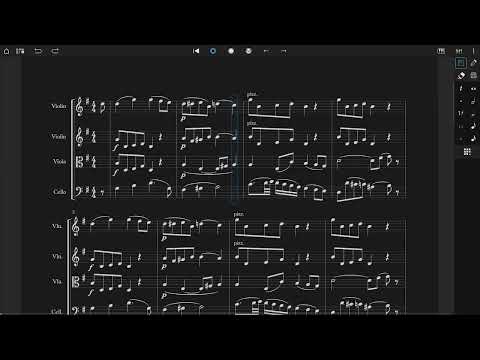
Notion is a free, award-winning music composition app for Android on phones, tablets, Chromebooks, and more! You’ll effortlessly compose dynamic sheet music in traditional musical notation or guitar tablature with its intuitive touch-based interface and incredibly broad editing capabilities.
With a user-friendly interface and simple interactive piano keyboard, fretboard, drum pad, and even optional Handwriting Recognition, Notion makes it easy to get started composing your music. You’ll hear your music performed with the most realistic playback possible, using real audio samples recorded by the London Symphony Orchestra at Abbey Road Studios.
Notion is a native cross-platform app, meaning you can write anywhere on any device without requiring a constant Internet connection. And when you’re back online, you’ll be able to sync your work across multiple devices through your preferred cloud provider. Start your work on one device and finish it on another. Once you are happy with your creation you can share the Notion file, or export as MIDI, MusicXML, PDF or as an audio file. You can even optionally transmit scores across a network with other instances of Notion, or between Notion and the Fender Studio Pro DAW.
Compose, edit, and play back your sheet music performed with real piano and orchestral samples recorded by the London Symphony Orchestra at Abbey Road Studios — along with outstanding sampled guitar, bass, drums and other popular instruments. And when you’re ready for more sounds, you’ll find the extensive library of Notion Add-on Soundsets as part of the Feature Bundle. To save space, the initial app download contains just piano — you can then manage which of the bundled Soundsets to have on your device or keep in the cloud, just tap on Sound Installation.
Notion has been featured in various worldwide campaigns and has won several awards, including a prestigious music industry NAMM TEC Award for Best Smartphone/Tablet App.
What you get:
Notion includes unlimited staves, comprehensive editing features and core orchestral and rhythm section Soundsets — all for free. Register to get an additional free Welcome Pack which unlocks an additional Soundset (containing Solo Strings, Classical Saxophones, and Glockenspiel), and the multivoice function that allows writing in up to four voices per staff. Then for the full experience, either sign in with your Fender Studio Pro+ membership or purchase the Notion Feature Bundle. This unlocks Handwriting Recognition, all the Expansion Soundsets (including many auxiliary instruments and additional articulations and effects), additional audio export formats (m4a, OPUS, FLAC) and direct score transfer with Notion and Fender Studio Pro running on the same network.
Free:
Unlimited staves
All editing features
Core Soundsets
Export as MIDI, PDF, wav, mp3
Register for free:
Reward Soundset including Solo Strings, Glockenspiel, Classical Saxophones
Additionally write for voices 3 and 4 in a single staff
Export as MusicXML, Compressed MusicXML
Feature Bundle:
Handwriting Recognition, powered by MyScript
Automatic pen vs. finger recognition to switch between handwriting and edit mode with supported styluses
Adjustable timer for Handwriting Recognition
Layout Control
All Expansion Soundsets
Additional audio export formats (m4a, OPUS, FLAC)
Transmit scores across a network with other instances of Notion, or between Notion and Fender Studio Pro
With a user-friendly interface and simple interactive piano keyboard, fretboard, drum pad, and even optional Handwriting Recognition, Notion makes it easy to get started composing your music. You’ll hear your music performed with the most realistic playback possible, using real audio samples recorded by the London Symphony Orchestra at Abbey Road Studios.
Notion is a native cross-platform app, meaning you can write anywhere on any device without requiring a constant Internet connection. And when you’re back online, you’ll be able to sync your work across multiple devices through your preferred cloud provider. Start your work on one device and finish it on another. Once you are happy with your creation you can share the Notion file, or export as MIDI, MusicXML, PDF or as an audio file. You can even optionally transmit scores across a network with other instances of Notion, or between Notion and the Fender Studio Pro DAW.
Compose, edit, and play back your sheet music performed with real piano and orchestral samples recorded by the London Symphony Orchestra at Abbey Road Studios — along with outstanding sampled guitar, bass, drums and other popular instruments. And when you’re ready for more sounds, you’ll find the extensive library of Notion Add-on Soundsets as part of the Feature Bundle. To save space, the initial app download contains just piano — you can then manage which of the bundled Soundsets to have on your device or keep in the cloud, just tap on Sound Installation.
Notion has been featured in various worldwide campaigns and has won several awards, including a prestigious music industry NAMM TEC Award for Best Smartphone/Tablet App.
What you get:
Notion includes unlimited staves, comprehensive editing features and core orchestral and rhythm section Soundsets — all for free. Register to get an additional free Welcome Pack which unlocks an additional Soundset (containing Solo Strings, Classical Saxophones, and Glockenspiel), and the multivoice function that allows writing in up to four voices per staff. Then for the full experience, either sign in with your Fender Studio Pro+ membership or purchase the Notion Feature Bundle. This unlocks Handwriting Recognition, all the Expansion Soundsets (including many auxiliary instruments and additional articulations and effects), additional audio export formats (m4a, OPUS, FLAC) and direct score transfer with Notion and Fender Studio Pro running on the same network.
Free:
Unlimited staves
All editing features
Core Soundsets
Export as MIDI, PDF, wav, mp3
Register for free:
Reward Soundset including Solo Strings, Glockenspiel, Classical Saxophones
Additionally write for voices 3 and 4 in a single staff
Export as MusicXML, Compressed MusicXML
Feature Bundle:
Handwriting Recognition, powered by MyScript
Automatic pen vs. finger recognition to switch between handwriting and edit mode with supported styluses
Adjustable timer for Handwriting Recognition
Layout Control
All Expansion Soundsets
Additional audio export formats (m4a, OPUS, FLAC)
Transmit scores across a network with other instances of Notion, or between Notion and Fender Studio Pro
Compose anywhere
Updated on
Safety starts with understanding how developers collect and share your data. Data privacy and security practices may vary based on your use, region, and age. The developer provided this information and may update it over time.
- No data shared with third partiesLearn more about how developers declare sharing
- This app may collect these data typesPersonal info and Device or other IDs
- Data is encrypted in transit
- You can request that data be deleted
- Committed to follow the Play Families Policy


Ratings and reviews
972 reviews

Bohdan
- Flag inappropriate
June 7, 2024
So I love this app, but I've got a horror story. I've been using Notion mobile for a couple of years now, and it's fantastic. Like 5/5. The reason I took a star off is because I got a new phone recently and (despite having registered my acount) none of my music transferred. I lost like 2 and a half years worth of work and I have no clue how to get it back, nor if that's even possible. So the app is great for composing, but make sure you save your scores elsewhere too!
13 people found this review helpful
Fender Musical Instruments Corporation
June 12, 2024
Hi, unless you are specifically saving your scores into a Cloud folder (e.g. Dropbox, OneDrive, Google Drive etc), Notion will work like any other app and store documents locally. If you have your old phone still with Notion still on it, then you should still have those files on the old device.

Isaac Smith
- Flag inappropriate
March 1, 2025
I really like this app but there are a few things that I wish were different 1. I wish that there was an actual bass saxophone so I wouldn't have to use a contrabass and change the settings to be in Bb 2. When exporting mp3s I wish that it was exported in the background so that in case I touched my phone on accident, the export wouldn't stop. 3. Another thing I noticed was when I wrote forte pianos, they either didn't go soft or just cut out completely Other than that, it's a really good app.
5 people found this review helpful

Kevin Wanamaker
- Flag inappropriate
October 21, 2022
This app is awesome! Instead of wasting time with mindless mobile games, Notion Mobile let's you do something valuable. It is easy enough to just jump in and play around, and it is powerful enough to seriously write music. The interface is very similar to the desktop app, which is great. It is rather intuitive, but if you are not familiar with the desktop Notion you will need to take a little time to learn the different functions. So happy to have Notion with me on the go. Thank you PreSonus!
35 people found this review helpful
Fender Musical Instruments Corporation
October 24, 2022
Thanks for the feedback – happy you are enjoying the app!
For community help, tips and support, join our new Facebook user group at https://www.facebook.com/groups/PreSonusNotionUsers/
Or our Notion Mobile forum at
https://forums.presonus.com/viewforum.php?f=416
What’s new
Welcome to Notion 3.7.1 Maintenance Release
For the full guide, check: https://shorturl.at/sAETQ
For the full guide, check: https://shorturl.at/sAETQ
App support
About the developer
Fender Musical Instruments Corporation
support@fender.com
17600 N Perimeter Dr Ste 100
Scottsdale, AZ 85255
United States
+1 323-210-1800


