
Scalefusion -Kiosk & MDM Agent

4.1star
2.84K reviews
100K+
Downloads

Everyone
info



About this app
Scalefusion is an industry-leading Kiosk Lockdown and Mobile Device Management Solution that allows organizations to secure and manage company-owned and employee-owned (BYOD) devices.
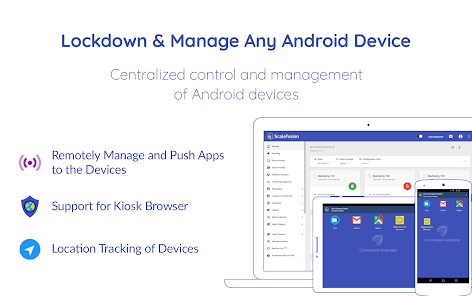
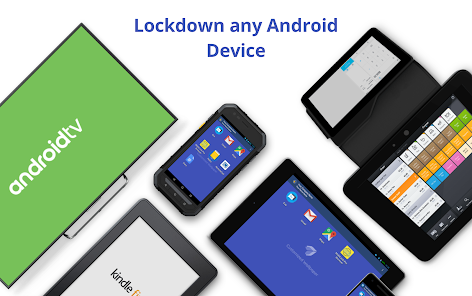
Scalefusion Kiosk Lockdown & MDM Agent app allows organizations to secure and manage Android-based endpoints, including smartphones, tablets, laptops, rugged devices, mPOS, and digital signages.
Our Kiosk Lockdown Software for Android offer single & multi-app Kiosk mode in which the default home screen/launcher is replaced with a customizable screen that limits user access to selected applications enabled by you. Kiosk Mode prevents misuse of Android tablets and smartphones or interactive self-service kiosks.
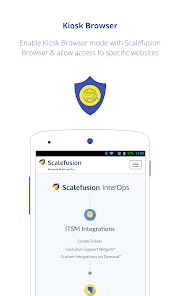
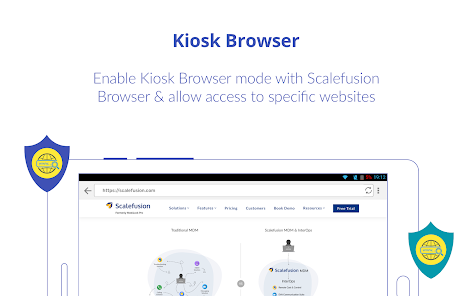
Our web-based dashboard allows you to manage the Android devices remotely; enable or disable applications that are essential for your business and block unnecessary data consuming apps such as games, social media, etc. With our custom Kiosk Lockdown Browser, you can whitelist specific websites to restrict users from browsing unwanted websites.
Features:
ANDROID KIOSK MODE
• Lockdown tablets/phones to multi-app Kiosk mode
• Lockdown tablets/phones in single app mode
• Auto launch application on device reboot
MOBILE DEVICE MANAGEMENT
• Remotely Lock or Unlock Android devices
• Remotely Wipe images and videos
• Allow/disallow users from accessing the “Wifi Connection” on their device
• View device specific data usage
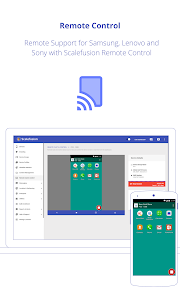
SCALEFUSION REMOTE CONTROL
• Control Android device remotely from Scalefusion dashboard (Only Samsung, LG, Sony & Lenovo devices)
KIOSK BROWSER LOCKDOWN
• Whitelist website with our custom Android Kiosk Browser
• Add browser shortcut & favicon on the device home screen
• Disable address bar
• Multi Tab support
LOCATION TRACKING
• Track device location in real-time
• Set geofences & get notified of geofence breach
MOBILE APPLICATION MANAGEMENT
• Upload your APKs & remotely install them on Android devices
• Remotely update, uninstall & distribute apps
• App version control support
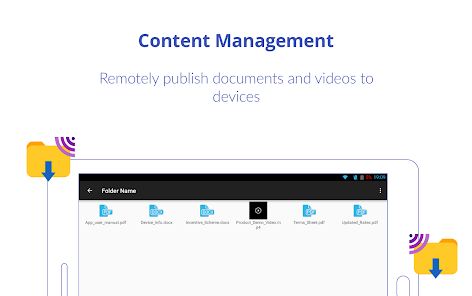
MOBILE CONTENT MANAGEMENT
• Remotely publish/unpublish files & folders to devices
• Multiple file format support
CUSTOM BRANDING
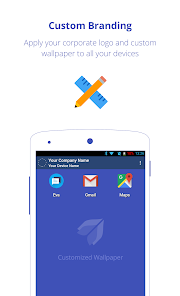
• Add custom logo, wallpaper, top bar color
• Change app icon size, text color & label color
Areas of use:
- Android Tablets & smartphones for field force
- Tablets at schools & universities
- Android tablet-based Interactive kiosks in retail
- Kiosk App for Hospitals, Restaurants & Logistics
- Kiosk App for Digital Signage & mPOS
- Custom Kiosk Lockdown solutions for Enterprise
14-day free trial. No credit card required
Pricing:
Volume based pricing
https://www.scalefusion.com/pricing
Why us?
- Free live chat, Phone & Video call based support
- Scalefusion (Formerly MobiLock Pro) supports wide-range of Android-powered devices
Important Note:
1. This app uses the Device Administrator permission.
2. Scalefusion collects the Installed Applications, Location, Device Hardware Details, SIM Information, IP Address and makes it available securely and only to your IT Admin or Organization.
3. Scalefusion requires access to All Files to provide for device management features like remotely pulling or pushing a file and opening a file as required by IT Admins and since the devices will be on field after enrollment this permission needs to be granted at enrollment.
4. Scalefusion uses Accessibility APIs on certain devices to prevent users from using applications that are not allowed for them when the device is managed by an Enterprise. However this does nor prevent you from uninstalling any application. This permission is not used to inject events or to capture/transmit screen data at any time. For any questions on how we use this permission please reach out to our support.
Contact US:
Support: support@scalefusion.com
Sales : sales@scalefusion.com
Website : https://scalefusion.com
Note: Scalefusion was formerly known as MobiLock Pro.
Scalefusion Kiosk Lockdown & MDM Agent app allows organizations to secure and manage Android-based endpoints, including smartphones, tablets, laptops, rugged devices, mPOS, and digital signages.
Our Kiosk Lockdown Software for Android offer single & multi-app Kiosk mode in which the default home screen/launcher is replaced with a customizable screen that limits user access to selected applications enabled by you. Kiosk Mode prevents misuse of Android tablets and smartphones or interactive self-service kiosks.
Our web-based dashboard allows you to manage the Android devices remotely; enable or disable applications that are essential for your business and block unnecessary data consuming apps such as games, social media, etc. With our custom Kiosk Lockdown Browser, you can whitelist specific websites to restrict users from browsing unwanted websites.
Features:
ANDROID KIOSK MODE
• Lockdown tablets/phones to multi-app Kiosk mode
• Lockdown tablets/phones in single app mode
• Auto launch application on device reboot
MOBILE DEVICE MANAGEMENT
• Remotely Lock or Unlock Android devices
• Remotely Wipe images and videos
• Allow/disallow users from accessing the “Wifi Connection” on their device
• View device specific data usage
SCALEFUSION REMOTE CONTROL
• Control Android device remotely from Scalefusion dashboard (Only Samsung, LG, Sony & Lenovo devices)
KIOSK BROWSER LOCKDOWN
• Whitelist website with our custom Android Kiosk Browser
• Add browser shortcut & favicon on the device home screen
• Disable address bar
• Multi Tab support
LOCATION TRACKING
• Track device location in real-time
• Set geofences & get notified of geofence breach
MOBILE APPLICATION MANAGEMENT
• Upload your APKs & remotely install them on Android devices
• Remotely update, uninstall & distribute apps
• App version control support
MOBILE CONTENT MANAGEMENT
• Remotely publish/unpublish files & folders to devices
• Multiple file format support
CUSTOM BRANDING
• Add custom logo, wallpaper, top bar color
• Change app icon size, text color & label color
Areas of use:
- Android Tablets & smartphones for field force
- Tablets at schools & universities
- Android tablet-based Interactive kiosks in retail
- Kiosk App for Hospitals, Restaurants & Logistics
- Kiosk App for Digital Signage & mPOS
- Custom Kiosk Lockdown solutions for Enterprise
14-day free trial. No credit card required
Pricing:
Volume based pricing
https://www.scalefusion.com/pricing
Why us?
- Free live chat, Phone & Video call based support
- Scalefusion (Formerly MobiLock Pro) supports wide-range of Android-powered devices
Important Note:
1. This app uses the Device Administrator permission.
2. Scalefusion collects the Installed Applications, Location, Device Hardware Details, SIM Information, IP Address and makes it available securely and only to your IT Admin or Organization.
3. Scalefusion requires access to All Files to provide for device management features like remotely pulling or pushing a file and opening a file as required by IT Admins and since the devices will be on field after enrollment this permission needs to be granted at enrollment.
4. Scalefusion uses Accessibility APIs on certain devices to prevent users from using applications that are not allowed for them when the device is managed by an Enterprise. However this does nor prevent you from uninstalling any application. This permission is not used to inject events or to capture/transmit screen data at any time. For any questions on how we use this permission please reach out to our support.
Contact US:
Support: support@scalefusion.com
Sales : sales@scalefusion.com
Website : https://scalefusion.com
Note: Scalefusion was formerly known as MobiLock Pro.
Updated on
Safety starts with understanding how developers collect and share your data. Data privacy and security practices may vary based on your use, region, and age. The developer provided this information and may update it over time.

No data shared with third parties
Learn more about how developers declare sharing

This app may collect these data types
Personal info

Data is encrypted in transit

You can request that data be deleted
Ratings and reviews
4.0
1.84K reviews

Alok Londhe
- Flag inappropriate
- Show review history
April 20, 2021
Scalefusion provides excellent functionality at an affordable price. I use Scalefusion to manage Android devices, the platform UI looks great and is intuitive to use. All of the major features my business needed were there, initial setup for device enrollment is done with ease. Their support really is amazing! They have been very quick to help me every time I've need it
3,130 people found this review helpful

A Google user
- Flag inappropriate
October 10, 2019
Nice app , but there many problem I am using realme 3pro device-android 9 , In this all the setup is done but it can't change my home screen setting from color os to scale fusion ,finally i manually go to settings and change default to scale fusion 2nd - it can't prevent theives from turning off the phone by pressing power key On the other hand alarmy app available on play store can prevent phone from turning off if alarm is ringing so it is best for me to add this feature for security purpse
952 people found this review helpful

APOORAV GULERIA
- Flag inappropriate
- Show review history
March 10, 2024
I am giving 1 star because there is no lower feedback available here this is the worst app I have evere used it is just annoying and the worst part is am not able get rid of it I want to uninstall but I can't there are lots of bugs due to this app . My phone started hanging not just this .it doesn't even have the option to disable it .
319 people found this review helpful
What's new
-Time-Based Access for Applications on CompanyOwned apps
-Enhanced InActivity & GeoFence Compliance workflows to enforce even more actions
-Enhanced Kiosk/launcher that extends it to a full-blown launcher with all apps or suspends apps in background
-Policy enhancements to disable/wipe the SD Card, prevent mobile data usage for selected apps, block uninstallation of specific apps, control navigation mode & many more.
More details https://help.scalefusion.com/docs/latest-release-notes-year-2024
-Enhanced InActivity & GeoFence Compliance workflows to enforce even more actions
-Enhanced Kiosk/launcher that extends it to a full-blown launcher with all apps or suspends apps in background
-Policy enhancements to disable/wipe the SD Card, prevent mobile data usage for selected apps, block uninstallation of specific apps, control navigation mode & many more.
More details https://help.scalefusion.com/docs/latest-release-notes-year-2024


