
Qustodio Parental Control App
In-app purchases
3.8star
15.1K reviews
1M+
Downloads

Everyone
info






About this app
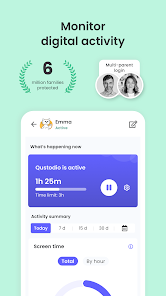
Awarded PC Mag’s Editors’ Choice, Qustodio Parental Control App makes parenting easier with daily screen time limits, app monitoring (including social media and YouTube), app blocking, kid tracking, family mode, porn blocking and more.
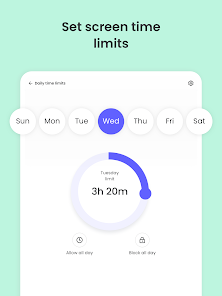
- Screen Time Control: Automatically blocks the device after the set time has passed
- Block, Monitor & Parental Filter: Tracks and controls what your kids access on the internet including delicate content and adult content filter
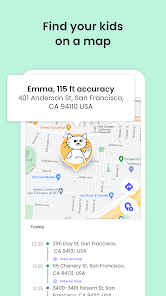
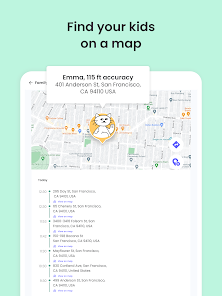
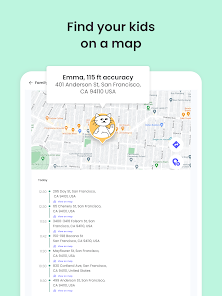
- Family Locator & GPS Family Tracker: Tracks your kid's phone and sends you the GPS location
Start by downloading this Qustodio Parental Control App onto your device. Then download the Kids App Qustodio companion app onto your child’s devices. Together, the apps allow you to seamlessly manage your child’s daily screen time allowance on linked mobile, tablet or desktop devices across platforms including Android, iOS and other major operating systems.
Protect your child’s online safety
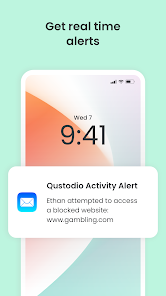
✓ Filter web (block games, porn, gambling and lock out unwanted content)
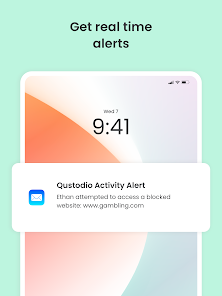
✓ Receive alerts about web activity and blocked websites
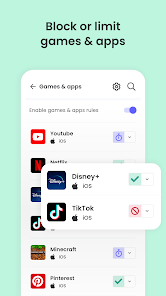
✓ Block games & apps
✓ Enforce safe search
Nurture healthy habits
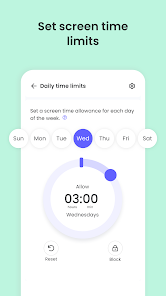
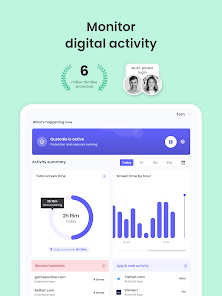
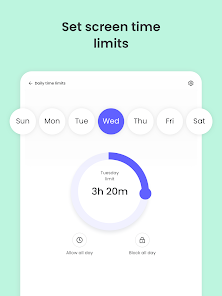
✓ Set daily screen time limits
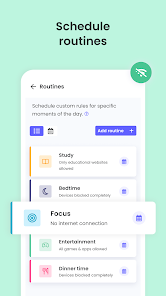
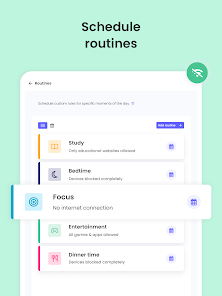
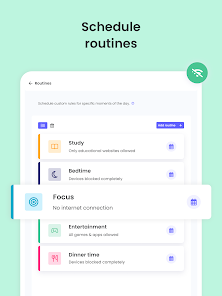
✓ Schedule restricted times
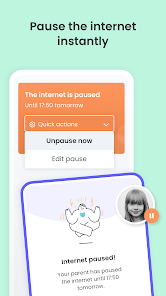
✓ Pause the internet at the click of a button
✓ Set limits on games & apps
Have full visibility
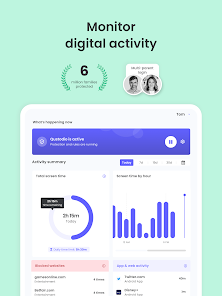
✓ Get 30-day reports about online activity
✓ Receive app download alerts
✓ Monitor Youtube activity
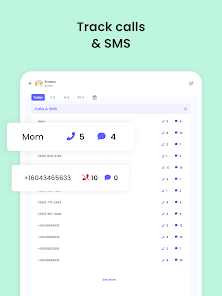
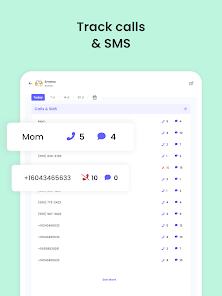
✓ Track calls and SMS messaging
✓ Supervise together: Invite another parent/guardian to monitor and set rules for your child (co-parent)
✓ Install a panic button onto your kid's device
✓ Install Qustodio to monitor screen time on any iOS, Windows, Mac, Android or Kindle device
Locate your family
✓ GPS location monitoring (geolocation kid tracker)
✓ Find your child’s phone
✓ Locate kids on the move
✓ Share your location
✓ Save your favorite places
Choose Qustodio’s free parental control plan or upgrade to the premium plan for full access to all the features.
How to protect, block, & monitor screen time with Qustodio Parental Control Apps:
1 – First download Qustodio Parental Control App onto your device (usually your mobile phone or laptop), create an account or log in
2 – Then install Kids App Qustodio on the device you want to supervise
3 – Log in and follow the quick setup instructions
4 – Once done, inappropriate websites will be blocked automatically
5 – To monitor activity and screen time use this Qustodio Parental Control App on a Parent’s device or log in to your online Qustodio Family Screen Time dashboard (https://family.qustodio.com)
Our FAQ:
• Does Qustodio Parental Control family screen time blocker app support Android 8 (Oreo): Yes.
• Does Qustodio family screen time blocker app work on other platforms besides Android? Qustodio can protect Windows, Mac, iOS, Kindle and Android.
• What languages do you support? Qustodio is available in English, Spanish, French, Italian, Portuguese, German, Japanese and Chinese.
For support. Contact us here: https://www.qustodio.com/help and support@qustodio.com
Notes:
This app uses the Device Administrator permission. This will prevent a user from uninstalling Qustodio Family Screen Time App without your knowledge.
This app uses Accessibility services to build an excellent device experience that helps users with behavioral disabilities set appropriate levels of access and monitoring of screen time, web content and apps, in order to limit their risks and enjoy life normally.
Troubleshooting notes:
Huawei devices owners: Battery-saving mode needs to be disabled for Qustodio.
- Screen Time Control: Automatically blocks the device after the set time has passed
- Block, Monitor & Parental Filter: Tracks and controls what your kids access on the internet including delicate content and adult content filter
- Family Locator & GPS Family Tracker: Tracks your kid's phone and sends you the GPS location
Start by downloading this Qustodio Parental Control App onto your device. Then download the Kids App Qustodio companion app onto your child’s devices. Together, the apps allow you to seamlessly manage your child’s daily screen time allowance on linked mobile, tablet or desktop devices across platforms including Android, iOS and other major operating systems.
Protect your child’s online safety
✓ Filter web (block games, porn, gambling and lock out unwanted content)
✓ Receive alerts about web activity and blocked websites
✓ Block games & apps
✓ Enforce safe search
Nurture healthy habits
✓ Set daily screen time limits
✓ Schedule restricted times
✓ Pause the internet at the click of a button
✓ Set limits on games & apps
Have full visibility
✓ Get 30-day reports about online activity
✓ Receive app download alerts
✓ Monitor Youtube activity
✓ Track calls and SMS messaging
✓ Supervise together: Invite another parent/guardian to monitor and set rules for your child (co-parent)
✓ Install a panic button onto your kid's device
✓ Install Qustodio to monitor screen time on any iOS, Windows, Mac, Android or Kindle device
Locate your family
✓ GPS location monitoring (geolocation kid tracker)
✓ Find your child’s phone
✓ Locate kids on the move
✓ Share your location
✓ Save your favorite places
Choose Qustodio’s free parental control plan or upgrade to the premium plan for full access to all the features.
How to protect, block, & monitor screen time with Qustodio Parental Control Apps:
1 – First download Qustodio Parental Control App onto your device (usually your mobile phone or laptop), create an account or log in
2 – Then install Kids App Qustodio on the device you want to supervise
3 – Log in and follow the quick setup instructions
4 – Once done, inappropriate websites will be blocked automatically
5 – To monitor activity and screen time use this Qustodio Parental Control App on a Parent’s device or log in to your online Qustodio Family Screen Time dashboard (https://family.qustodio.com)
Our FAQ:
• Does Qustodio Parental Control family screen time blocker app support Android 8 (Oreo): Yes.
• Does Qustodio family screen time blocker app work on other platforms besides Android? Qustodio can protect Windows, Mac, iOS, Kindle and Android.
• What languages do you support? Qustodio is available in English, Spanish, French, Italian, Portuguese, German, Japanese and Chinese.
For support. Contact us here: https://www.qustodio.com/help and support@qustodio.com
Notes:
This app uses the Device Administrator permission. This will prevent a user from uninstalling Qustodio Family Screen Time App without your knowledge.
This app uses Accessibility services to build an excellent device experience that helps users with behavioral disabilities set appropriate levels of access and monitoring of screen time, web content and apps, in order to limit their risks and enjoy life normally.
Troubleshooting notes:
Huawei devices owners: Battery-saving mode needs to be disabled for Qustodio.
Updated on
Safety starts with understanding how developers collect and share your data. Data privacy and security practices may vary based on your use, region, and age. The developer provided this information and may update it over time.


Ratings and reviews
3.8
14.8K reviews

Charity Schoemer
- Flag inappropriate
April 26, 2024
I was so excited to purchase the year-long subscription. The free version worked great as a trial. Ever since I purchased it though I've been having nothing but problems. I have looked up all the helpful websites, questions and answers. I have also uninstalled and reinstalled it on my daughter's phone and my phone. I have tried multiple times to do updates. And all this time it will not allow me to view my child's text messages and phone calls. Highly disappointed and bummed I paid for it.
6 people found this review helpful
Qustodio LLC
May 2, 2024
Hello Charity, we’re sorry to read about your experience with our Parental Control App. Could you please contact us via our website referencing this review. We would like to know more about your issue so that we can investigate this further. Regards, Qustodio Team

Caleb brown
- Flag inappropriate
May 6, 2024
Horrible app. Not intuitive at all. I paid for premium and it's a decision that will haunt me forever. If you want to speak to a live person they make you make an appointment. If your child is using an Iphone it's especially worthless. The GPS tracking is inaccurate and slow to update. The calls and messaging app fails to sync about 90% of the time. I hate the people that made this app.
3 people found this review helpful
Qustodio LLC
May 7, 2024
Hi. We would like to know more about your experience with Qustodio. This will help us improve the application and the experience for both parents and children. Feel free to contact us and share your ideas/suggestions.

Brad R.
- Flag inappropriate
- Show review history
April 7, 2024
Not that good, doesn't accurately track screen time. I've literally been sitting next to my daughter as she's been on her phone for 3 hours, but according to Qustodio she's been on for 50 minutes. So if my goal with this app is to limit screen time, it fails miserabley. It's got okay blocking features, but they are incredibly easy to circumvent.
12 people found this review helpful
Qustodio LLC
April 14, 2024
Hello Brad, we’re sorry to read about your experience with our Parental Control App. Could you please contact us via our website referencing this review? We would like to know more about your issue so that we can investigate this further. Regards, Qustodio Team
What's new
Hi Parents!
We've made more improvements and fixed some minor bugs to make your Qustodio experience even better. As always, we recommend that you enable auto-updating in the Play Store so both your and your kids' apps are always up-to-date.
The Qustodio Team
We've made more improvements and fixed some minor bugs to make your Qustodio experience even better. As always, we recommend that you enable auto-updating in the Play Store so both your and your kids' apps are always up-to-date.
The Qustodio Team


