
RAR
In-app purchases
4.2star
8.83L reviews
10Cr+
Downloads

Everyone
info



About this app
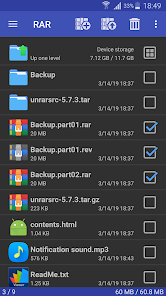
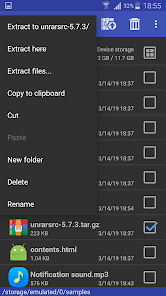
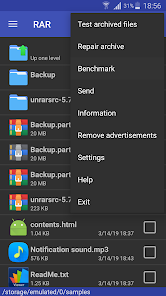
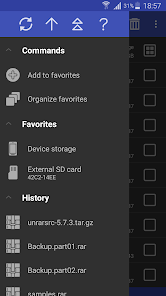
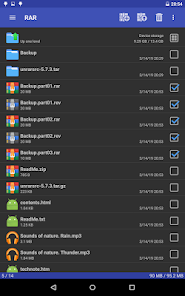
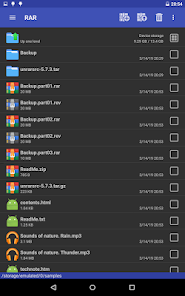
RARLAB's RAR is an all-in-one, original, free, simple, easy and quick compression program, archiver, backup tool, extractor and even a basic file manager.
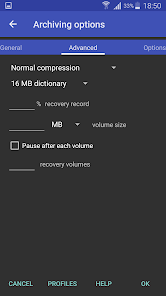
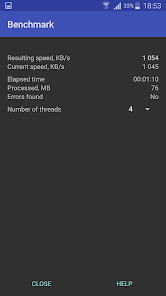
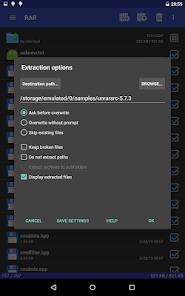
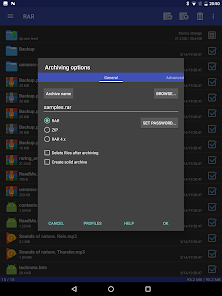
RAR can create RAR and ZIP and unpack RAR, ZIP, TAR, GZ, BZ2, XZ, 7z, ISO, ARJ archives. List of functions include repair command for damaged ZIP and RAR files, benchmark function compatible with RARLAB's WinRAR benchmark, recovery record, usual and recovery volumes, encryption, solid archives, utilizing multiple CPU cores to compress data.
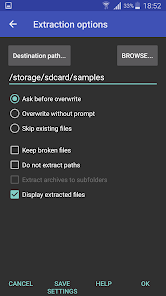
Additionally to standard ZIP files, unzip function supports ZIP and ZIPX with BZIP2, LZMA, PPMd and XZ compression also as password protected ZIP. Unrar command is available for all versions of RAR archives including the latest RAR5, password protected and multipart files.
File management functions include copying, deleting, moving and renaming files and folders, creating new folders and installing applications from APK packages.
If you wish to help us translating RAR to your language, please download RAR for Android language files in "RAR extras" section of www.rarlab.com and follow instructions in readme.txt. Thank you.
RAR can create RAR and ZIP and unpack RAR, ZIP, TAR, GZ, BZ2, XZ, 7z, ISO, ARJ archives. List of functions include repair command for damaged ZIP and RAR files, benchmark function compatible with RARLAB's WinRAR benchmark, recovery record, usual and recovery volumes, encryption, solid archives, utilizing multiple CPU cores to compress data.
Additionally to standard ZIP files, unzip function supports ZIP and ZIPX with BZIP2, LZMA, PPMd and XZ compression also as password protected ZIP. Unrar command is available for all versions of RAR archives including the latest RAR5, password protected and multipart files.
File management functions include copying, deleting, moving and renaming files and folders, creating new folders and installing applications from APK packages.
If you wish to help us translating RAR to your language, please download RAR for Android language files in "RAR extras" section of www.rarlab.com and follow instructions in readme.txt. Thank you.
Updated on
Safety starts with understanding how developers collect and share your data. Data privacy and security practices may vary based on your use, region and age. The developer provided this information and may update it over time.

No data shared with third parties
Learn more about how developers declare sharing

No data collected
Learn more about how developers declare collection
Ratings and reviews
4.2
8.15L reviews

Vitomir Starcevic
- Flag inappropriate
5 October 2024
The app is great! I love how I can look at pictures without having to extract them. I don't know if it's possible, but I'd love it if I could scroll through pictures instead of opening each one individually. I also like the "send" option where I can move things to other zip/rar files. However, it looks like I can't send folders to other zip/rar files. Would be great if I could do that and also create folders myself within the zip/rar files, since I like having things be organized.
5 people found this review helpful

A Google user
- Flag inappropriate
- Show review history
11 July 2019
Great app! Useful for when I want to open 7z or RAR folders. But i have issues, sometimes when I'm opening a 7z folder, it'll say that there are no files selected, so i have to delete the app and try again. The full screen ads are strange though. Otherwize, amazing. Its user interface is easy to use, I never had a hard time looking for files. The downloading of extracted folders takes a long time, but you can press the background button to download them in the background. Also SD card support!
351 people found this review helpful

L J
- Flag inappropriate
- Show review history
28 May 2020
I've been using this for a week or so and the ads aren't too bad for a free app, even though they're fullscreen they aren't long, you can close them immediately. It's been good so far with opening up RAR files and such and i wouldn't say it has any downsides. I can see all my files. [I've been using this for my 2DS, and at first i used the app on my tablet, and i could only move the files to a home folder on that SD, but it doesn't happen on my phone so thats nice!] Suggestion: Search button
461 people found this review helpful
What's new
Bugs fixed:
a) updating an encrypted file in a solid RAR archive produced a corrupt archive if updated file was the first in archive, no password was specified when starting updating and file name encryption in the updated archive wasn't enabled;
b) fixed a possible crash when processing a corrupt RAR archive.
a) updating an encrypted file in a solid RAR archive produced a corrupt archive if updated file was the first in archive, no password was specified when starting updating and file name encryption in the updated archive wasn't enabled;
b) fixed a possible crash when processing a corrupt RAR archive.
App support
About the developer
win.rar GmbH
dev@rarlab.com
Marienstr. 12
10117 Berlin
Germany
+49 15566 718567


