
Clinometer with Voice Commands
Contains adsIn-app purchases

star
2.26K reviews

Everyone
info
500K+
Downloads

Everyone
Learn more


About this app
Clinometer turns your phone into an inclinometer, slope meter and spirit level. Read the slope of a roof, ramp, drain or driveway as percent grade, a 1:n ratio or roof pitch, or switch to degrees. Beside it sit tools for building, the field and the road: GPS area measure, a metal detector, a decibel meter, an altimeter, a satellite finder, a snow slope meter and more.
SLOPES AND PITCH
• Edge, Back and Level: an edge's tilt, the grade of a surface, or pitch and roll at once.
• % grade, 1:n, x/12 pitch, mm/m, in/ft, degrees or radians; signed readings show uphill and downhill.
• Tap the dial to hold, and calibrate every tab separately.
• Zones (Plus) color the dial for roofs, ramps, stairs, drains, grading, avalanche slopes or your own limits. References (Plus) mark ADA ramps, ladders and roofs.
• Three screens: Console, Dial Theme and Aurora (Plus), and more than 25 dial styles, seven free. Pro adds dials such as tree height and Pole Star.
NEW: VOICE COMMANDS (PRO)
Keep the phone on the surface and say "lock", "measure again", "save", "level" or "in percent". "10 degrees" sets a target and "say the reading" speaks it. Volume keys can run commands too. Free users can try voice commands, Target lock and cues for a limited time.
TARGET LOCK (PLUS)
Type or say the slope you need; the reading locks when you reach it, with a tone, vibration or the value read out.
DATA LOGGER (PRO)
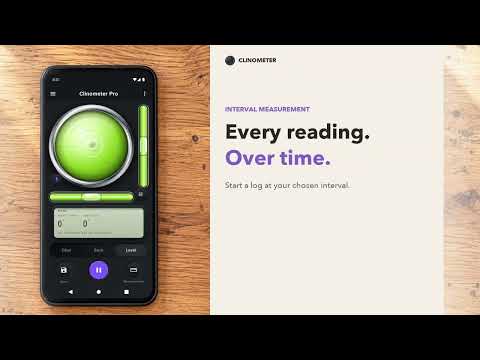
Record the slope every few seconds or minutes using interval measurement: a live graph, average, min and max, and a photo for each reading. Keep it in Records or send CSV or PDF.
ON THE BUILDING SITE
• Roof pitch & slope: ramps, stairs, ladders, drains, roofs and trench walls checked against US, English or Australian rules.
• Leveling assistant (Plus): RV and caravan leveling, showing how much to raise each wheel or the hitch.
• Construction tools (Pro): more than 30 calculators for concrete, stairs, roofing and tiles, each with what to buy.
• Corner angle finder: inside and outside corners, and the true 3D angle between two faces (Pro).
• Protractor and Laser Level on the camera, a Ruler, and a Unit converter (Plus).
IN THE FIELD
• GPS area measure (new): distances, paths, areas and angles on a map, tapped in or walked around. Drawings are saved; PDF, GeoJSON and CSV exports are Plus.
• Snow slope meter (new): a slope's angle, aspect and elevation against avalanche angle bands; a guide, not a safety device. Sight and Field card are Pro.
• Satellite finder: azimuth, elevation and LNB skew for a dish, or the best tilt for a solar panel; guided steps and the sky chart are Pro.
• Off-road inclinometer: your 4x4's pitch and roll on a 3D model, beeping past your limits.
• Strike & dip: a geology compass for rock layers and faults, on a stereonet.
• Compass: pick a bezel or a globe.
SENSOR METERS
• Metal detector: finds steel, iron and magnets through changes in the magnetic field.
• Decibel meter: live A, C or Z weighted sound level; analysis, saved sessions and recording are Pro.
• Altimeter: height between floors from the barometer, and a walk's climb.
• Vibration meter: RMS, peak and frequency with a live spectrum.
• Lux meter (Pro): light for rooms and plants (PPFD, DLI), and camera exposure.
YOUR DATA
Records keep every saved slope with tags, photos and voice notes, and export to Excel, PDF or CSV. Charts graph them, the Gallery holds photos and videos, and your To-do list keeps tasks, reminders and Construction material lists.
FREE, PLUS AND PRO
Free with ads. Plus and Pro are monthly or yearly subscriptions without ads that open more tools and designs. Clinometer PRO is a separate app with everything.
Readings depend on your phone's sensors; calibrate on a surface you trust before precise work. Ideas or problems? smarttoolfactory@icloud.com
SLOPES AND PITCH
• Edge, Back and Level: an edge's tilt, the grade of a surface, or pitch and roll at once.
• % grade, 1:n, x/12 pitch, mm/m, in/ft, degrees or radians; signed readings show uphill and downhill.
• Tap the dial to hold, and calibrate every tab separately.
• Zones (Plus) color the dial for roofs, ramps, stairs, drains, grading, avalanche slopes or your own limits. References (Plus) mark ADA ramps, ladders and roofs.
• Three screens: Console, Dial Theme and Aurora (Plus), and more than 25 dial styles, seven free. Pro adds dials such as tree height and Pole Star.
NEW: VOICE COMMANDS (PRO)
Keep the phone on the surface and say "lock", "measure again", "save", "level" or "in percent". "10 degrees" sets a target and "say the reading" speaks it. Volume keys can run commands too. Free users can try voice commands, Target lock and cues for a limited time.
TARGET LOCK (PLUS)
Type or say the slope you need; the reading locks when you reach it, with a tone, vibration or the value read out.
DATA LOGGER (PRO)
Record the slope every few seconds or minutes using interval measurement: a live graph, average, min and max, and a photo for each reading. Keep it in Records or send CSV or PDF.
ON THE BUILDING SITE
• Roof pitch & slope: ramps, stairs, ladders, drains, roofs and trench walls checked against US, English or Australian rules.
• Leveling assistant (Plus): RV and caravan leveling, showing how much to raise each wheel or the hitch.
• Construction tools (Pro): more than 30 calculators for concrete, stairs, roofing and tiles, each with what to buy.
• Corner angle finder: inside and outside corners, and the true 3D angle between two faces (Pro).
• Protractor and Laser Level on the camera, a Ruler, and a Unit converter (Plus).
IN THE FIELD
• GPS area measure (new): distances, paths, areas and angles on a map, tapped in or walked around. Drawings are saved; PDF, GeoJSON and CSV exports are Plus.
• Snow slope meter (new): a slope's angle, aspect and elevation against avalanche angle bands; a guide, not a safety device. Sight and Field card are Pro.
• Satellite finder: azimuth, elevation and LNB skew for a dish, or the best tilt for a solar panel; guided steps and the sky chart are Pro.
• Off-road inclinometer: your 4x4's pitch and roll on a 3D model, beeping past your limits.
• Strike & dip: a geology compass for rock layers and faults, on a stereonet.
• Compass: pick a bezel or a globe.
SENSOR METERS
• Metal detector: finds steel, iron and magnets through changes in the magnetic field.
• Decibel meter: live A, C or Z weighted sound level; analysis, saved sessions and recording are Pro.
• Altimeter: height between floors from the barometer, and a walk's climb.
• Vibration meter: RMS, peak and frequency with a live spectrum.
• Lux meter (Pro): light for rooms and plants (PPFD, DLI), and camera exposure.
YOUR DATA
Records keep every saved slope with tags, photos and voice notes, and export to Excel, PDF or CSV. Charts graph them, the Gallery holds photos and videos, and your To-do list keeps tasks, reminders and Construction material lists.
FREE, PLUS AND PRO
Free with ads. Plus and Pro are monthly or yearly subscriptions without ads that open more tools and designs. Clinometer PRO is a separate app with everything.
Readings depend on your phone's sensors; calibrate on a surface you trust before precise work. Ideas or problems? smarttoolfactory@icloud.com
Inclinometer, metal detector, decibel meter, satellite finder, GPS area measure
Updated on
Safety starts with understanding how developers collect and share your data. Data privacy and security practices may vary based on your use, region, and age. The developer provided this information and may update it over time.


Ratings and reviews
2.22K reviews

A Google user
- Flag inappropriate
February 15, 2020
Finally - didn't have to run to store to buy a tool just to get one quick reading. I went thru several of these apps and I chose to stay with yours because I could move it to my SD card as I am running out of internal storage. Thank you for allowing that - I wish all developers did that. PRO: Quick and easy. Seems accurate enough for my needs. CONS: Not really an app con, yet be aware that if you have side buttons that stick out a bit, you'll need to account for them when looking for plumb.
75 people found this review helpful
A Google user
- Flag inappropriate
April 25, 2019
I seem to have issues with the "calibration" feature. For example, let's say I calibrate against a wall or floor surface known to be flat, so that I get a calibrated reading on the app. After taking a few measurements and then going back to that same spot on the wall or floor to see if the calibration is "holding", I usually find that the app has reset or lost the calibration and is back to reading the original pre-calibration angle value. There seems to be no way to "lock" or "save" a calibration so it will hold.
74 people found this review helpful
A Google user
- Flag inappropriate
- Show review history
June 22, 2019
Simple, and clear readout. By default no decimals: just go into [=] (settings) to change to 1 digits (or 2, or 3 but I think at 2 you are already beyond the margin of error of your phone)) Not excessively complicated like some. Love the large dial.
16 people found this review helpful
What’s new
Improved satellite and solar-panel alignment with 3D, camera and map views, guided steps and voice commands. Clearer Big Dipper, Little Dipper and North Star guides. Added spoken voice selection and improved tutorials and translations.
Everyone
Learn moreApp support
About the developer
Fatih Özcan
smarttoolfactory@icloud.com
Erikli Köyü Erikli Mah Erikli Caddesi
No:40 B_Cumhuriyet Sitesi
22800 Keşan/Edirne
Türkiye


