
CPU & GPU Throttling Test
Contains adsIn-app purchases

star
8.15K reviews

Everyone
info
500K+
Downloads

Everyone
Learn more


About this app
Check your phone's CPU and GPU thermal throttling with ease!
Three sustained-load tests in one app — a CPU throttling test, a GPU stress test and the Legacy throttling engine with an AI report — so you can see exactly how your phone holds up when it gets hot.
Why Choose This App?
This app is proudly developed in India from the ground up! Support locally made apps and innovation.
🔥 CPU Throttling Test
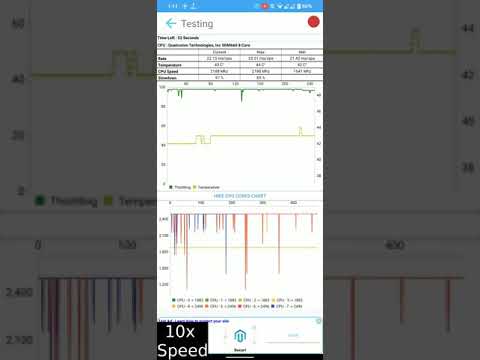
Tracks maximum, minimum and average GIPS (Giga Instructions Per Second) over time, with real-time per-core clock speeds and temperature.
✔ Quick test — start instantly with no setup.
✔ Multi Thread and Single Thread tests.
✔ Custom test — choose your own thread count and duration.
✔ Export results to CSV.
🧓 Legacy Throttling Test
A faithful port of the classic throttling test engine, with a live GIPS bar chart and per-core clock graphs.
✔ Sustained score you can compare with any other phone that ran the same test.
✔ Rated findings on every run — free, offline, calculated on your device.
✔ Online rankings for each test duration.
🤖 AI Throttle Report
✔ A headline verdict on how well your phone held up under sustained load.
✔ Rated findings — green, amber or red — each pointing at the minute it happened (5-10 on a 15-minute or longer run, 2-4 on the 2-minute demo).
✔ Throughput, temperature and cores-online charts on one time axis.
✔ A full PDF report you can save or share.
The AI report is a paid unlock, available on Legacy test runs. For the most useful report, run 15 minutes or longer.
🎮 GPU Stress Test
A heavy 4K offscreen rendering workload that measures sustained graphics performance.
✔ Average, peak and low FPS over the whole run.
✔ Live GPU temperature and FPS tracking.
✔ A graded result for your phone's GPU.
📊 More Features
✔ Test history for all CPU, Legacy and GPU runs in one place.
✔ Compare your results with other users on the scoreboard.
✔ Optional CPU monitor notification.
Test Durations
CPU test:
🟢 5 Min (Free)
🔵 10 Min, 20 Min, 40 Min (Watch a rewarded ad, or get Pro)
Legacy test:
🟢 2 Min demo (Free)
🔵 15 Min, 30 Min, 60 Min (Watch a rewarded ad, or get Pro)
GPU test:
🟢 15 Sec demo (Free)
🔵 5 Min, 15 Min, 30 Min, 60 Min (Watch a rewarded ad, or get Pro)
Pro unlocks every long test and the Custom test permanently. Single Thread and Multi Thread tests can also be unlocked with a rewarded ad.
For accurate results:
✔ Allow your device to cool down for at least 10 minutes before testing.
✔ Close all background apps.
✔ Note that longer tests may consume more battery and generate heat.
If you notice performance drops during extended use, thermal throttling might be the cause. For a detailed analysis, a 20-minute CPU test or a 15-minute Legacy test is recommended.
Three sustained-load tests in one app — a CPU throttling test, a GPU stress test and the Legacy throttling engine with an AI report — so you can see exactly how your phone holds up when it gets hot.
Why Choose This App?
This app is proudly developed in India from the ground up! Support locally made apps and innovation.
🔥 CPU Throttling Test
Tracks maximum, minimum and average GIPS (Giga Instructions Per Second) over time, with real-time per-core clock speeds and temperature.
✔ Quick test — start instantly with no setup.
✔ Multi Thread and Single Thread tests.
✔ Custom test — choose your own thread count and duration.
✔ Export results to CSV.
🧓 Legacy Throttling Test
A faithful port of the classic throttling test engine, with a live GIPS bar chart and per-core clock graphs.
✔ Sustained score you can compare with any other phone that ran the same test.
✔ Rated findings on every run — free, offline, calculated on your device.
✔ Online rankings for each test duration.
🤖 AI Throttle Report
✔ A headline verdict on how well your phone held up under sustained load.
✔ Rated findings — green, amber or red — each pointing at the minute it happened (5-10 on a 15-minute or longer run, 2-4 on the 2-minute demo).
✔ Throughput, temperature and cores-online charts on one time axis.
✔ A full PDF report you can save or share.
The AI report is a paid unlock, available on Legacy test runs. For the most useful report, run 15 minutes or longer.
🎮 GPU Stress Test
A heavy 4K offscreen rendering workload that measures sustained graphics performance.
✔ Average, peak and low FPS over the whole run.
✔ Live GPU temperature and FPS tracking.
✔ A graded result for your phone's GPU.
📊 More Features
✔ Test history for all CPU, Legacy and GPU runs in one place.
✔ Compare your results with other users on the scoreboard.
✔ Optional CPU monitor notification.
Test Durations
CPU test:
🟢 5 Min (Free)
🔵 10 Min, 20 Min, 40 Min (Watch a rewarded ad, or get Pro)
Legacy test:
🟢 2 Min demo (Free)
🔵 15 Min, 30 Min, 60 Min (Watch a rewarded ad, or get Pro)
GPU test:
🟢 15 Sec demo (Free)
🔵 5 Min, 15 Min, 30 Min, 60 Min (Watch a rewarded ad, or get Pro)
Pro unlocks every long test and the Custom test permanently. Single Thread and Multi Thread tests can also be unlocked with a rewarded ad.
For accurate results:
✔ Allow your device to cool down for at least 10 minutes before testing.
✔ Close all background apps.
✔ Note that longer tests may consume more battery and generate heat.
If you notice performance drops during extended use, thermal throttling might be the cause. For a detailed analysis, a 20-minute CPU test or a 15-minute Legacy test is recommended.
Test CPU & GPU thermal throttling with sustained stress tests and AI reports.
Updated on
Safety starts with understanding how developers collect and share your data. Data privacy and security practices may vary based on your use, region, and age. The developer provided this information and may update it over time.


Ratings and reviews
7.8K reviews

Simone Prete
- Flag inappropriate
October 29, 2026
exept a lot of ads, the app is good especially on snapdragon chipsets because you can see the temperature while mediatek and exynos no, the problem? the try pro by watching an add says "unsupported in you region" I'm in belgium, literally days ago it used to work and now no. I don't know whose fault is this this country or the app.
Texts Dev
October 29, 2026
Hi I'm extremely sorry that you have to have this issue of no ads, can you please help me a bit in identifying the issues you faced, we would quickly fix and release a new build. thank you

William Cromer
- Flag inappropriate
- Show review history
October 1, 2026
okay so starting off when you first open the app promotes paid tier (Nope) then as soon as you get to the main screen AD. when you tell it to run the test AD then on top of that before it even fully got to the main menu with froze but then after that it ran flawless it definitely puts the phone through its paces but I still feel like geekbench is well free doesn't bother you with ads tells you what you need to know nice details definitely uninstalling after this.
1 person found this review helpful
Texts Dev
October 1, 2026
this is not exactly geekbench it's mainly for stress testing

Vignesh Gamers
- Flag inappropriate
October 31, 2026
this app actually boots phone to high optimisation and run at high lighting and also scam every single performance drop and also mentions thr the exact value
Texts Dev
October 31, 2026
thank you for the review ☺️
What’s new
• Added AI analysis for CPU throttling results
• Clear 🟢 good, 🟡 caution, and 🔴 bad indicators
• Added a 1080p GPU test with live FPS and temperature graphs
• Fixed crashes on some Android devices
• Clear 🟢 good, 🟡 caution, and 🔴 bad indicators
• Added a 1080p GPU test with live FPS and temperature graphs
• Fixed crashes on some Android devices
Everyone
Learn moreApp support
About the developer
Aishik Kirtaniya
textsmessaging@gmail.com
Aryabhatta
Durgapur, West Bengal 713205
India


