
FastPDF: PDF Reader & Editor
Contains ads

Everyone
info
10+
Downloads

Everyone
Learn more



About this app
FastPDF – PDF Reader, Editor & Scanner
FastPDF is a modern, lightweight and powerful PDF application designed for speed, productivity and simplicity.
Read, edit, scan and manage your PDF documents easily with an elegant and smooth experience.
Whether you are a student, office worker or everyday user, FastPDF gives you everything you need in one app.
IMPORTANT NOTICE
• All features in the application are completely free to use.
• Internet connection is required because content and features are verified through servers and supported by advertisements.
KEY FEATURES
PDF READER
• Open PDF files instantly
• Smooth scrolling and fast rendering
• Zoom in and zoom out
• Horizontal & vertical reading modes
• Jump directly to pages
• Dark mode for comfortable reading
• Bookmark important pages
• Recent files history
PDF EDITOR
• Add text to PDFs
• Highlight important content
• Draw and annotate
• Underline and strike-through text
• Add signatures
• Insert images into PDFs
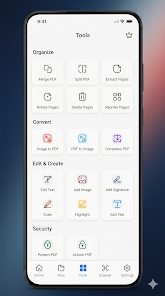
PDF TOOLS
• Merge multiple PDFs
• Split PDF pages
• Compress PDF files
• Rotate pages
• Extract pages
• Convert images to PDF
DOCUMENT SCANNER
• Scan documents with camera
• Auto edge detection
• High-quality PDF export
• Black & white mode
• Grayscale mode
SECURITY
• Open password-protected PDFs
• Protect PDFs with password
• Secure local file handling
FILE MANAGEMENT
• Search PDF files easily
• Sort by date, size or name
• Rename documents
• Delete files
• Share PDFs instantly
• Favorite important files
FAST & LIGHTWEIGHT
FastPDF is optimized for:
• Fast startup speed
• Low RAM usage
• Smooth performance
• Large PDF files
• Modern Android devices
WHY FASTPDF?
• Clean & modern design
• Easy to use
• Powerful PDF tools
• Fast performance
• Lightweight app size
• Secure file management
DOWNLOAD FASTPDF NOW
Enjoy a smooth and professional PDF experience directly on your Android device.
FastPDF is a modern, lightweight and powerful PDF application designed for speed, productivity and simplicity.
Read, edit, scan and manage your PDF documents easily with an elegant and smooth experience.
Whether you are a student, office worker or everyday user, FastPDF gives you everything you need in one app.
IMPORTANT NOTICE
• All features in the application are completely free to use.
• Internet connection is required because content and features are verified through servers and supported by advertisements.
KEY FEATURES
PDF READER
• Open PDF files instantly
• Smooth scrolling and fast rendering
• Zoom in and zoom out
• Horizontal & vertical reading modes
• Jump directly to pages
• Dark mode for comfortable reading
• Bookmark important pages
• Recent files history
PDF EDITOR
• Add text to PDFs
• Highlight important content
• Draw and annotate
• Underline and strike-through text
• Add signatures
• Insert images into PDFs
PDF TOOLS
• Merge multiple PDFs
• Split PDF pages
• Compress PDF files
• Rotate pages
• Extract pages
• Convert images to PDF
DOCUMENT SCANNER
• Scan documents with camera
• Auto edge detection
• High-quality PDF export
• Black & white mode
• Grayscale mode
SECURITY
• Open password-protected PDFs
• Protect PDFs with password
• Secure local file handling
FILE MANAGEMENT
• Search PDF files easily
• Sort by date, size or name
• Rename documents
• Delete files
• Share PDFs instantly
• Favorite important files
FAST & LIGHTWEIGHT
FastPDF is optimized for:
• Fast startup speed
• Low RAM usage
• Smooth performance
• Large PDF files
• Modern Android devices
WHY FASTPDF?
• Clean & modern design
• Easy to use
• Powerful PDF tools
• Fast performance
• Lightweight app size
• Secure file management
DOWNLOAD FASTPDF NOW
Enjoy a smooth and professional PDF experience directly on your Android device.
Read, edit, scan and manage PDF files quickly and easily
Updated on
Safety starts with understanding how developers collect and share your data. Data privacy and security practices may vary based on your use, region, and age. The developer provided this information and may update it over time.


What’s new
first version
Everyone
Learn moreApp support
About the developer
Gökhan Yavaş
dev.gokhanyavas@gmail.com
Yeni mah. 7144 sk no 11
34500 İstanbul
Türkiye


