

Zoho SalesIQ - Live Chat App

4.4star
930 reviews
100K+
Downloads

Teen
info



About this app
Join 100,000+ livechat app users who're already using Zoho SalesIQ to convert their website visitors and mobile app visitors into happy paying customers.
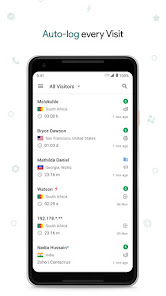
Zoho SalesIQ is an unique live chat software with website visitor tracking, app visitor tracking, lead scoring and analytics all rolled into one for growing businesses. We've built it to maximize the ROI on your content, SEO, Adwords, and email marketing efforts.
Key Features:
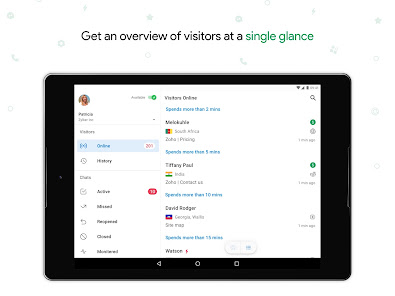
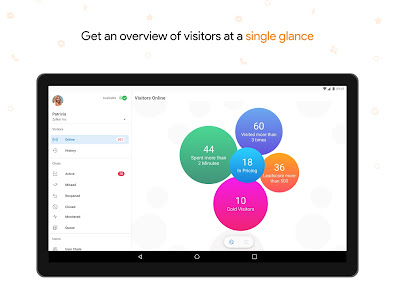
1) Track your website/app visitors and know how they are interacting with your content in real time.
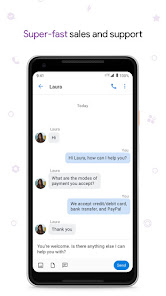
2) Improve your sales and customer support with live chat that's easily configurable in your website and mobile app too.
3) Win the attention of your app visitors with proactive mobile live chat.
4) Trigger automated invitations to chat online in real time with prospects.
5) Collect feedback after a website live chat session to enhance the quality of interaction with your visitors. The same is possible for app live chat sessions too.
6) Engage a wider audience with real-time live chat translation, available for 25+ languages with this live support software.
7) Identify, track and capture the list of all your live chat website visitors and app visitors.
8) Use lead scoring to categorize your website/app visitors on the likelihood of their purchasing intent.
9) Setting up Zoho SalesIQ on your website can be done within 5 minutes. It is as easy as doing a copy-paste of a code-snippet to your website.
10) A super friendly customer support team available to answer all your queries via live chat, phone or email.
Zoho SalesIQ is an unique live chat software with website visitor tracking, app visitor tracking, lead scoring and analytics all rolled into one for growing businesses. We've built it to maximize the ROI on your content, SEO, Adwords, and email marketing efforts.
Key Features:
1) Track your website/app visitors and know how they are interacting with your content in real time.
2) Improve your sales and customer support with live chat that's easily configurable in your website and mobile app too.
3) Win the attention of your app visitors with proactive mobile live chat.
4) Trigger automated invitations to chat online in real time with prospects.
5) Collect feedback after a website live chat session to enhance the quality of interaction with your visitors. The same is possible for app live chat sessions too.
6) Engage a wider audience with real-time live chat translation, available for 25+ languages with this live support software.
7) Identify, track and capture the list of all your live chat website visitors and app visitors.
8) Use lead scoring to categorize your website/app visitors on the likelihood of their purchasing intent.
9) Setting up Zoho SalesIQ on your website can be done within 5 minutes. It is as easy as doing a copy-paste of a code-snippet to your website.
10) A super friendly customer support team available to answer all your queries via live chat, phone or email.
Updated on
Safety starts with understanding how developers collect and share your data. Data privacy and security practices may vary based on your use, region, and age. The developer provided this information and may update it over time.

No data shared with third parties
Learn more about how developers declare sharing

This app may collect these data types
Location, Personal info and 7 others

Data is encrypted in transit

You can request that data be deleted
Ratings and reviews
4.4
914 reviews

Jay M
- Flag inappropriate
April 30, 2021
With this version it's hit and miss on whether i can pull up a missed chat. Some pull up as expectwd, and others it just spins indefinitely, forcing you to give up and back out of the chat details. This version follows a major update on the salesiq portal so i'm sure there's some sifting to be done. Desktop web portal works just fine, and the last time there was a major salesiq remodel, the android app had the same issue. It was eventually resolved and this time i'm sure it will as well.
7 people found this review helpful
Zoho Corporation
May 18, 2021
Hello Jay! We are sorry to hear about this. We request you to drop an email to support@zohosalesiq.com from your registered email address to debug this further on our side.

sommy promzy
- Flag inappropriate
- Show review history
January 29, 2026
The app was working fine previously, but recently a problem started occurring. Whenever I’m replying to messages and try to open a shared image (such as an error screenshot), the app immediately logs me out. This happens every time I tap on an image.
Zoho Corporation
February 4, 2026
Hello Sommy,
We apologize for the inconvenience caused. We are glad to inform you that the reported issue has been resolved. We kindly request that you update the SalesIQ mobile app to the latest version, v2.19.3 and check again. If the issues persist, please drop an email to support[at]zohosalesiq[dot]com for further investigation.

Adesakin Temitope
- Flag inappropriate
- Show review history
October 31, 2025
It's a nice app, I really like it! But I think it would be great if you could add an option to edit messages after sending them. Sometimes we make small typing mistakes or want to correct something, but there’s no way to edit the message right now. It would really help if users could edit their sent messages to fix typos or make changes
1 person found this review helpful
Zoho Corporation
November 28, 2025
Hi Adesakin,
We have already supported the ‘Edit’ option in our Android mobile app. To make use of this feature, please go to Settings -> Brands -> Click on the brand name -> Configurations -> Under "Privacy" -> Message actions -> Check the "Edit" option for "Operators".
What’s new
Miscellaneous bug fixes and performance improvements.
App support
About the developer
Zoho Corporation
mobileapp-support@zohocorp.com
4141 Hacienda Dr
Pleasanton, CA 94588-8566
United States
+1 903-221-2616


