
WiFi Overview 360 Pro

star
1.64K reviews

Everyone
info
50K+
Downloads

Everyone
Learn more


About this app
WiFi Overview 360 - The universal WiFi tool, incl. Widgets
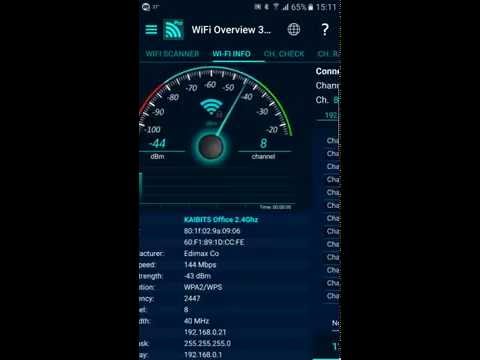
WiFi Overview 360 and the Pro version is not only a WiFI-Scanner, which shows all WiFis in range, the app is much more. This app is a "Swiss Army Knife" for WiFis.
With this tool you can manage and optimize your used wireless network and with one look you'll get detailed information of the WiFis (WiFi name (SSID), signal strength, channelnumber, encryptionin - open or not and much more) in your environment.
The tab "Ch Check" (Channel Checker) and "Ch. Radar" (Channel Radar) are powerful tools to optimize your own WiFi network. For best performance your network must use a channel or frequency range where are no other wireless networks or little as possible. WiFi Overview 360 gives you the best choice for the channel.
With a powerful "WiFi Detector/Sniffer" (only Pro Version), who expanded the Android function enormously. "WiFi Detector" looking for open WiFis, gives a notification (sound, pop-up text window, vibrate and text-to-speech - if you want) and can connect automatically.
Main features are:
- WiFi Detector - the powerful open network finder (only Pro version)
- "Quick connect shortcut", you can set a shortcut to switch/connect quick and easy between/to WiFis (only Pro version)
- change WiFi priority manually (only Pro version)
- included 1x1, 2x1 and 4x1 widgets with different styles
- WiFi scanner
- WiFi sorting options for "strength", "alphabetically", "channel" and "open/known Wi-Fis"
- automatic WiFi activation at startup - if off, and automatic turn-off at the end
- manual way to add a network
- detailed WiFi information
- graphical representation of all wireless networks in the operating range
- channel checker for the best channel choice
- Tablet support
- WiFi Internet connection check
- and much more ...
WiFi Overview 360 and the Pro version is not only a WiFI-Scanner, which shows all WiFis in range, the app is much more. This app is a "Swiss Army Knife" for WiFis.
With this tool you can manage and optimize your used wireless network and with one look you'll get detailed information of the WiFis (WiFi name (SSID), signal strength, channelnumber, encryptionin - open or not and much more) in your environment.
The tab "Ch Check" (Channel Checker) and "Ch. Radar" (Channel Radar) are powerful tools to optimize your own WiFi network. For best performance your network must use a channel or frequency range where are no other wireless networks or little as possible. WiFi Overview 360 gives you the best choice for the channel.
With a powerful "WiFi Detector/Sniffer" (only Pro Version), who expanded the Android function enormously. "WiFi Detector" looking for open WiFis, gives a notification (sound, pop-up text window, vibrate and text-to-speech - if you want) and can connect automatically.
Main features are:
- WiFi Detector - the powerful open network finder (only Pro version)
- "Quick connect shortcut", you can set a shortcut to switch/connect quick and easy between/to WiFis (only Pro version)
- change WiFi priority manually (only Pro version)
- included 1x1, 2x1 and 4x1 widgets with different styles
- WiFi scanner
- WiFi sorting options for "strength", "alphabetically", "channel" and "open/known Wi-Fis"
- automatic WiFi activation at startup - if off, and automatic turn-off at the end
- manual way to add a network
- detailed WiFi information
- graphical representation of all wireless networks in the operating range
- channel checker for the best channel choice
- Tablet support
- WiFi Internet connection check
- and much more ...
The universal WiFi tool
Updated on
Safety starts with understanding how developers collect and share your data. Data privacy and security practices may vary based on your use, region, and age. The developer provided this information and may update it over time.
- No data shared with third partiesLearn more about how developers declare sharing
- No data collectedLearn more about how developers declare collection


Ratings and reviews
1.44K reviews

Donald Richard Roth Jr
- Flag inappropriate
December 6, 2023
I have a Samsung Galaxy S22 Ultra running Android UI 6.0. I paid for the paid version of Wi-Fi overview 360 because of the ability to put a widget on my homepage when I'm at home to see which channels on my router are the strongest. The widget almost never works I have to press it 15 or 20 times for it to populate and name the network I'm attached to the speed etc. This is an absolutely awesome app. But I only bought it for that one reason and I'm really disappointed.
4 people found this review helpful

Maarten van den Berg
- Flag inappropriate
March 28, 2026
very nice app! but by now not as useful anymore 😕. it doesn't understand newer technology. Things like MLO Mac Link Mac, a client doing MLO on wifi7 on multiple channels, extremely confuse it, making it display an MLO network as "open" while it's really not (WPA3) and lists apps and clients as having the same Mac. would be great if this received an update!
3 people found this review helpful

- Mike -
- Flag inappropriate
June 2, 2025
App & Widget work perfectly ... ( Galaxy S23+ & A52+ & S8+ ) - IF LOCATION is switched ON. This is because GOOGLE forced this requirement on ALL Network Apps etc. several Years ago - from Android 6 onwards. I guess they weren't happy with 'roughly' Tracking our phones using only Cell Tower Tracking ... not enough Details for them to sell. - M¡ke -
4 people found this review helpful
What’s new
better Android 11/12(S) support
bug fixes
numerous code optimizations
performance improvements
stability improvements
bug fixes
numerous code optimizations
performance improvements
stability improvements
Everyone
Learn moreApp support
About the developer
KAIBITS Software GmbH
support@kaibits-software.com
Schloßpark 15 B
01796 Pirna
Germany
+49 163 1631964


