
DSLR Controller

star
6.48K reviews

Everyone
info
100K+
Downloads

Everyone
Learn more


About this app
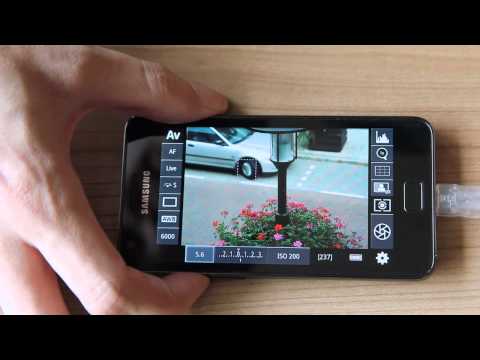
DSLR Controller was the first and remains the best app to fully control your Canon EOS DSLR from your Android device, through USB cable or Wi-Fi connection. No computer or laptop required, no root required, only a compatible mobile device, a compatible camera, and if connecting through USB, the right cable.
We strongly suggest you read up on the website ( http://dslrcontroller.com/ ) about what DSLR Controller can do, how it works, and how to use it, before purchasing. The website contains a wealth of information you should know before using.
Not all devices are compatible, especially if you want to use a USB connection. For a free app you can use to test compatibility, see the "Remote Release" app ( http://market.android.com/details?id=eu.chainfire.remoterelease ). If you need a refund, go to our website ( http://dslrcontroller.com/ ) and follow the instructions in the FAQ entry. We cannot process refunds through email.
Usage notes, feature lists, device compatibility lists, changelogs, FAQs, can all be found on our website: http://dslrcontroller.com/
Most questions should go to the support and discussion thread at XDA-Developers.com:
http://forum.xda-developers.com/showthread.php?t=1202082
Features
Features include but are not limited to:
- Live View
- Auto Focus (tap Live View)
- Manual focus adjustments (in AF mode)
- Histogram
- Zoom control
- Grid and aspect ratio overlay
- Bulb capture
- Continuous capture
- Image review (+ follow shot, gallery)
- Image filters (peaking, contrast, channel mask, grayscale, 4 modes/filter)
- Video recording
- HDR/Auto Exposure Bracketing
- Focus Bracketing (incl. HDR)
- Focus A-B
- Mirror Lockup support
- Timelapse (incl. HDR)
- Wi-Fi Passthrough
- Extensive modification of settings
-- Shutter speed
-- Aperture
-- ExpComp and Bracket
-- ISO speed
-- Auto-Focus Mode
-- Focus and Zoom area (tap-and-hold Live View)
-- Picture Style
-- Drive Mode
-- White Balance
-- Color Temperature
-- Auto-Lighting Optimizer
-- Metering Mode
-- Image and video quality and format
Available options depend on the mode you have your camera set to (M, Av, Tv, etc) and camera model. Refer to the website ( http://dslrcontroller.com/ ) for further details.
Supported Android devices:
If you are connecting using Wi-Fi, virtually all modern Android devices are supported (your camera needs Wi-Fi support, though). If you are connecting over USB, your device needs USB host support - most recent devices do. Please see the 'Devices' section on our website ( https://dslrcontroller.com/devices.php ) for further information.
If your camera only supports USB, you can modify a TL-MR3040 to provide a Wi-Fi connection ( http://dslrcontroller.com/guide-wifi_mr3040.php )
Supported Canon EOS models:
Newer cameras than listed below are usually supported.
Full support:
- 1D Mark IV
- 1D X
- 1D X Mark II
- 5D Mark II
- 5D Mark III
- 5D Mark IV
- 5Ds(r)
- 50D
- 500D
- 550D
- 6D
- 60D
- 600D
- 650D
- 7D
- 7D Mark II
- 70D
- 700D
- 750D
- 760D
- 80D
- 1100D
- 1200D
- 1300D
- 100D
Limited support:
- 1D mk III
- 1Ds mk III
- 30D
- 40D
- 400D
- 450D
- 1000D
No support:
- pre-2006 models
- EOS M mirrorless devices (work in progress)
Let us know which hardware you are using with DSLR Controller!
We strongly suggest you read up on the website ( http://dslrcontroller.com/ ) about what DSLR Controller can do, how it works, and how to use it, before purchasing. The website contains a wealth of information you should know before using.
Not all devices are compatible, especially if you want to use a USB connection. For a free app you can use to test compatibility, see the "Remote Release" app ( http://market.android.com/details?id=eu.chainfire.remoterelease ). If you need a refund, go to our website ( http://dslrcontroller.com/ ) and follow the instructions in the FAQ entry. We cannot process refunds through email.
Usage notes, feature lists, device compatibility lists, changelogs, FAQs, can all be found on our website: http://dslrcontroller.com/
Most questions should go to the support and discussion thread at XDA-Developers.com:
http://forum.xda-developers.com/showthread.php?t=1202082
Features
Features include but are not limited to:
- Live View
- Auto Focus (tap Live View)
- Manual focus adjustments (in AF mode)
- Histogram
- Zoom control
- Grid and aspect ratio overlay
- Bulb capture
- Continuous capture
- Image review (+ follow shot, gallery)
- Image filters (peaking, contrast, channel mask, grayscale, 4 modes/filter)
- Video recording
- HDR/Auto Exposure Bracketing
- Focus Bracketing (incl. HDR)
- Focus A-B
- Mirror Lockup support
- Timelapse (incl. HDR)
- Wi-Fi Passthrough
- Extensive modification of settings
-- Shutter speed
-- Aperture
-- ExpComp and Bracket
-- ISO speed
-- Auto-Focus Mode
-- Focus and Zoom area (tap-and-hold Live View)
-- Picture Style
-- Drive Mode
-- White Balance
-- Color Temperature
-- Auto-Lighting Optimizer
-- Metering Mode
-- Image and video quality and format
Available options depend on the mode you have your camera set to (M, Av, Tv, etc) and camera model. Refer to the website ( http://dslrcontroller.com/ ) for further details.
Supported Android devices:
If you are connecting using Wi-Fi, virtually all modern Android devices are supported (your camera needs Wi-Fi support, though). If you are connecting over USB, your device needs USB host support - most recent devices do. Please see the 'Devices' section on our website ( https://dslrcontroller.com/devices.php ) for further information.
If your camera only supports USB, you can modify a TL-MR3040 to provide a Wi-Fi connection ( http://dslrcontroller.com/guide-wifi_mr3040.php )
Supported Canon EOS models:
Newer cameras than listed below are usually supported.
Full support:
- 1D Mark IV
- 1D X
- 1D X Mark II
- 5D Mark II
- 5D Mark III
- 5D Mark IV
- 5Ds(r)
- 50D
- 500D
- 550D
- 6D
- 60D
- 600D
- 650D
- 7D
- 7D Mark II
- 70D
- 700D
- 750D
- 760D
- 80D
- 1100D
- 1200D
- 1300D
- 100D
Limited support:
- 1D mk III
- 1Ds mk III
- 30D
- 40D
- 400D
- 450D
- 1000D
No support:
- pre-2006 models
- EOS M mirrorless devices (work in progress)
Let us know which hardware you are using with DSLR Controller!
Full control of your Canon EOS DSLR from through USB or Wi-Fi !
Updated on
Safety starts with understanding how developers collect and share your data. Data privacy and security practices may vary based on your use, region, and age. The developer provided this information and may update it over time.
- No data shared with third partiesLearn more about how developers declare sharing
- No data collectedLearn more about how developers declare collection


Ratings and reviews
5.06K reviews

A Google user
- Flag inappropriate
August 12, 2019
I bought this app a few years ago to use with an old Canon t3i (with a TP-Link MR3040 for wifi). I have to say it gives terrific freedom being able to sit in the cool inside air and snap pictures with the phone when my camera is set to shoot wildlife outside. As an fyi, this may have something to do with my Android version, but recently I'd been having a real issue getting the app to fully connect to the camera. It would say it saw a camera but would not connect. After hours spent experimenting, I found it was the phone connecting to the the tp-link that had an odd glitch. Because the tp-link wifi connection does not actually give internet access, the phone would connect fine but then after a few seconds it would give a pop-up saying the connection had no internet access. The problem was I had to click "YES" to close that pop-up! If I simply went on into the app it would never finally connect to the camera. All the times I ignored it and it went away by itself, it wouldn't connect. So, clicking "yes" on the pop-up makes it work now every time. (Note: clicking the check box in the pop-up will avoid all this! :)
24 people found this review helpful

Derek Sterling
- Flag inappropriate
June 18, 2021
Really like this app! the only thing I would suggest is it needs a trial or free version ........ when I first paid for it, I couldn't get it to connect, so I refunded it ........ after trying others I didn't like, I looked up vids on troubleshooting the connection, re-purchased it and figured it out. would have been nice to had time to figure it out the first time, then purchased it.
37 people found this review helpful
A Google user
- Flag inappropriate
March 24, 2019
kept crashing with my 5D MkII when shooting a video... and at the very end only, when you stop recording ! So you can't rely on it. I desintalled it before the 2h period and didnt get the refund. There is a refund section on the FAQ of their website that tells you not to contact them directly, but to follow a link on your receipt... The link on my receit that goes nowhere... So basicaly it is supposed to be good, but it didn't work for me, and I didn't get a refund...
47 people found this review helpful
What’s new
v1.06:
- Fixed crash when starting video playback with MX Player
v1.05:
Release notes: https://plus.google.com/+Chainfire/posts/duh4LAqcDMC
(c) 2017
Added:
- Night mode
- Notice for disabled shuttercounter (5D4+?)
Improved:
- High speed shooting handling
- Communication error notice
Fixed:
- Various 5D4 issues
- Level circle sometimes no longer drawn filled on some devices while recording
- Fixed crash when starting video playback with MX Player
v1.05:
Release notes: https://plus.google.com/+Chainfire/posts/duh4LAqcDMC
(c) 2017
Added:
- Night mode
- Notice for disabled shuttercounter (5D4+?)
Improved:
- High speed shooting handling
- Communication error notice
Fixed:
- Various 5D4 issues
- Level circle sometimes no longer drawn filled on some devices while recording
Everyone
Learn moreApp support
About the developer
J.B. Jongma Holding B.V.
web201604@chainfire.eu
Waleweinlaan 253
5665 CJ Geldrop
Netherlands
+31 6 34000683


