
Volume Control Panel
Contains ads
4.1star
1.13K reviews
100K+
Downloads

Everyone
info






About this app
This is the FREE Advertising supported version of Volume Panel Pro.
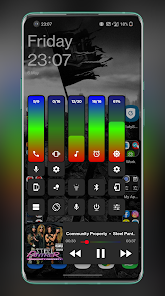
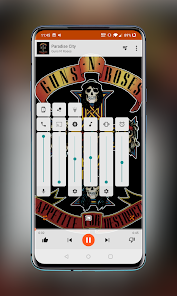
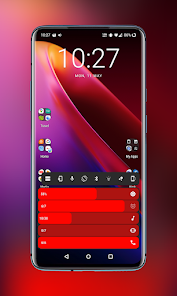
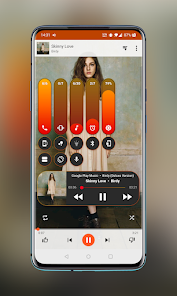
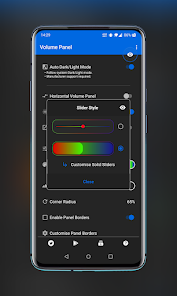
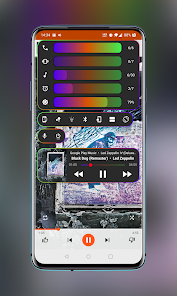
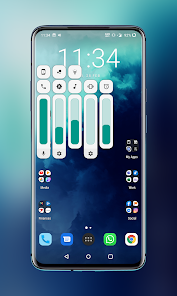
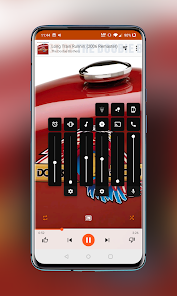
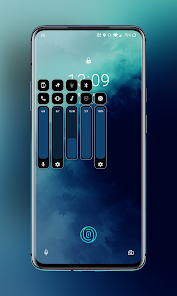
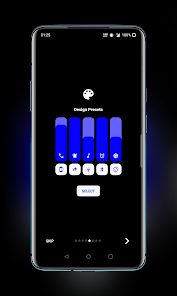
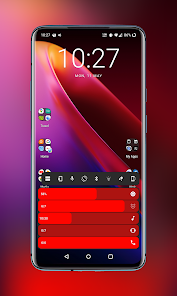
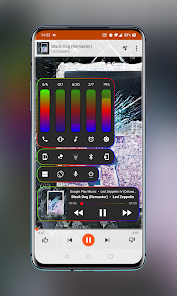
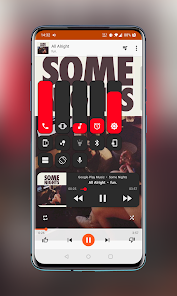
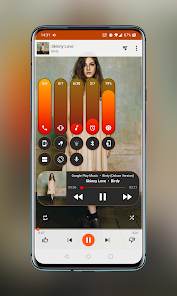
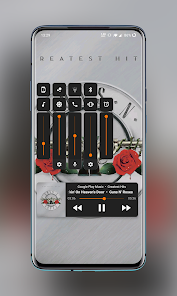
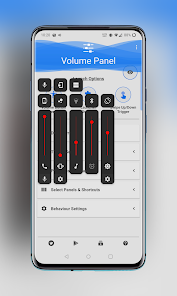
Volume Panel is an enhanced replacement for your system volume control panel with an array of customization options, all system volume controls available in one place plus screen brightness, media playback controls and a selection of additional shortcuts!
Check out our design pre-sets channel on Telegram and see what's possible at: t.me/VPPresets
Join in the conversation & keep up with the latest developments and ideas at: t.me/volumepanel
Go PRO for less than the price of a cup of coffee: https://play.google.com/store/apps/details?id=leedroiddevelopments.volumepanel
Replace your system volume panel with the Volume Button Override service, launch the panel from the non obtrusive floating trigger or map the handy shortcuts to other applications, it's also extra useful if your volume keys are worn or damaged.
Features:
* Horizontal or Vertical Sliders
* Volume button override
* Swipe Up/Down floating trigger
- Long press & slide over the trigger to directly change the volume
* Launcher shortcuts
* Multiple design template options
* Choose Media or Ring as the default button response
* Configurable Dark/Light Modes
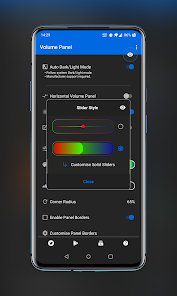
* Gradient colour options.
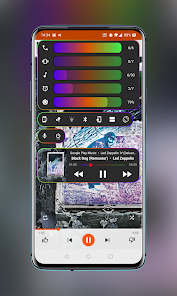
* Animated gradients colours - RGB IT UP!!
* Auto Dark/Light Modes (Android 9+)
* Custom vibration intensity
* Custom animation duration
* Start collapsed or expanded
* Left or Right handed mode
* Left or Right handed in landscape
* Left or right trigger
-- The panel will open on the same side as the trigger when launched from the trigger
* Custom vertical position
* Custom panel timeout
* Media control from your volume panel!
* Screen brightness control
* Swap/Invert Buttons
* Force close system dialog
* Optional Audio Feedback
* Custom background, slider & icon colours
* Adjustable panel height & width
* Adjustable panel margin
* Option to exclude from certain applications
* Volume streams: Cast, Media, Ring, Notification (If Supported), Call & Alarm
* Bluetooth volume control
* Quick Settings Pull-down Tiles
* Pinned Launcher Shortcuts (Oreo+)
* Screen Shot shortcut(Android 9+)
* Split Screen shortcut(Android 9+)
* Lock Rotation shortcut
* Power Menu Shortcut.
* Google Assistant shortcut
* Bluetooth shortcut
* Flashlight shortcut
And more!
Quick Access Icons (in the panel):
* Instant access to alarm clock & alarm status.
* Mute microphone in call.
* Mute media or casting streams.
* Switch between speaker/earpiece when in call.
* Toggle between Ring, Vibrate or do Not Disturb (Silent).
* Screen Shot (Android 9+).
Quick Settings Pull Down Tiles:
* Mute Media.
* Toggle Ring Mode.
* Launch Volume Panel.
Launcher Shortcuts:
* Mute Media.
* Toggle Ring Mode.
* Launch Volume Panel.
* Volume + / Volume-
Notification Volume
- If the Notification Panel is enabled and splitting ring & notification is supported by the system, ring & notification are independent, if the notification panel is hidden, both stream's are tied together and follow ring volume.
PLEASE NOTE: Button Mapping apps such as Button Mapper or Bixby Button Re-mapper may interfere if volume button customisation is enabled, you can negate this by launching volume panel from your button mapper and assigning the Vol+/- shortcuts.
Required Permissions (Feature Linked):
* Accessibility - Detect volume +/- key presses.
* Do Not Disturb Access.
* Notification Listener Access - Detect audio casting.
* Overlay Permissions - Show the panel as a system overlay.
* Usage Access: Detect the presence of excluded applications.
If you would like to contribute to translating the app, please drop me an email.
Volume Control Panel does not collect, store or share any personal information, nor does it have any of the permissions required to do so, it doesn't even connect to the Internet!.
My privacy policy can be found here: https://www.leedroid.co.uk/privacy-policy.html
Volume Panel is an enhanced replacement for your system volume control panel with an array of customization options, all system volume controls available in one place plus screen brightness, media playback controls and a selection of additional shortcuts!
Check out our design pre-sets channel on Telegram and see what's possible at: t.me/VPPresets
Join in the conversation & keep up with the latest developments and ideas at: t.me/volumepanel
Go PRO for less than the price of a cup of coffee: https://play.google.com/store/apps/details?id=leedroiddevelopments.volumepanel
Replace your system volume panel with the Volume Button Override service, launch the panel from the non obtrusive floating trigger or map the handy shortcuts to other applications, it's also extra useful if your volume keys are worn or damaged.
Features:
* Horizontal or Vertical Sliders
* Volume button override
* Swipe Up/Down floating trigger
- Long press & slide over the trigger to directly change the volume
* Launcher shortcuts
* Multiple design template options
* Choose Media or Ring as the default button response
* Configurable Dark/Light Modes
* Gradient colour options.
* Animated gradients colours - RGB IT UP!!
* Auto Dark/Light Modes (Android 9+)
* Custom vibration intensity
* Custom animation duration
* Start collapsed or expanded
* Left or Right handed mode
* Left or Right handed in landscape
* Left or right trigger
-- The panel will open on the same side as the trigger when launched from the trigger
* Custom vertical position
* Custom panel timeout
* Media control from your volume panel!
* Screen brightness control
* Swap/Invert Buttons
* Force close system dialog
* Optional Audio Feedback
* Custom background, slider & icon colours
* Adjustable panel height & width
* Adjustable panel margin
* Option to exclude from certain applications
* Volume streams: Cast, Media, Ring, Notification (If Supported), Call & Alarm
* Bluetooth volume control
* Quick Settings Pull-down Tiles
* Pinned Launcher Shortcuts (Oreo+)
* Screen Shot shortcut(Android 9+)
* Split Screen shortcut(Android 9+)
* Lock Rotation shortcut
* Power Menu Shortcut.
* Google Assistant shortcut
* Bluetooth shortcut
* Flashlight shortcut
And more!
Quick Access Icons (in the panel):
* Instant access to alarm clock & alarm status.
* Mute microphone in call.
* Mute media or casting streams.
* Switch between speaker/earpiece when in call.
* Toggle between Ring, Vibrate or do Not Disturb (Silent).
* Screen Shot (Android 9+).
Quick Settings Pull Down Tiles:
* Mute Media.
* Toggle Ring Mode.
* Launch Volume Panel.
Launcher Shortcuts:
* Mute Media.
* Toggle Ring Mode.
* Launch Volume Panel.
* Volume + / Volume-
Notification Volume
- If the Notification Panel is enabled and splitting ring & notification is supported by the system, ring & notification are independent, if the notification panel is hidden, both stream's are tied together and follow ring volume.
PLEASE NOTE: Button Mapping apps such as Button Mapper or Bixby Button Re-mapper may interfere if volume button customisation is enabled, you can negate this by launching volume panel from your button mapper and assigning the Vol+/- shortcuts.
Required Permissions (Feature Linked):
* Accessibility - Detect volume +/- key presses.
* Do Not Disturb Access.
* Notification Listener Access - Detect audio casting.
* Overlay Permissions - Show the panel as a system overlay.
* Usage Access: Detect the presence of excluded applications.
If you would like to contribute to translating the app, please drop me an email.
Volume Control Panel does not collect, store or share any personal information, nor does it have any of the permissions required to do so, it doesn't even connect to the Internet!.
My privacy policy can be found here: https://www.leedroid.co.uk/privacy-policy.html
Updated on
Safety starts with understanding how developers collect and share your data. Data privacy and security practices may vary based on your use, region, and age. The developer provided this information and may update it over time.

No data shared with third parties
Learn more about how developers declare sharing

No data collected
Learn more about how developers declare collection
Ratings and reviews
4.1
1.1K reviews

Alberto Di Rosa
- Flag inappropriate
- Show review history
August 16, 2022
Amazing app. Unfortunately the brightness slider is completely off sync with system (yes, i did calibrate it properly) and it's extremely annoying. For some reason i can't ask information on Telegram as i appear to be perma banned from it (?). EDIT: auto brightness is of no matter - it's off sync despite of it. I used the app for a long time - not just a couple days (pro version)
3 people found this review helpful
LeeDrOiD Apps
August 16, 2022
Hi Alberto, I will take a look at telegram & the slider, is auto brightness turned off?.. edit: thanks for clarifying, I will take a look at it this week and see if I can work out what's happening, also trying to figure out if I can see blocked users in the group, doesn't appear to be an option.
Edit2: try joining the group again

Tran Thai
- Flag inappropriate
- Show review history
May 3, 2020
Great app, nice and convenient panel. There're minor things to be improved. It forget ring and notitification level, If I set ring volume to 1/7 or 2/7 and change ring mode to silent and back to ringing, then ring level changes to 6/7. The animation could not be turned off. While expanding full panel, bars are anoying run accross screen separately. it is better place each bar at right position and animate the panel right to left (or in revert) like when merged panel is set. Thank you
1 person found this review helpful

A Google user
- Flag inappropriate
March 26, 2020
In my opinion, this app is one that you don't realize how much you want it until you actually try it. I didn't think that a volume slider could be improved enough to merit installing a 3rd party app. But i was so wrong! You don't realize how much you interact with volume and screen brightness throughout the day and how much time it actually saves integrating the two. It didn't take long for me to want to show my appreciation to the developer by purchasing the pro version. Trust me, TRY IT! 👍👍
14 people found this review helpful
LeeDrOiD Apps
March 26, 2020
Thanks Jeremy! 👌😁
What’s new
V21.28:
* Fix colours in media control panel.
* Update target API level to 33.
* Update ADs SDK.
* Fix colours in media control panel.
* Update target API level to 33.
* Update ADs SDK.
App support
About the developer
Carys Bailey
leedroid.apps@gmail.com
75 Whinlatter Place
NEWTON AYCLIFFE
DL5 7DS
United Kingdom


